Analytics Model Association
Release Date: May 5th, 2026
Insights are only as powerful as your ability to act on them. With our new Analytics Suite capabilities, you can now take analytics outputs as an optimization model and apply them directly to your campaigns instantly.
No manual translation. No workflow gaps. Just seamless activation.
The Custom Model tab, available at both the Campaign and Line levels, brings your models directly into the Targeting workflow, giving you greater control over how and where your models are applied to your campaigns.
To learn more about the analytics models and for instructions on how to generate a report/model, see here: Analytics Documentation
From Analysis to Activation:
- Generate a Targeting, Audience, Incrementality, or Full Analysis (all three pipelines combined) report
- Navigate to the Targeting section at the Campaign or Line level
- Select the Custom Model tab
- Enable the Use Custom Models feature
- Choose a model from the available list
Once enabled, a table will display all available models associated with the advertiser. Each model includes the following information to help guide selection:
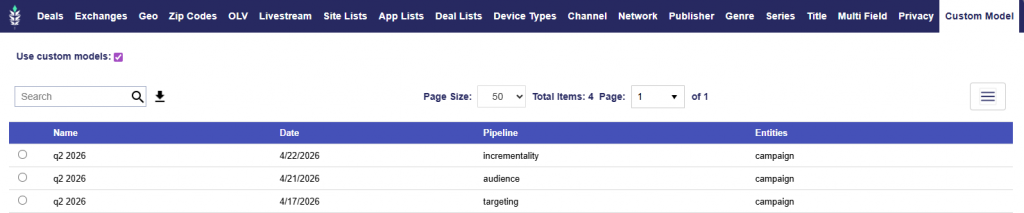
- Name: The name of the report/model
- Date: When the report/model was generated. If you Save & Rerun the original report, the model will automatically update.
- Pipeline: The type of analysis used to generate the model (Targeting, Audience, Incrementality, or Full Analysis)
- Entities: Indicates whether the model was built at the Advertiser, Campaign, or Line level
This streamlined workflow makes it easy to select the most relevant model and move from insight to action in seconds!