Pontiac Wiki Pontiac Wiki

May 2026

May 2026

  • Deal Creative Types & Inventory Types
  • New Frequency Capping By Options
  • Creative Testing for Malicious Intent
  • Analytics Model Association
  • Pixel Type Tooltips
  • Added Creative Type to Creatives Section
  • Pacing Tab Filters
  • Inventory Type Troubleshoot Check
  • First Party Video Aspect Ratios
  • Public CTR Models
  • Microsoft Curate Integration
  • Pixel Custom Audience Update
  • Line Performance Inventory Availability
  • Updated Creative Type Names
  • Served to COPPA and DNT Unchecked by Default
  • GDPR Enabled Seat Default Country
  • New Default Basic Bid Price
  • Videos: Hosted Audio Bit Rate Added to Specs Tab
  1. Home
  2. Platform Updates
  3. New Features
  4. May 2026

Deal Creative Types & Inventory Types

Release Date: May 4th, 2026

Two optional columns Creative Types and Inventory Type have been added and are available in:

  • Bidder > Inventory > Deals Table
  • Bidder > Inventory > Negotiated Deals
  • ART > Deal Landscape > Deals Table

These columns support delivery troubleshooting and inventory understanding. Both columns are optional and hidden by default. They can be enabled via the column selector and will remain selected once enabled. This keeps the table clean for most users while allowing deeper inspection when needed.
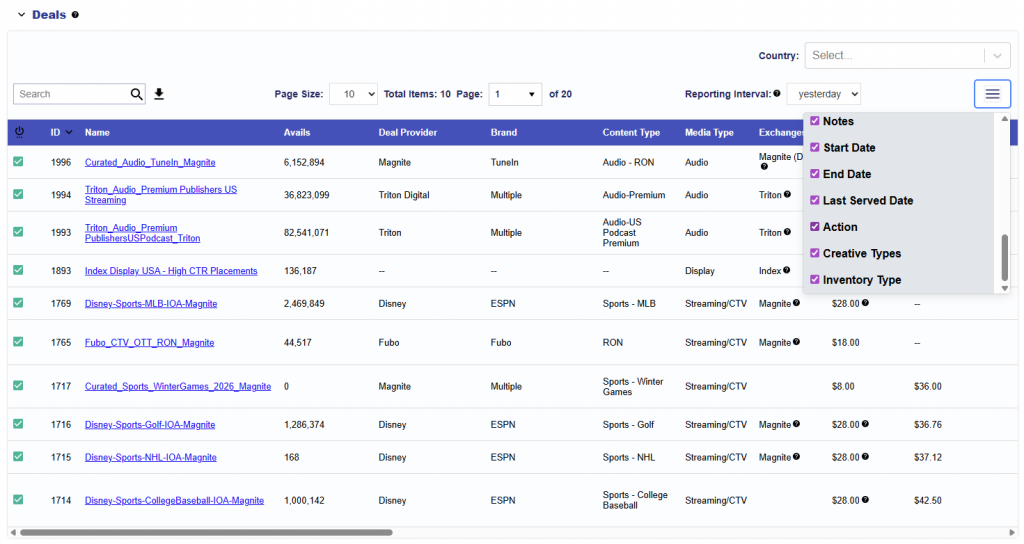
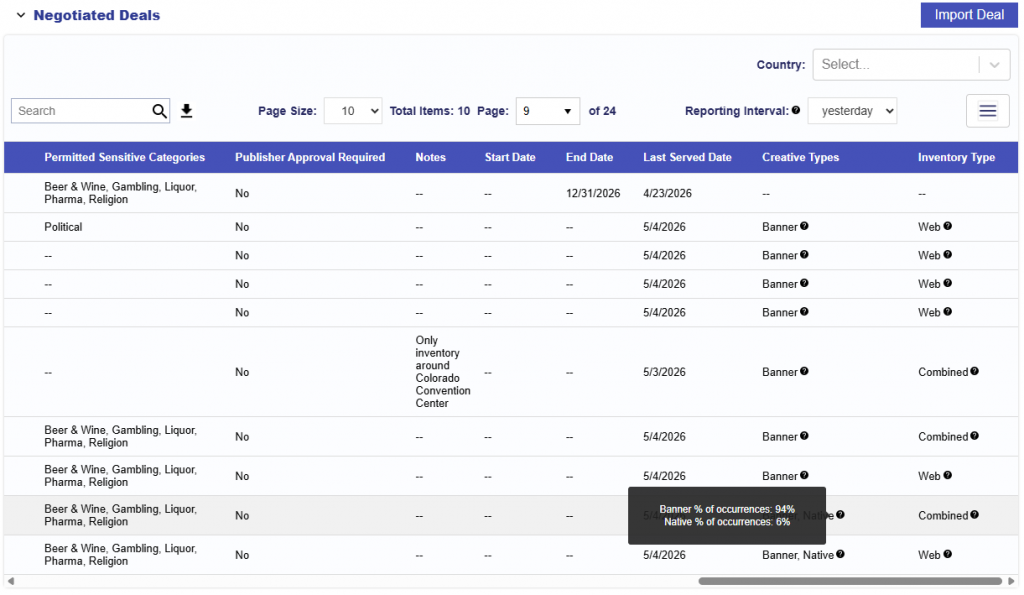
Creative Types: Shows which creative formats are seen in the bid requests for a specific Deal.

  • Video, Audio, Banner, or Native
  • Hovering reveals distribution: See the example below for a Deal that has Creative Type = Banner, Native
    • Banner % of occurrences: 94%
    • Native % of occurrences: 6%
  • Example Scenario and Insight: Your line is using Native creatives, but this deal only has ~6% Native inventory. Expect limited delivery. Consider using a deal with more Native supply or adding Banner creatives.
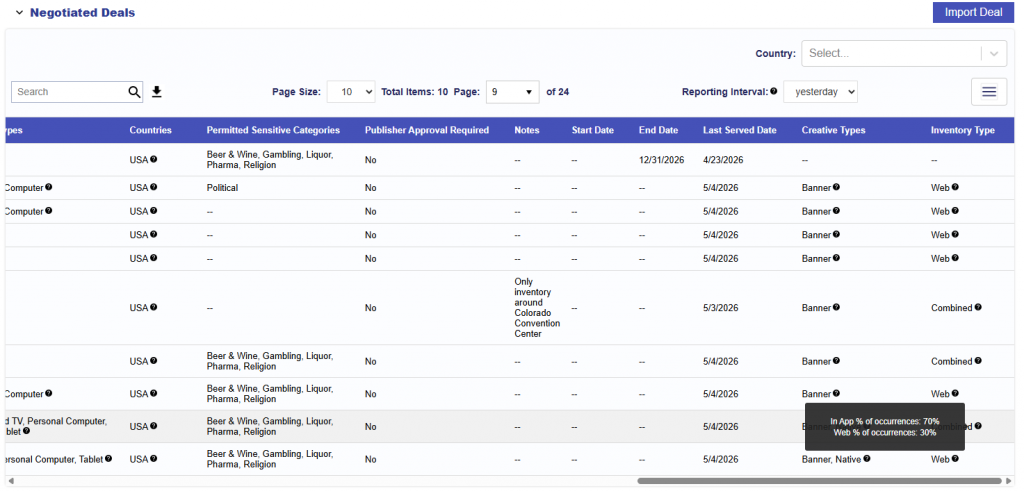
Inventory Types: Shows what type of inventory is seen in the bid requests for a specific Deal.

  • Web, In App, or Combined
  • Hovering reveals distribution: See the example below for a Deal that has Inventory Type = Combined example
    • In App % of occurrences: 70%
    • Web % of occurrences: 30%
  • Example Scenario and Insight: This deal is mostly In App (70%), but your line targets Web only. You’re only eligible for a small portion of traffic. Consider switching the Line’s Inventory Type to Combined or targeting a Web heavy Deal.

New Frequency Capping By Options

Release Date: May 4th, 2026

On both the Campaign and Line levels, users can apply frequency caps based on either:

  • IP (default): Caps impressions at the household level based on a user’s IP address. Commonly used for CTV environments.
  • IFA: Caps impressions at the device level using an Identifier for Advertising (IFA). Typically used in app-based environments where cookies are not supported (e.g., mobile and CTV apps).
  • Cookies (EU only): Caps impressions at the browser level using cookies. Available in EU-supported web environments where cookie-based tracking is permitted.

This setting is controlled via the Cap By dropdown found in the Frequency & Recency section.

Creative Testing for Malicious Intent

Release Date: May 4th, 2026

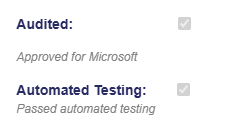
Automated Testing is a quality check that evaluates creatives after they have been audited by Pontiac. This process helps ensure that creatives do not contain malicious intent. Testing results are displayed on the creative details view on the Advertiser, Campaign, and Line level under Automated Testing.

  • Pass message: Passed automated testing
  • Fail message: Failed automated testing
  • Not sent for testing: Not tested

Analytics Model Association

Release Date: May 5th, 2026

Insights are only as powerful as your ability to act on them. With our new Analytics Suite capabilities, you can now take analytics outputs as an optimization model and apply them directly to your campaigns instantly.

No manual translation. No workflow gaps. Just seamless activation.

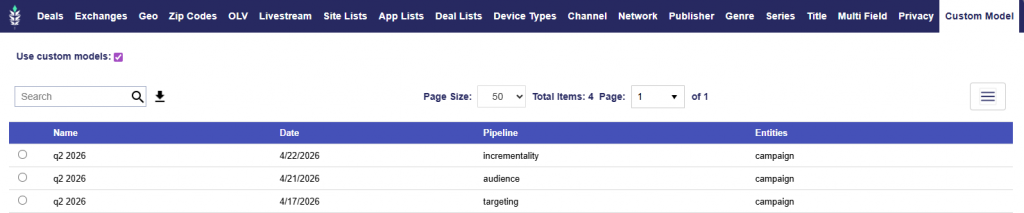
The Custom Model tab, available at both the Campaign and Line levels, brings your models directly into the Targeting workflow, giving you greater control over how and where your models are applied to your campaigns.

To learn more about the analytics models and for instructions on how to generate a report/model, see here: Analytics Documentation

From Analysis to Activation:

  1. Generate a Targeting, Audience, Incrementality, or Full Analysis (all three pipelines combined) report
  2. Navigate to the Targeting section at the Campaign or Line level
  3. Select the Custom Model tab
  4. Enable the Use Custom Models feature
  5. Choose a model from the available list

Once enabled, a table will display all available models associated with the advertiser. Each model includes the following information to help guide selection:

  • Name: The name of the report/model
  • Date: When the report/model was generated. If you Save & Rerun the original report, the model will automatically update.
  • Pipeline: The type of analysis used to generate the model (Targeting, Audience, Incrementality, or Full Analysis)
  • Entities: Indicates whether the model was built at the Advertiser, Campaign, or Line level

This streamlined workflow makes it easy to select the most relevant model and move from insight to action in seconds!

Pixel Type Tooltips

Release Date: May 12th, 2026

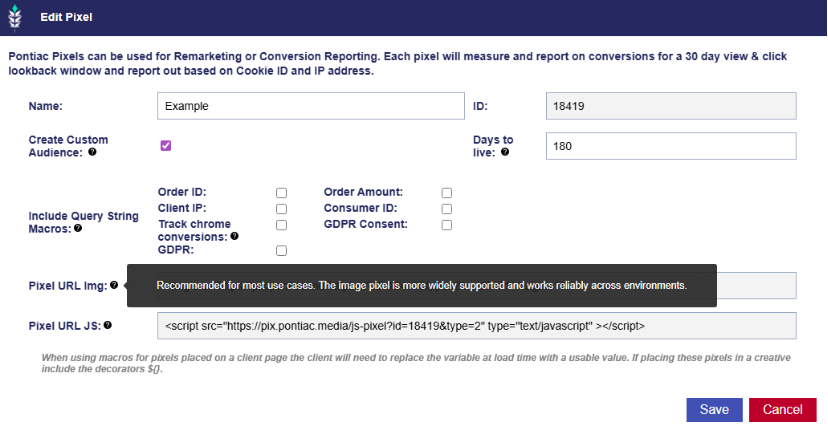
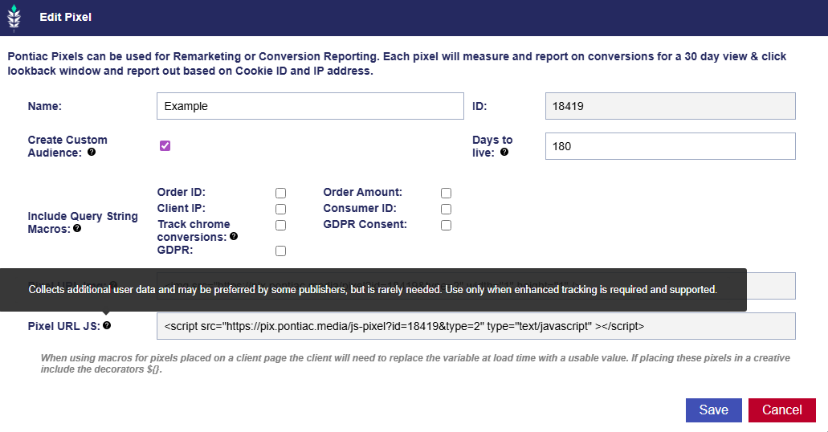
To add more clarity, we have added tool tips to our pixel types: Imgs and JS

Pixel URL Img: Recommended for most use cases. The image pixel is more widely supported and works reliably across environments.

Pixel URL JS: Collects additional user data and may be preferred by some publishers, but is rarely needed. Use only when enhanced tracking is required and supported.

Added Creative Type to Creatives Section

Release Date: May 12th, 2026

Add a new Creative Type column at the Advertiser, Campaign, and Line levels.

This column helps users quickly identify the type of creatives associated with a given advertiser, campaign, or line.

Supported creative types include:

  • Ad Server Tag Banner
  • First Party Banner
  • HTML5
  • Native
  • First Party Video
  • Ad Server Tag Video (VAST)
  • Ad Server Tag Audio
  • First Party Audio

Pacing Tab Filters

Release Date: May 12th, 2026

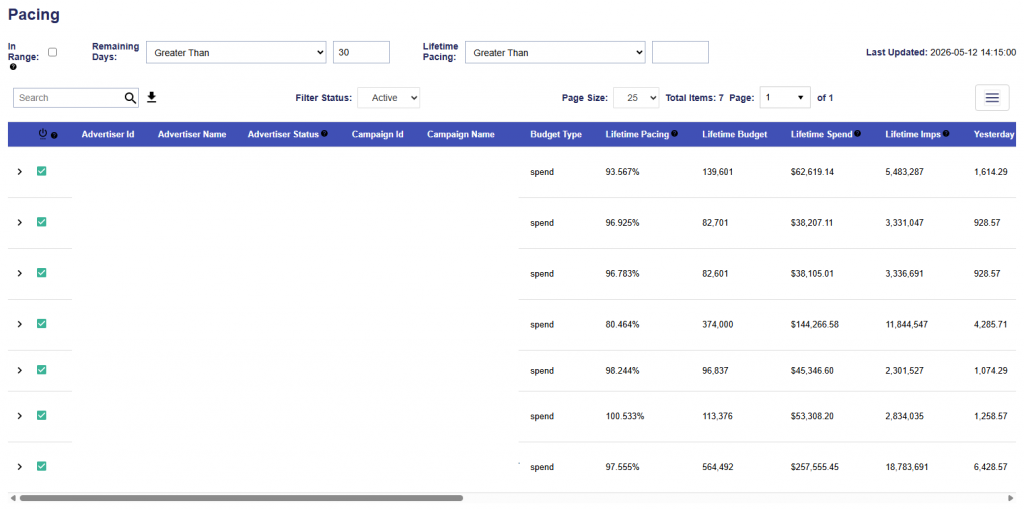
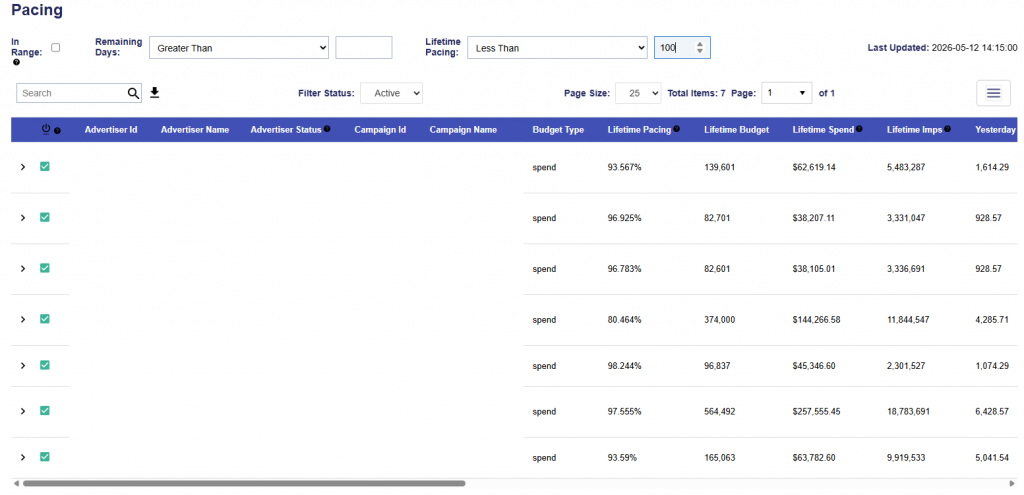
We have added new filters to the Pacing tab for both Campaign and Line views: Days Remaining and Lifetime Pacing.

Days Remaining

The Days Remaining filter allows users to filter campaigns and lines based on the number of days remaining before the end date.

The filter includes:

  • An operator dropdown with options such as Greater Than and Less Than
  • A numeric text box that only accepts numbers

Example: Campaigns filtered to show only campaigns with greater than 30 days remaining.

Lifetime Pacing

The Lifetime Pacing filter allows users to filter campaigns and lines by lifetime pacing value.

The filter includes:

  • An operator dropdown with options such as Greater Than and Less Than
  • A numeric text box that only accepts numbers

Example: Campaigns filtered to show only campaigns with Lifetime Pacing less than 100%.

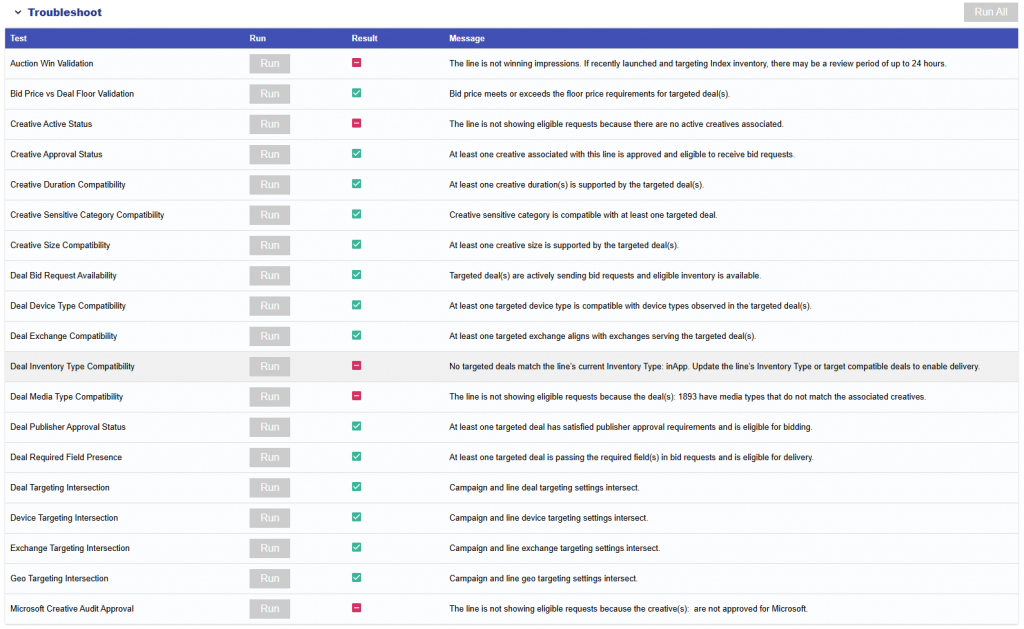
Inventory Type Troubleshoot Check

Release Date: May 12th, 2026

A new validation has been added to the Troubleshoot feature in the Performance tab at the Line level.

This check compares the line’s selected Inventory Type against the inventory type of the deals targeted by that line. It confirms that the line is targeting at least one deal with a compatible inventory type, so the line is eligible to receive bid requests.

Check Logic

  • If the line’s Inventory Type is Web, at least one targeted deal must have an inventory type of Web or Combined.
  • If the line’s Inventory Type is In App, at least one targeted deal must have an inventory type of In App or Combined.
  • If the line’s Inventory Type is Combined, the validation will pass.
  • If no targeted deals match the line’s selected inventory type, the validation will fail.

Validation Messages

  • Pass: At least one targeted deal matches the line’s selected Inventory Type, and the line is eligible to receive bid requests.
  • Pass with manual review: The targeted deal(s): {deal_ids} do not have an inventory type defined. Compatibility with the line’s Inventory Type: {line_inventory_type} cannot be confirmed. Please review manually.
  • Fail: No targeted deals match the line’s current Inventory Type: {line_inventory_type}. Update the line’s Inventory Type or target compatible deals to enable delivery.

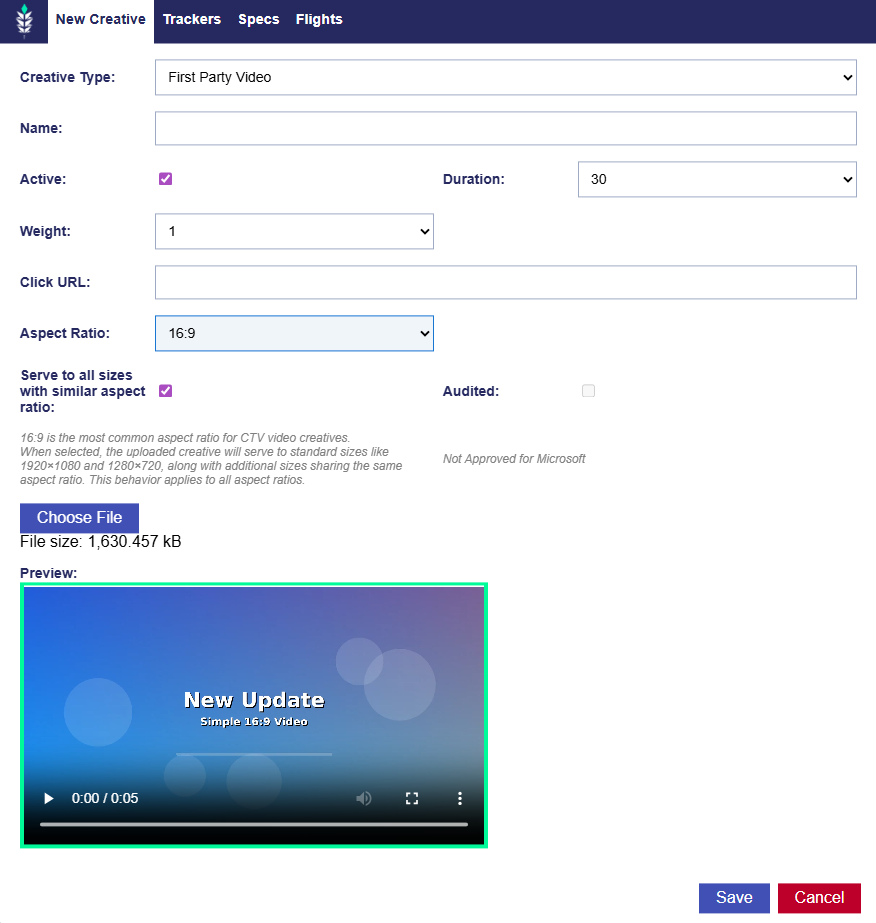
First Party Video Aspect Ratios

Release Date: May 12th, 2026

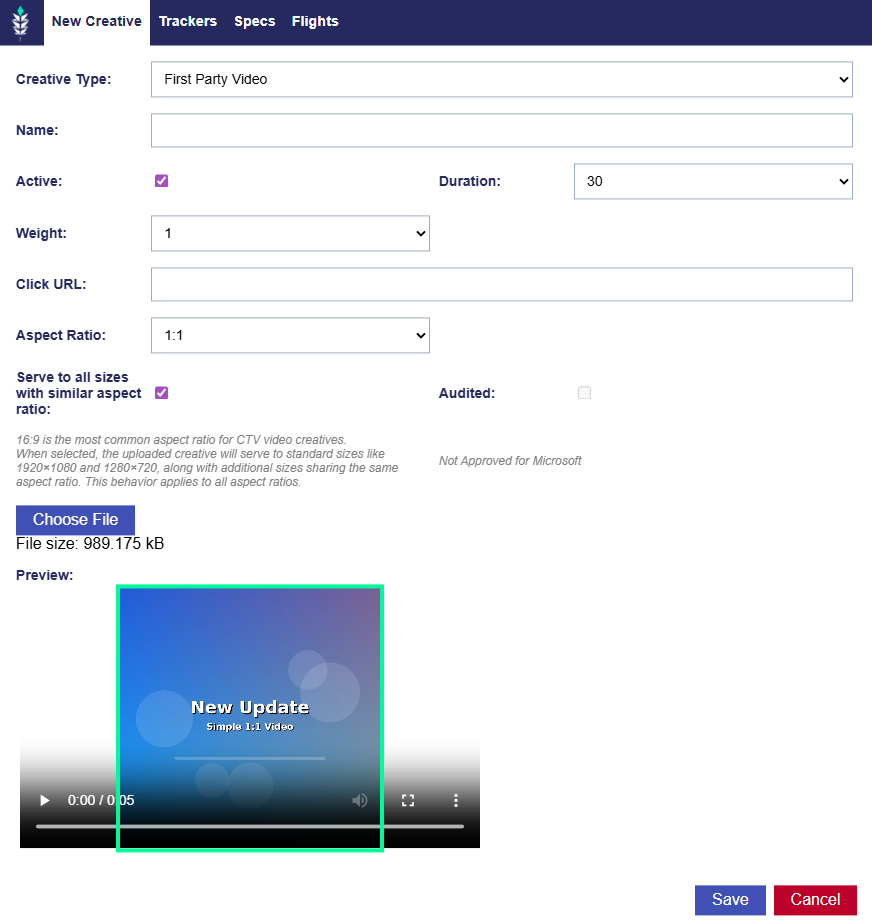
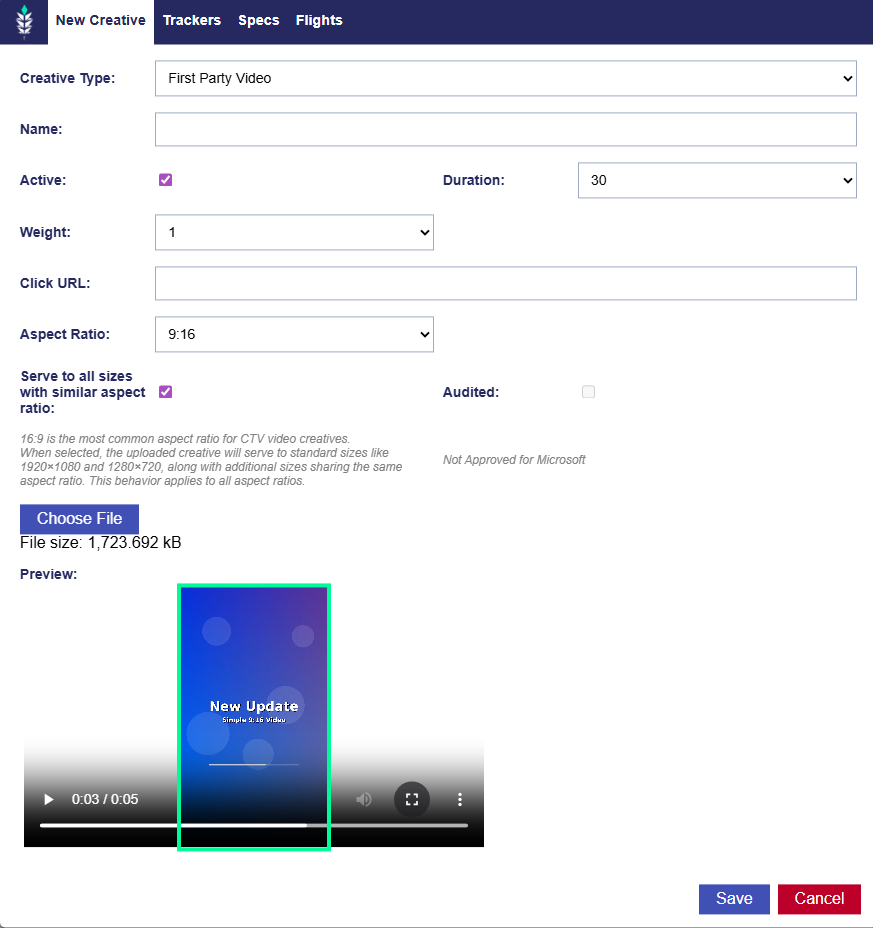
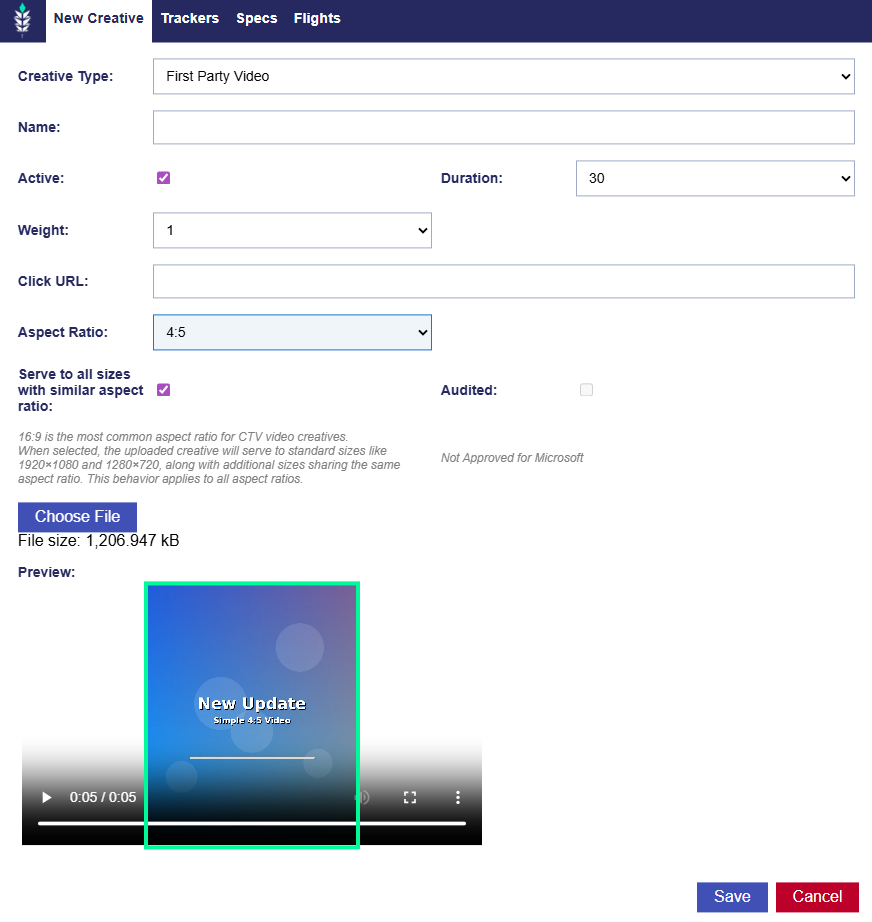
When creating or editing a First Party Video creative, users can select the desired aspect ratio from the Aspect Ratio dropdown.

The Preview area dynamically updates based on the selected aspect ratio, allowing users to confirm how the uploaded video will display for each supported format. The selected aspect ratio controls the video preview and helps ensure the uploaded creative matches the intended format.

These supported aspect ratios allow users to upload creatives for common video placements, including standard landscape, square, vertical, and portrait formats.

16:9 Preview

1:1 Aspect Ratio

9:16 Aspect Ratio

4:5 Aspect Ratio

Public CTR Models

Release Date: May 12th, 2026

Public CTR models are now available to all seats with the Analytics Platform enabled.

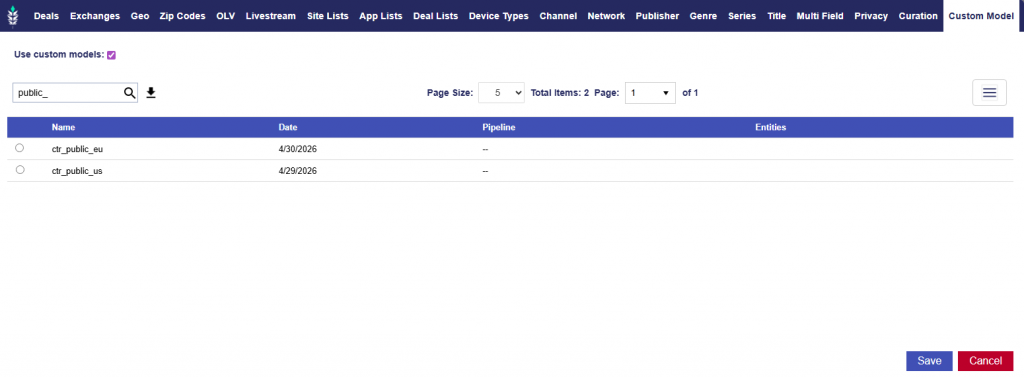
Users can enable Use custom models in the Targeting section > Custom Models tab and select from the available public CTR models. These models can be associated at either the Campaign or Line level.

Available public CTR models include:

  • ctr_public_us
  • ctr_public_eu

See the following documentation for more details on model association: Analytics Model Association

Microsoft Curate Integration

Release Date: May 12th, 2026

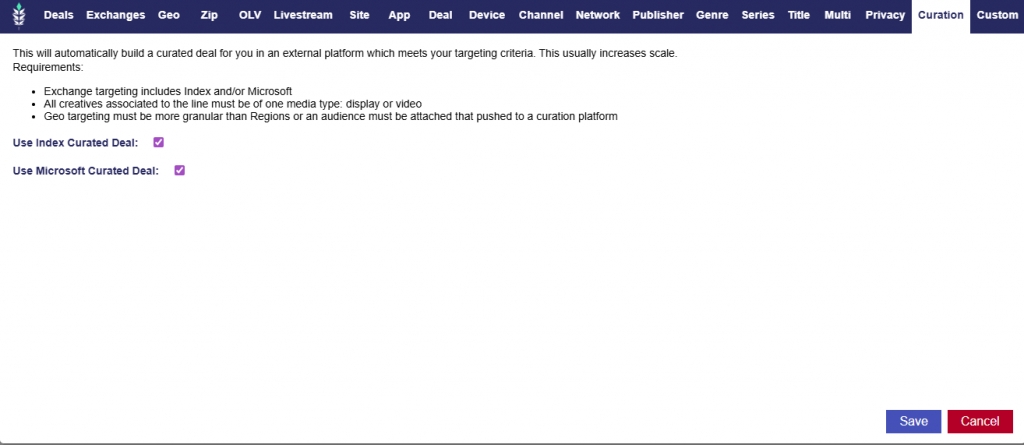
Microsoft Curate is now available for curated deal setup.

In the Targeting section of the Line, the Curation tab now has a Use Microsoft Curated Deal option. When it is selected on a Line, Pontiac will automatically create a deal in Microsoft/Xandr and associate that deal with the line. This works the same as the existing Index Curate flow.

The following will get sent to Microsoft:

  • Zip Codes
  • Custom Audiences

This allows users to set up curated Microsoft deals directly from the line workflow without manually creating and associating the deal outside of Pontiac. It also helps increase scale by giving lines access to additional curated deal opportunities through Microsoft.

Pixel Custom Audience Update

Release Date: May 18th, 2026

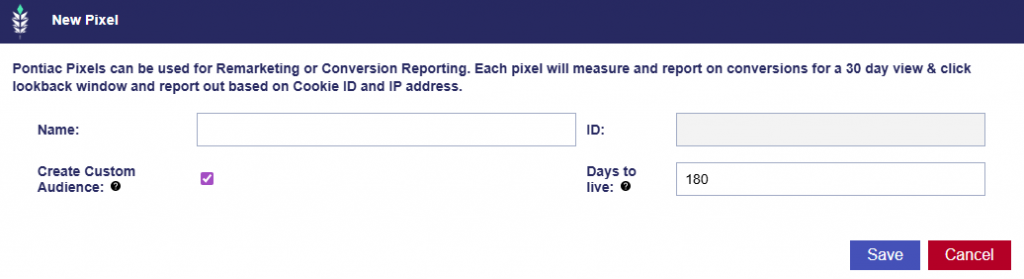
When creating a pixel, users have the option to select Create Custom Audience. When this option is selected, the Days to Live field becomes visible and defaults to 180 days. The Days to Live field represents the number of days a record remains active in the custom audience. Users can keep the default value or update it if they need a different duration.

Line Performance Inventory Availability

Release Date: May 18th, 2026

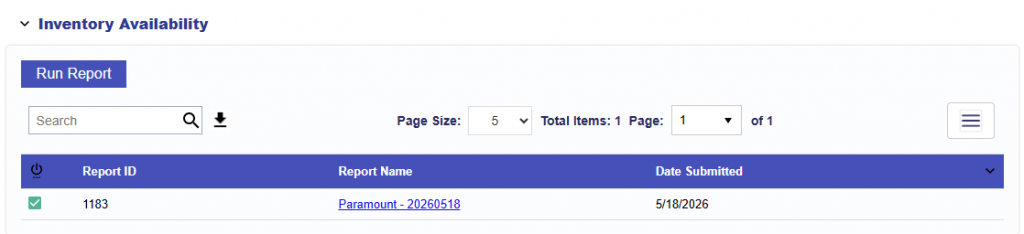
The Line Performance tab now includes an Inventory Availability section. This section appears near the top of the Performance tab, under the pacing bars, and allows users to run and review Inventory Availability reports directly from the Line.

Select Run Report to generate a new Inventory Availability report for the line.

The report is generated using the line’s current configuration, including:

  • Inventory type
  • Creative type
  • Advertiser
  • Campaign
  • Line
  • Effective targeting (Intersection of the Campaign and Line)
  • Audiences (only Line level)
    • If audiences are applied to the Campaign level, users can manually add an additional group and then run the report, but it will not be automatically included.
    • See Boolean Logic for more details on any and all logic for targeting between groups.

After a report is submitted, it appears in the Inventory Availability report table for that line.

The table includes:

  • Report Status: Shows whether the report is processing, complete, or has an issue
  • Report ID
  • Report Name: Generated using the line name and date. When users click on the name, they are taken to the full report.
  • Date Submitted

Reports are ordered by Date Submitted, with the newest reports shown first.

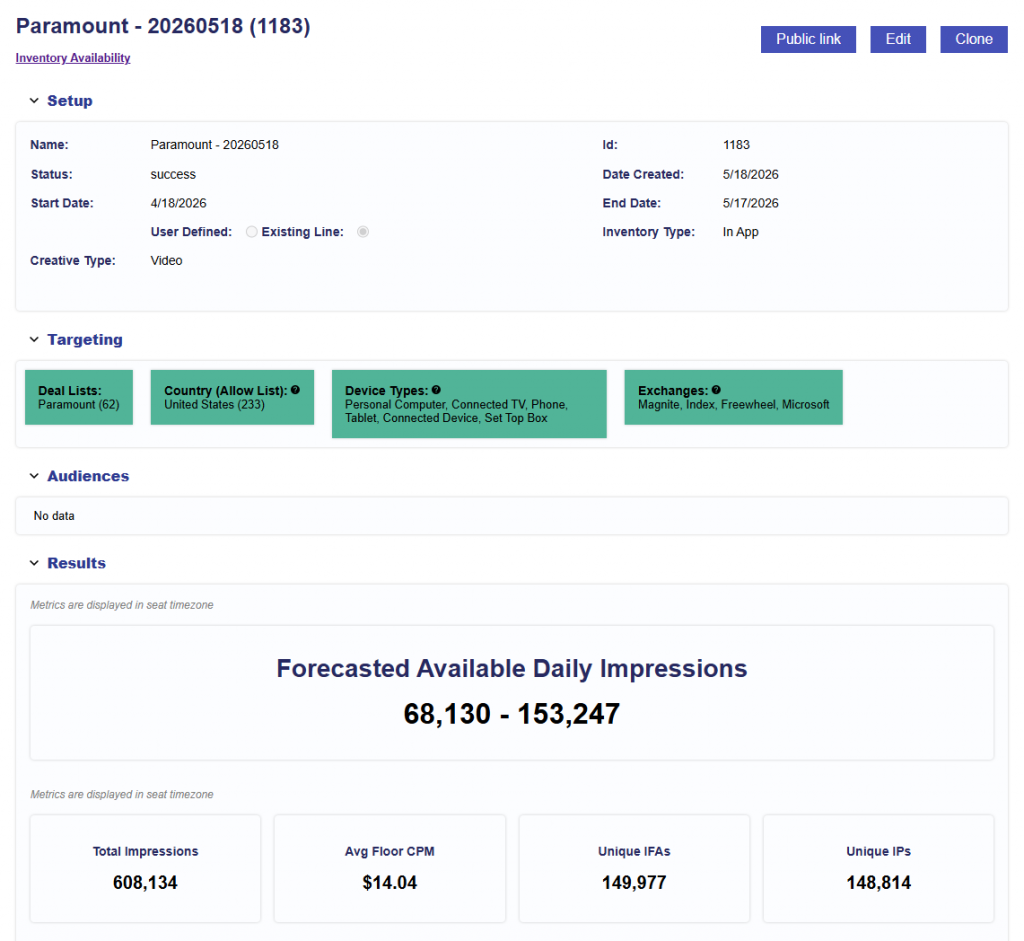
Results

Once the Report has finished processing, click on the Report Name to see the results. See the documentation here for a deep dive into Inventory Availability Reports: Inventory Availability Tool

Updated Creative Type Names

Release Date: May 18th, 2026

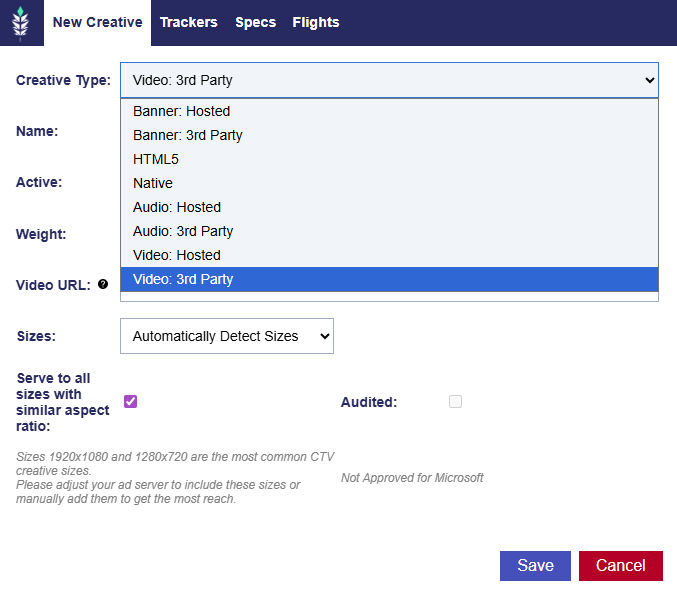
The Creative Type dropdown in the Creative Dialog has been updated with clearer naming and a more organized order.

The updated options are:

  • Banner: Hosted
  • Banner: 3rd Party
  • HTML5
  • Native
  • Audio: Hosted
  • Audio: 3rd Party
  • Video: Hosted
  • Video: 3rd Party

These updates make the creative type options easier to understand by grouping them by format and identifying whether the creative is hosted or served through a third party tag.

Served to COPPA and DNT Unchecked by Default

Release Date: May 18th, 2026

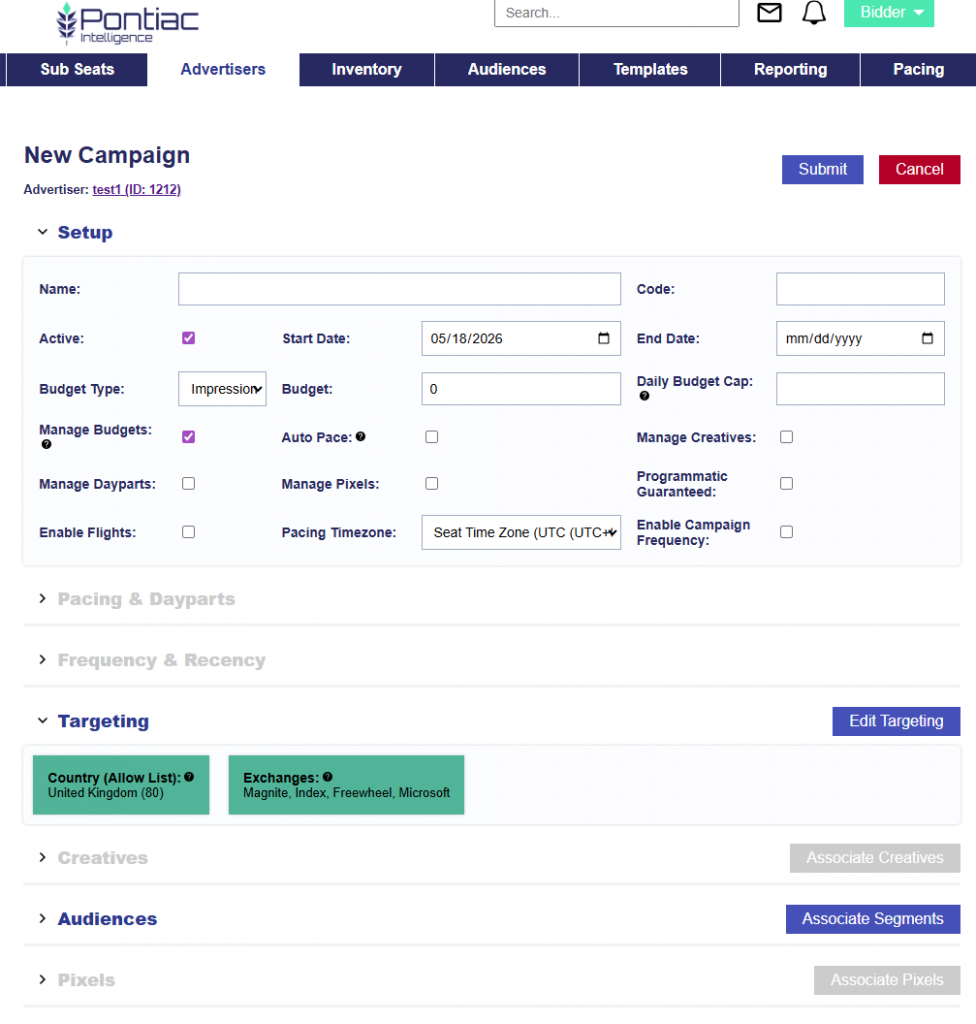
When creating a new campaign, Serve to COPPA and Serve to DNT are unchecked by default in the campaign and line targeting sections.

When either option is enabled, campaigns cannot target audiences that rely on persistent identifiers. This includes IP-based audiences, IDFAs, cookies, Google Ad IDs, fingerprints, precise geolocation, full IP addresses, and full referrer URLs. This data is stripped from the bid request before targeting is applied and cannot be passed back to clients or passed through pixel or creative macros.

When Serve to COPPA is checked, inventory regulated under COPPA, the Children’s Online Privacy Protection Act, may be purchased.

When Serve to DNT is checked, users who have elected not to be tracked may be served to.


GDPR Enabled Seat Default Country

Release Date: May 18th, 2026

For seats with GDPR enabled, the default country in the targeting section will now be set to United Kingdom (UK) instead of United States (US).

This applies to the country targeting field in both:

  • Campaign targeting
  • Line targeting

Users can still update the country targeting as needed, but for GDPR-enabled seats, the default selection will be United Kingdom.

New Default Basic Bid Price

Release Date May 18th, 2026

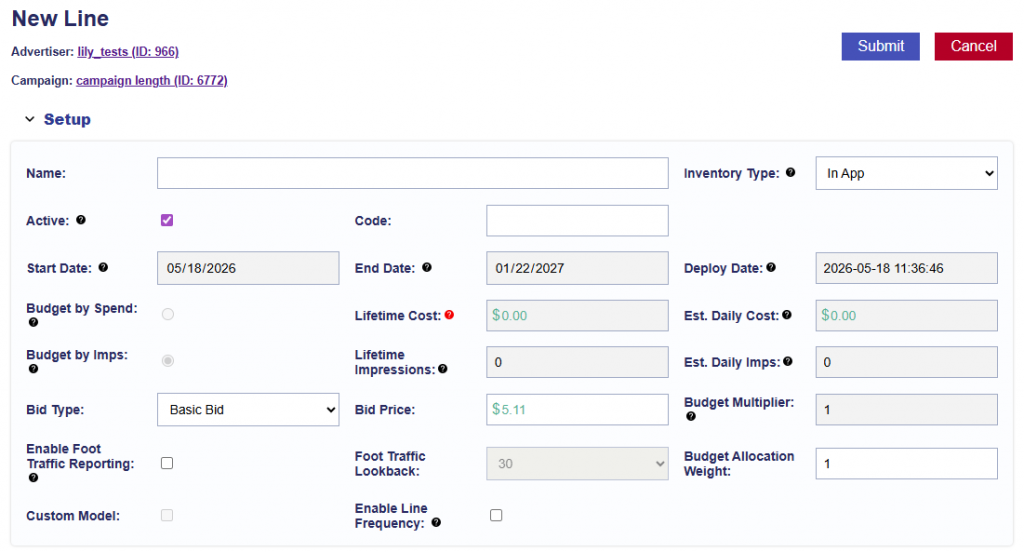
When creating a new Line the default bid price has been updated to $5.11. Users can still update the bid price as needed before saving the line. Refer to typical bid recommendations for guidance: Bid Recommendations

Videos: Hosted Audio Bit Rate Added to Specs Tab

Release Date: May 18th, 2026

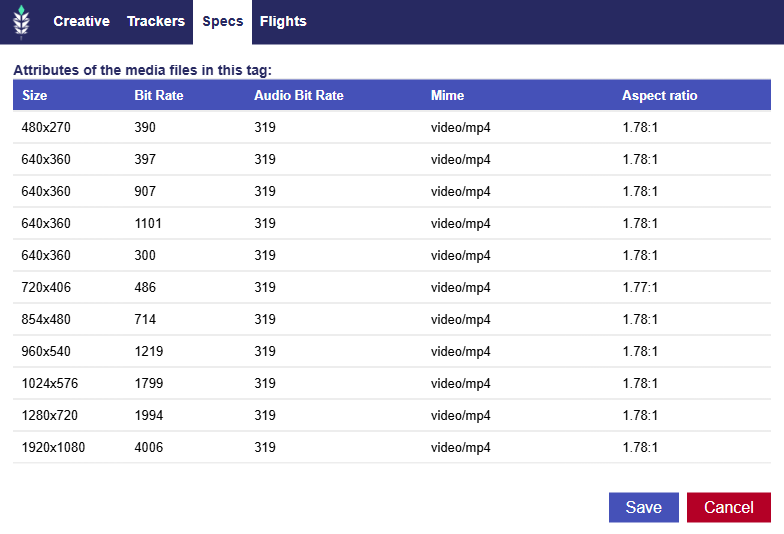
For hosted Video creatives, the Specs tab in the creative popup now includes Audio Bit Rate.

This update applies anywhere the creative popup is available, including:

  • Advertiser level
  • Campaign level
  • Line level

For hosted Video creatives, the Specs tab displays:

  • Size
  • Bit Rate (Video Bit Rate)
  • Audio Bit Rate
  • Mime
  • Aspect Ratio

This makes it easier to review both video and audio encoding details for uploaded video creatives.

© 2026 Pontiac Wiki Sec · All Rights Reserved · Developed by RDK

  • Contact Us
  • Privacy Policy
  • Terms & Conditions
  • Pontiac.media