Campaign Builder from Planning Tool
Release Date: July 15th, 2026
The Pontiac Planning Tool allows users to quickly create a media plan with the help of LLM-powered research and recommendations. Users can provide information about their brand, campaign goals, target audience, geography, budget, and other relevant details, along with optional supporting documents.
Based on these inputs, the tool researches the brand, identifies potential audience and content alignment, and recommends inventory. It also uses Pontiac’s sample bid request data to match the campaign’s goals and targeting strategy with available inventory and expected volume, helping ensure that recommendations are grounded in real marketplace availability.
Users can review and refine the proposed plan before using it to launch campaigns directly in the platform.
For full documentation see here: Planning
Follows these steps to launch your media plan once the report has been generated:
- Import the Plan at the Campaign Level
- Navigate to the campaign level and click Import.

- In the pop-up window, find and select the desired Planning report by name.
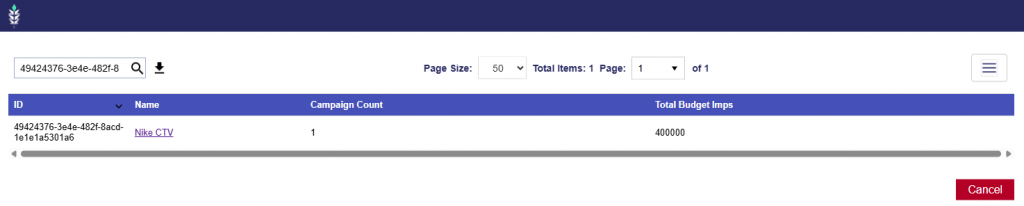
- Click the Planning report name.
2. Review and QA the generated campaign to ensure all settings, targeting, budgets, and line configurations are as desired before launch.
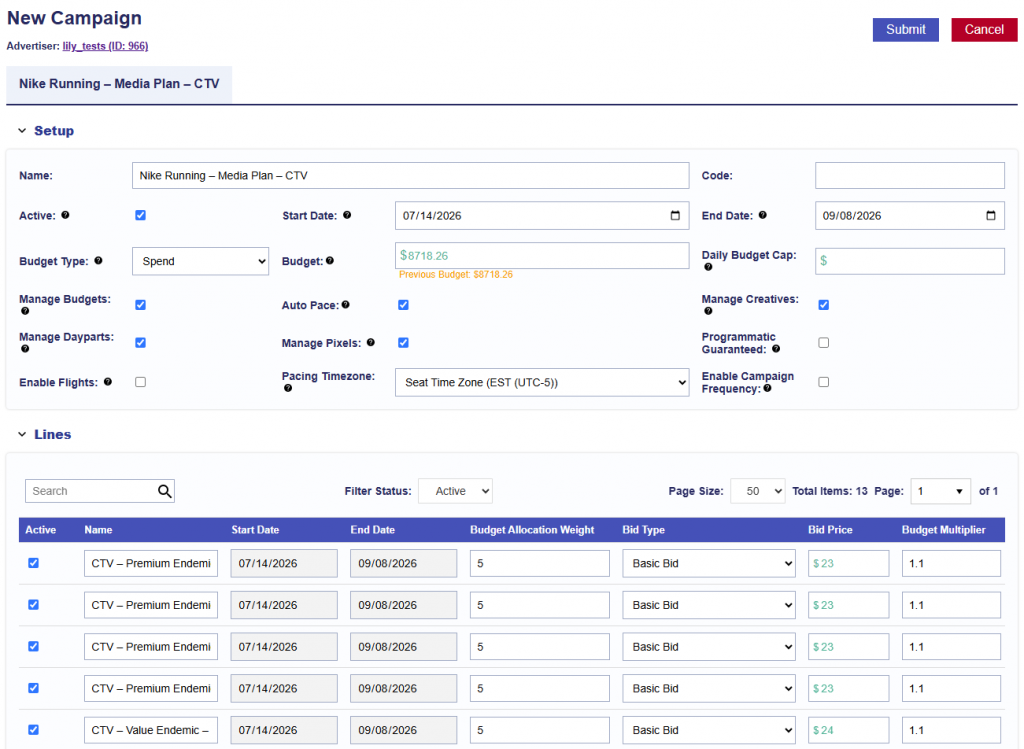
The following campaign-level settings are selected by default when a Planning report is imported:
- Manage Budgets
- Auto Pace
- Manage Creatives
- Manage Dayparts
- Manage Pixels
All lines included in the Planning report are also automatically populated as part of the import.
3. Associate your Creatives.
4. Associate Audience Segments if desired.
5. Associate your Pixels.
6. Once the campaign has been fully reviewed and all desired creatives, audiences, and pixels have been associated, click Submit.
From there, monitor performance and make optimizations once your campaign has ramped up! For analytics tool documentation, see here: Analytics Tools