Get DOOH Creative Sizes
DOOH Creative dimensions vary depending on the Venue, Publisher, and Media Type.
Pontiac provides a Get Creative Sizes tool to help identify the Creative dimensions supported by available inventory before uploading assets.
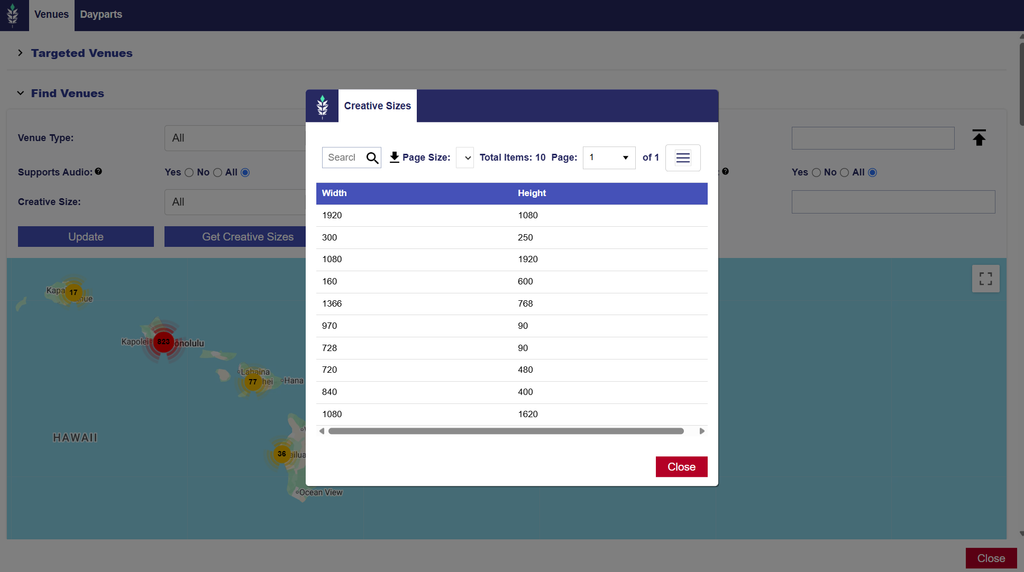
Find Available Creative Sizes
- Open the appropriate DOOH Advertiser.
- Select New Line or edit an existing Line.
- Under Line Setup, select Edit Targeting.
- Expand Find Venues.
- Enter the desired targeting criteria, such as Venue Type, Region, ZIP Codes, Publisher, or supported Media Type.
- Select Get Creative Sizes to view the available Creative dimensions for the matching inventory.
You can also select individual Venues on the map to review their required Creative Size in the Inventory Details window.
Important Considerations
- Venue Compatibility: Creative dimensions must match the requirements of the targeted inventory.
- Media Type: Confirm whether the selected Venues support Banner, Video, or Video with Audio.
- Multiple Sizes: Targeting multiple Venues may require uploading several Creative sizes.
- Inventory Availability: Available Creative sizes depend on the Venues matching your selected search filters.
Recommendation: Run Get Creative Sizes before uploading Creatives to ensure that the required dimensions are available for your intended placements.
For additional guidance, see: