Advanced
Advanced Targeting provides additional controls for applying Custom Models and managing eligibility for inventory with specific privacy requirements.
These settings are available within the Campaign and Line Targeting workflow. Campaign-level targeting applies shared requirements across all Lines, while Line-level targeting allows users to configure additional requirements for an individual Line.
How to Access Advanced Targeting
- Create a new Campaign or Line, or open an existing one in Edit mode.
- Navigate to the Targeting section.
- Select Edit Targeting.
- Under Advanced, select Custom Model or Privacy from the Targeting dropdown menu.
- Configure the applicable settings and select Save.
- Complete and save the Campaign or Line configuration.
Custom Model
Custom Model Targeting allows users to apply an available Custom Model directly to a Campaign or Line.
Custom Models provide a way to activate optimization models generated through Pontiac’s Analytics Suite within the targeting workflow.
Configuring Custom Model Targeting
- Navigate to the Targeting section of the applicable Campaign or Line and select Edit Targeting.
- Under Advanced, select Custom Model from the Targeting dropdown menu.
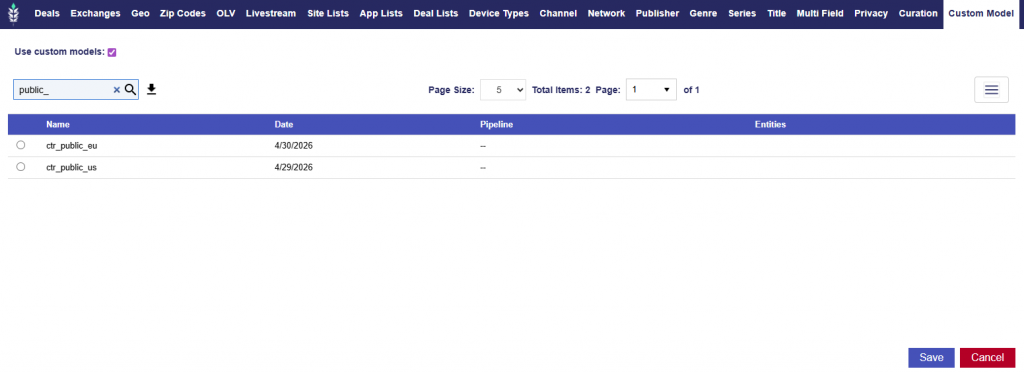
- Enable Use custom models.
- Select the model you want to apply using the radio button next to its name in the available models table.
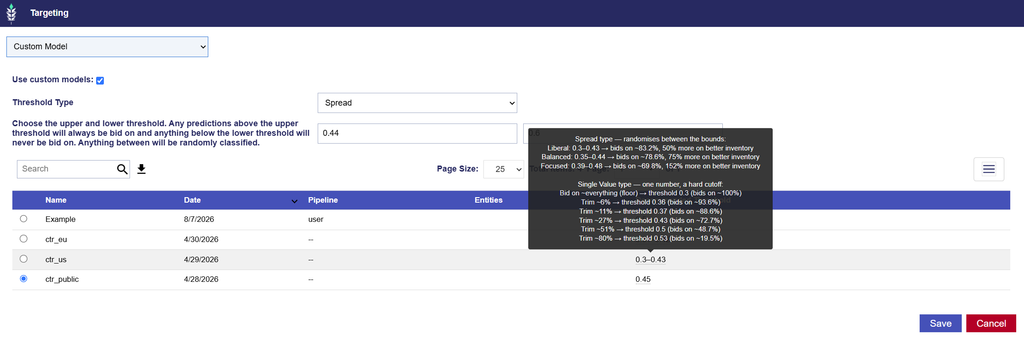
- Select the applicable Threshold Type: Single Value or Spread.
- Single Value uses one probability threshold to determine bid eligibility.
- Predictions above the entered threshold will pass the model’s bidding criteria.
- Predictions below the threshold will be excluded from bidding.
- For example, if the Single Value threshold is set to
0.35, bid requests with a predicted probability above0.35pass the model’s criteria, while requests below that value are excluded.
- Spread allows users to enter a lower and an upper probability threshold.
- Single Value uses one probability threshold to determine bid eligibility.
| Prediction | Model behavior |
|---|---|
| Above the upper threshold | Always passes the model’s bidding criteria. |
| Below the lower threshold | Excluded from bidding. |
| Between the two thresholds | Randomly classified for bidding. |
For example, if the lower threshold is 0.31 and the upper threshold is 0.42:
- Predictions above
0.42pass the model’s bidding criteria. - Predictions below
0.31are excluded. - Predictions between
0.31and0.42are randomly classified.
Spread provides flexibility in how the model handles predictions that fall between two defined thresholds.
Important: Passing the Custom Model’s bidding criteria does not guarantee an impression will serve. The bid request must still satisfy all other applicable targeting, budget, and bidding requirements.
- Enter the desired threshold value or values.
- For guidance, hover over the Recommended Threshold figures. See further details below.
- Review your configuration and select Save.
Available Models
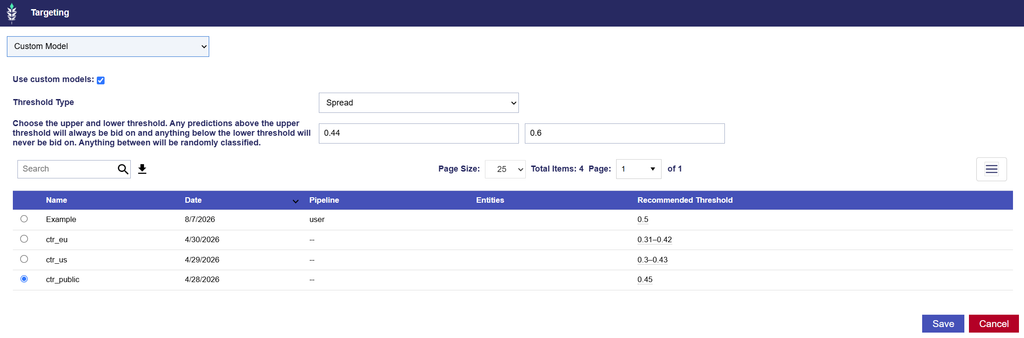
When Use custom models is enabled, a table displays the available models associated with the Advertiser.
The table includes the following information:
| Column | Description |
|---|---|
| Name | Name of the model. |
| Date | Date the model was generated. |
| Pipeline | Analysis pipeline associated with the model. |
| Entities | Advertiser, Campaign, or Line entities associated with the model. |
| Recommended Threshold | Recommended probability threshold range associated with the model. |
Use the Search bar to find a model by name. Select the radio button next to the desired model to apply it to the targeting configuration.
Recommended Threshold
The Recommended Threshold column displays a suggested probability range for each model.
For example, a model may display a Recommended Threshold of 0.31–0.42.
Users can reference this range when configuring their threshold settings:
- Single Value: Choose one threshold value.
- Spread: Configure a lower and upper threshold.
The recommended range serves as guidance for configuring the model. Users should review the selected thresholds based on their campaign objectives and desired inventory eligibility.
Important Considerations
- Threshold Selection
- Thresholds determine how restrictive the Custom Model is when evaluating bid requests.
- For Single Value, increasing the threshold excludes more predictions below the cutoff.
- For Spread, predictions between the lower and upper thresholds are randomly classified rather than automatically included or excluded.
- Campaign and Line Targeting
- Custom Model Targeting does not override other targeting requirements. An impression must still satisfy all applicable Campaign and Line settings to be eligible to serve.
- Model Availability
- Only models available to the applicable Advertiser are displayed for selection.
For information about generating models through Pontiac’s Analytics Suite, see the Analytics Documentation .
Privacy
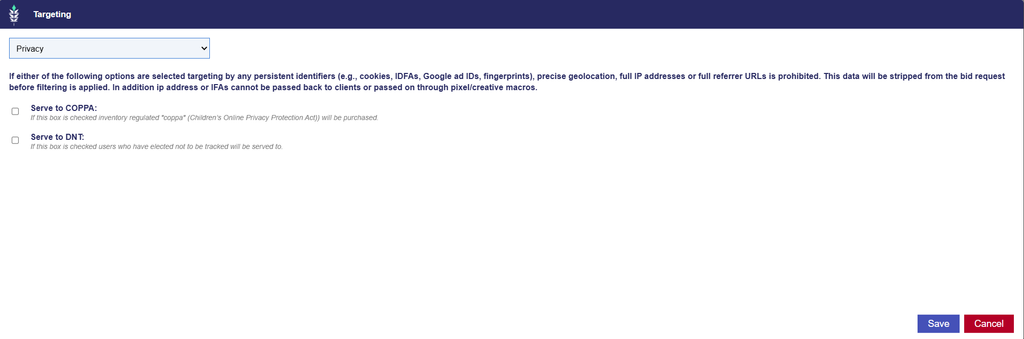
Privacy Targeting controls eligibility for inventory associated with specific privacy restrictions. These settings allow advertisers to enable delivery to inventory identified as subject to COPPA or Do Not Track (DNT) restrictions.
Available Privacy Options
| Option | Description |
|---|---|
| Serve to COPPA | Allows delivery to inventory identified as subject to the Children’s Online Privacy Protection Act (COPPA). |
| Serve to DNT | Allows delivery to impressions associated with users who have indicated a Do Not Track preference. |
Configuring Privacy Targeting
- Navigate to the Targeting section of the applicable Campaign or Line and select Edit Targeting.
- Under Advanced, select Privacy from the Targeting dropdown menu.
- Enable Serve to COPPA and/or Serve to DNT, as applicable.
- Select Save to apply the targeting configuration.
Important Considerations
- Data Restrictions
- When either Serve to COPPA or Serve to DNT is enabled, the following information is restricted from use in targeting:
- Persistent identifiers, including cookies, IDFAs, Google Advertising IDs, and device fingerprints.
- Precise geolocation.
- Full IP addresses.
- Full referrer URLs.
- Pontiac strips this restricted information from the bid request before targeting filters are applied.
- Additionally, IP addresses and mobile advertising identifiers (IFAs) cannot be passed back to clients or included in pixel or creative macros for these impressions.
- When either Serve to COPPA or Serve to DNT is enabled, the following information is restricted from use in targeting:
- Targeting Compatibility
- Targeting methods that depend on restricted identifiers or precise location information may not be applicable to this inventory.
- Review Audience, Device, Geographic, and other targeting requirements to ensure the Campaign can serve without relying on unavailable information.
- Campaign and Line Targeting
- Privacy settings do not override other targeting requirements. Impressions must still satisfy all applicable Campaign and Line restrictions to be eligible to serve.
Important: Enabling these options allows delivery to the corresponding inventory categories; it does not remove the associated privacy restrictions or independently establish compliance with applicable requirements.