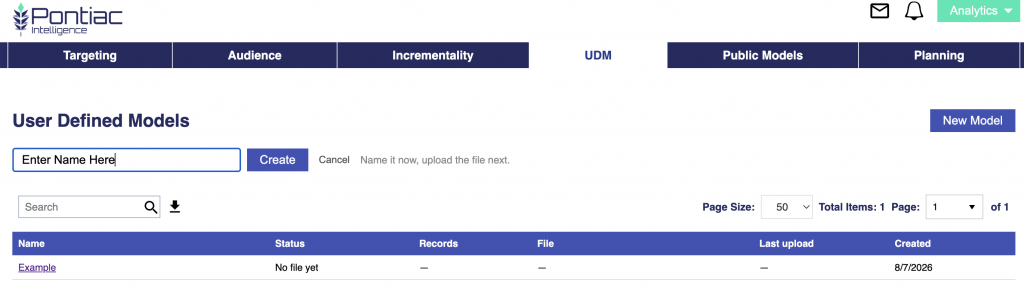
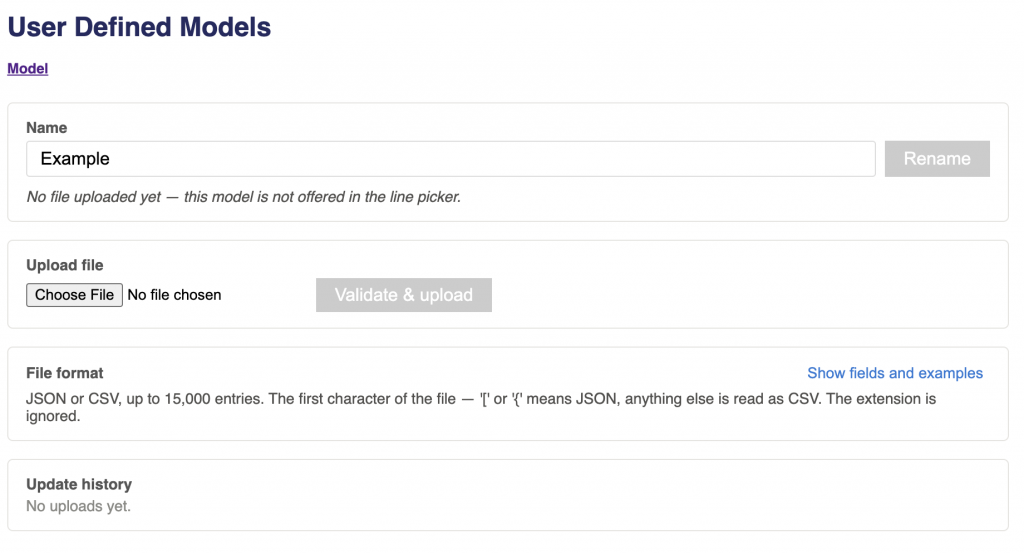
Overview
For the Targeting Model, report-generated outputs can be easily applied to a campaign, but users are not limited to the exact variables and combinations identified by the model. Users can also create their own custom JSON file using the same general structure as the model outputs.
This allows users to define variables and combinations based on their own campaign learnings, business rules, historical performance, or optimization goals. For example, a user may already know that a certain geography, publisher, device type, content genre, or day of week is strategically important and can build those values into a custom model. The complete model file must be formatted as a JSON array.
Before creating a custom model, review Model Scoring Overview to understand how model entries are matched, weighted, combined into a request-level score, and evaluated against the threshold selected on the line.
Score Requirements
- Each entry must include a numeric score between -1 and 1.
- Scores entered in the JSON file use the −1-to-1 model scale. After matching entries are combined, the result is converted to the 0-to-1 bidder scale used by the line threshold. See Model Scoring Overview for details.
- Supported Fields and Expected Values
- The required fields depend on whether the entry is a single variable, a 2-way combination, or a 3-way combination. The following fields can be used in custom Targeting Models:
| Field | Group | How to write the value |
|---|---|---|
geo_region | Geography | Lowercase, exactly as it appears in the logs. |
geo_zip | Geography | Postal code as it appears in the logs. US ZIPs must keep their leading zero (‘04501’). Non-US formats are fine (‘1000-001’, ‘SW1A 1AA’). |
publisher_name | Inventory | Lowercase, exactly as it appears in the logs. |
site_domain | Inventory | Lowercase, exactly as it appears in the logs. |
app_bundle | Inventory | Lowercase, exactly as it appears in the logs. |
exchange | Inventory | Lowercase, exactly as it appears in the logs. |
deal_id | Inventory | Lowercase, exactly as it appears in the logs. |
content_channel | Content | Lowercase, exactly as it appears in the logs. |
content_network | Content | Lowercase, exactly as it appears in the logs. |
content_series | Content | Lowercase, exactly as it appears in the logs. |
content_title | Content | Lowercase, exactly as it appears in the logs. |
content_genre | Content | Lowercase, exactly as it appears in the logs. |
content_livestream | Content | ‘0’ or ‘1’. |
device_type | Device | IAB code as a whole number — ‘3’, never ‘3.0’ and never ‘Connected TV’. |
day | Time | Lowercase three-letter code (mon, tue, wed, thu, fri, sat, sun), in UTC. |
hour | Time | Whole number 0-23, in the user’s LOCAL time. |
Values should match the format used in the underlying bid request data.
For example
{
  "feature": "device_type",
  "value": "3",
  "score": 0.80
}
Use “3”, not “Connected TV” or “CTV”.
Single Variable
A single-variable entry must include:
- feature: The name of the feature.
- value: The specific value associated with the feature.
- score: A numeric value between -1 and 1.
Example:
{
  "feature": "geo_zip",
  "value": "10025",
  "score": 0.95
}
This example assigns a score of 0.95 to ZIP Code 10025.
2-Way Combination
A 2-way combination must include:
- feature1: The name of the first feature.
- feature2: The name of the second feature.
- combination: The exact values associated with feature1 and feature2, provided in the same order and separated by ×.
- score: A numeric value between -1 and 1.
Example 1:
{
  "feature1": "geo_zip",
  "feature2": "device_type",
  "combination": "10025 × 4",
  "score": 0.90
}
This represents ZIP Code 10025 + Device Type 4 with a score of 0.90.
Example 2:
{
  "feature1": "content_genre",
  "feature2": "day",
  "combination": "news/talk radio × thu",
  "score": 0.75
}
This represents Content Genre = news/talk radio + Day = Thursday with a score of 0.75.
The values in combination must match the order of the corresponding feature fields.
3-Way Combination
A 3-way combination must include:
- feature1: The name of the first feature.
- feature2: The name of the second feature.
- feature3: The name of the third feature.
- combination: The exact values associated with feature1, feature2, and feature3, provided in the same order and separated by ×.
- score: A numeric value between -1 and 1.
Example:
{
  "feature1": "geo_zip",
  "feature2": "publisher_name",
  "feature3": "device_type",
  "combination": "10025 × iheartmedia × 4",
  "score": 0.85
}
The order of the values in combination must match the order of the corresponding feature fields.
For example:
feature1 = geo_zipfeature2 = publisher_namefeature3 = device_type
must correspond to:
10025 × iheartmedia × 4
Users can include one or multiple single variables, 2-way combinations, and 3-way combinations in a custom JSON file to define the optimization logic they want to apply.
Model-generated metrics such as conversion rate, lift, score, and statistical significance apply only to variables and combinations produced and evaluated by the model. User-created variables or combinations should not be assumed to have the same performance unless they are separately analyzed and validated.
Reach out to your Account Manager or contact us through the Pontiac Help Center for assistance creating and implementing a custom JSON model.
Field Weights (Optional)
By default, every field in a User Defined Model contributes equally. For example, a match on site_domain carries the same influence as a match on hour.
Optional field weights allow users to change that balance when there is a specific reason to give one attribute more influence than another.
A model file without field weights behaves as an equally weighted model.
How Field Weights Affect Scoring
When a bid request matches multiple model entries, their scores are combined into a single result. With field weights, the classifier calculates a weighted average:
Combined model score =
Sum of (each matching score × its weight)
÷
Sum of all matching weights
A field with a higher weight has more influence over the combined result than a field with a lower weight.
If all weights are equal, the calculation is equivalent to the plain average used by an unweighted User Defined Model.
JSON
To provide field weights in JSON, wrap the model entries in an object and add a field_weights map:
{
  "entries": [
    {
      "feature": "site_domain",
      "value": "espn.com",
      "score": 0.80
    },
    {
      "feature": "hour",
      "value": "20",
      "score": -0.40
    }
  ],
  "field_weights": {
    "site_domain": 3.0,
    "hour": 1.0
  }
}
The existing plain-array JSON format remains valid when no custom field weights are needed:
[
  {
    "feature": "site_domain",
    "value": "espn.com",
    "score": 0.80
  },
  {
    "feature": "hour",
    "value": "20",
    "score": -0.40
  }
]
CSV
For CSV models, add a weight column. Add one separate row for each field weight, leaving value and score empty:
feature,value,score,weight
site_domain,espn.com,0.80,
hour,20,-0.40,
site_domain,,,3.0
hour,,,1.0
The JSON and CSV examples above produce the same model.
Field Weight Example
Assume a request matches:
site_domain = espn.com: score0.80, weight3.0hour = 20: score-0.40, weight1.0
The weighted combined model score is:
((0.80 × 3.0) + (-0.40 × 1.0)) ÷ (3.0 + 1.0)
= 0.50
The combined model score of 0.50 converts to a bidder score of:
(0.50 + 1) ÷ 2 = 0.750Without custom weights, the two entries contribute equally:
(0.80 + -0.40) ÷ 2 = 0.20which produces a bidder score of:
(0.20 + 1) ÷ 2 = 0.600Giving site_domain more weight therefore shifts the result toward its stronger positive score.
Only the Ratios Matter
Field weights are normalized so that the average field weight is 1 before the model is built.
For example:
| Weights supplied | Normalized weights |
|---|---|
site_domain: 3.0, hour: 1.0 | site_domain: 1.5, hour: 0.5 |
site_domain: 30, hour: 10 | site_domain: 1.5, hour: 0.5 |
These configurations are equivalent because the relative weighting between the fields is the same.
Increasing all weights by the same factor does not make the model more aggressive. Field weights control the relative influence of fields when the request-level score is calculated. How the resulting bidder scores affect bidding is controlled separately by the line’s threshold settings.
Combination Weights
A two- or three-variable combination uses the mean of its component fields’ weights.
For example, if:
site_domain weight = 1.5
hour weight = 0.5
then a matching site_domain × hour combination receives a weight of:
(1.5 + 0.5) ÷ 2 = 1.0A combination does not receive additional weight simply because it contains more variables.
Field Weight Rules
| Rule | Behavior |
| Field not listed | Uses the default field weight of 1 |
| Unknown field name | File is rejected |
| Weight is not numeric | File is rejected |
| Negative weight | File is rejected |
Weight of 0 | Accepted with a warning; the field stops contributing to the combined score |
| One field far above the rest | File is rejected if, after normalization, a single field would overwhelm the score |
If the intent is for a field to have no influence, removing its entries is generally clearer than assigning the field a weight of 0.
When to Use Field Weights
Use field weights when there is a specific reason to believe one supported attribute should have more influence than another.
For example, a campaign may have strong evidence that placement domain is more important to performance than time of day. Increasing the relative weight of site_domain allows domain matches to contribute more heavily to the combined score.
If there is no clear reason to weight fields differently, leave field weights out. Equal weighting is the default.
Pontiac Analytics-generated models may also contain field weights, but those weights are measured automatically from the campaign’s training data rather than supplied by the user. When there is not enough data to measure field importance reliably, the Analytics model falls back to equal weighting.
For more information about how field weights are applied during scoring, see Model Scoring Overview.
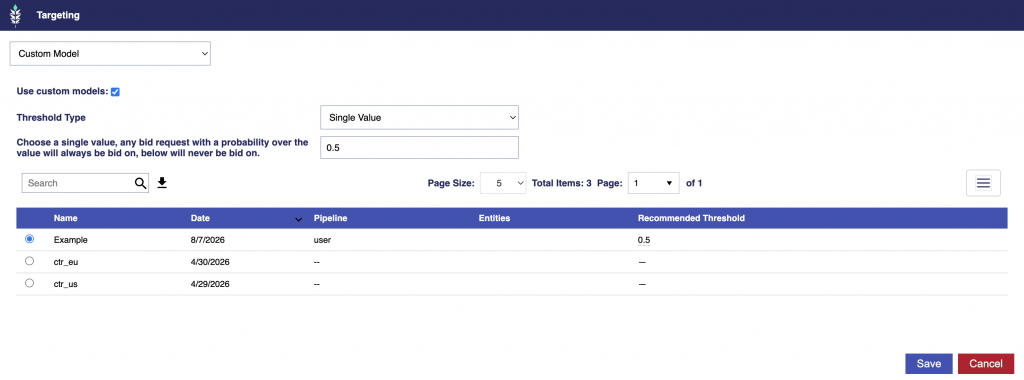
Threshold Settings
The model file defines the model’s scoring signals and optional field weights, but it does not define how the resulting bidder score affects bidding.
Threshold settings are selected when the model is associated with a Campaign or Line.
- Single Value applies a hard cutoff.
- Spread uses separate minimum and maximum thresholds to create a probabilistic bidding band.
For complete threshold behavior, including how unmatched requests scoring 0.5 are handled, see Model Scoring Overview.
Next Steps
For details about how matching entries are weighted and averaged, why unmatched requests receive a neutral bidder score of 0.5, and how Single Value and Spread threshold settings affect bidding, continue to Model Scoring Overview.