Report Results
The report results include the pipeline used, date created, when the report started, and when the report completed. The output is separated into 7 sections:
- Summary
- Dashboard
- Lookalike
- Personas
- Explorer
- Charts
- Downloads
This information provides a complete audit trail and transparency into the model, allowing users to understand how insights are generated and tie them back to audience behavior and performance, rather than relying on a black-box approach.
Summary
The Summary section provides a high-level overview of the analysis, including the Report ID, Advertiser ID, and Date Range, along with an automatically generated Executive Summary.
This summary explains:
- Key demographic drivers of conversions
- Audience composition and persona breakdown
- Geographic performance and distribution
- Lookalike expansion opportunities (if applicable)
- Strategic recommendations and action items
Tip: You can input the Executive Summary into your preferred LLM (e.g., ChatGPT or Claude) to quickly generate a presentation deck or case study based on the results.
Dashboard
The Dashboard section provides a visual overview of audience composition and demographic drivers of performance. It highlights which census-based features influence conversions, how audiences are distributed geographically, and how different demographic segments perform.
Dashboard Sections:
- Tile Metrics
- Most Important Demographic Categories
- Feature Impact Distribution — SHAP Beeswarm
- Demographic Sub-Feature Impact
- Shows the top three most important features based on your audience dynamically.
- Geographic Performance — Click a State to See ZIP Codes
- Cost per Conversion by Demographic Category
Tile Metrics
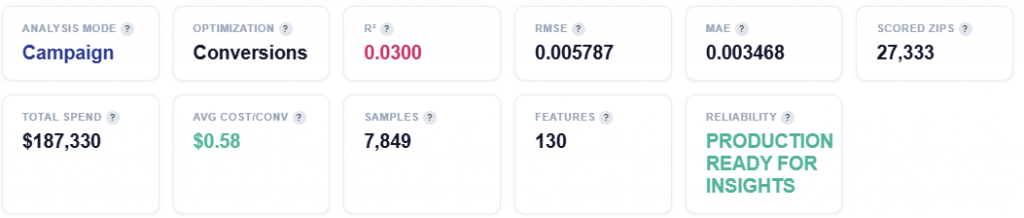
- Analysis Model: Campaign Mode — results are based on ad-attributed conversions. Impressions served by your lines that led to pixel fires within the lookback window. The model learns which demographics respond to your ad.
- Optimization: Conversions or Clicks
- Conversions: Optimizing for conversions (pixel fires). The model predicts which demographics drive conversion events.
- R² (Coefficient of Determination): Measures how much of the conversion rate variance is explained by demographics. 5–15% is typical. Demographics are just one signal among many.
- RMSE (Root Mean Squared Error): Lower is better. Measures the average prediction error in the same units as the target (conversion rate).
- MAE (Mean Absolute Error): Average absolute difference between predicted and actual conversion rates. Less sensitive to outliers than RMSE.
- Scored ZIPs: Total ZIP codes scored with demographic affinity. Example: 1,850 positive, 25,483 negative or zero (this figure changes dynamically).
- Total Spend: Total ad spend across all campaign ZIPs in this analysis period.
- Avg Cost/Conv: Average cost per conversion across all campaign ZIPs. Lower is more efficient.
- Samples: Number of ZIP codes included in the analysis after filtering for (>300 events) and outlier removal.
- Features: Number of census demographic features used by the model.
- Reliability: Pipeline quality assessment. Passed 3/4 checks — the results change dynamically.
Most Important Demographic Categories
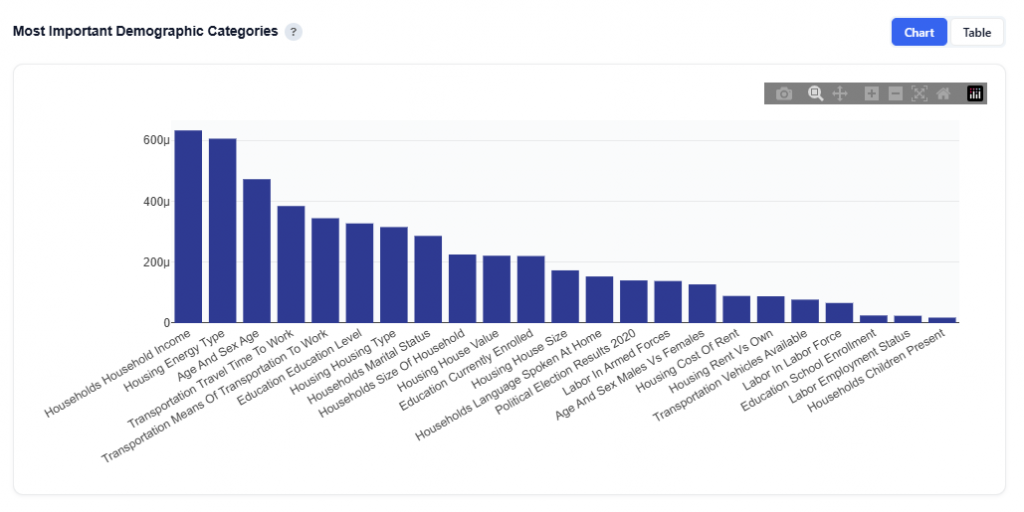
This section shows the total SHAP importance aggregated by demographic category, helping identify which broad demographic dimensions have the greatest influence on the model’s conversion rate predictions. Use this to understand which broad demographic dimensions matter the most.
Chart View
What It Shows:
- Each bar represents a demographic category (e.g., Household Income, Age, Housing, Transportation)
- Bar height reflects total SHAP importance across all features within that category
Interpretation:
- Taller bars indicate categories that have a greater impact on the model’s predictions
- Categories at the top represent the strongest drivers of conversion likelihood
- Lower bars indicate categories with less influence on performance
Table View
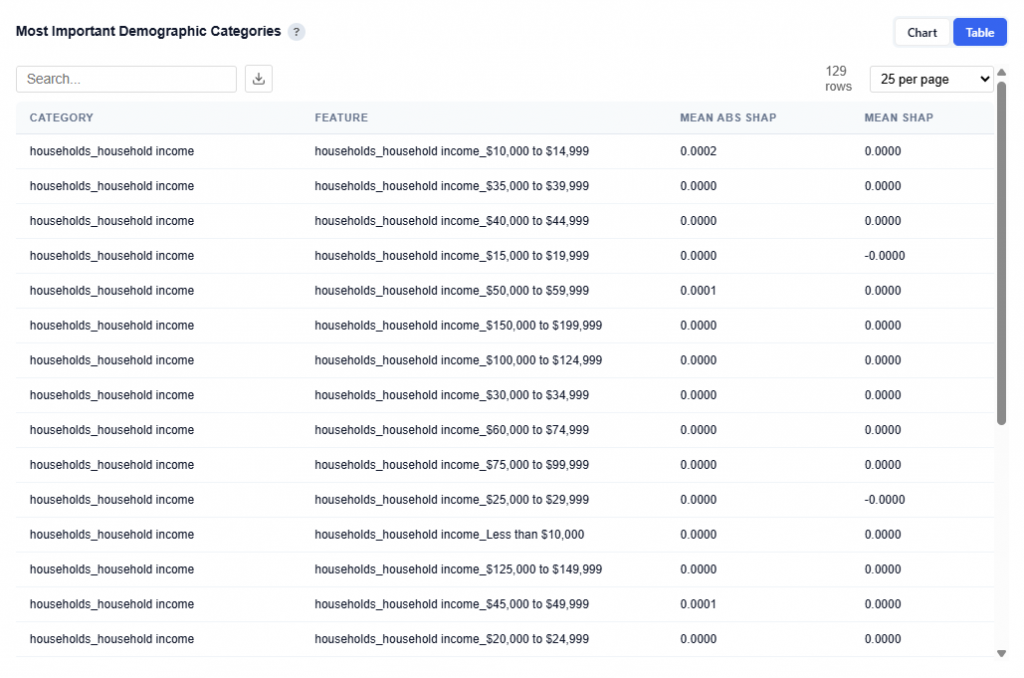
Provides a detailed breakdown of individual features within each demographic category, including:
- Category: High-level demographic group
- Feature: Specific sub-feature (e.g., income bracket, age range)
- Mean Abs SHAP: Overall importance of the feature
- Mean SHAP: Direction of impact (positive or negative influence)
Users can download this table as a CSV file for further analysis.
Feature Impact Distribution — SHAP Beeswarm
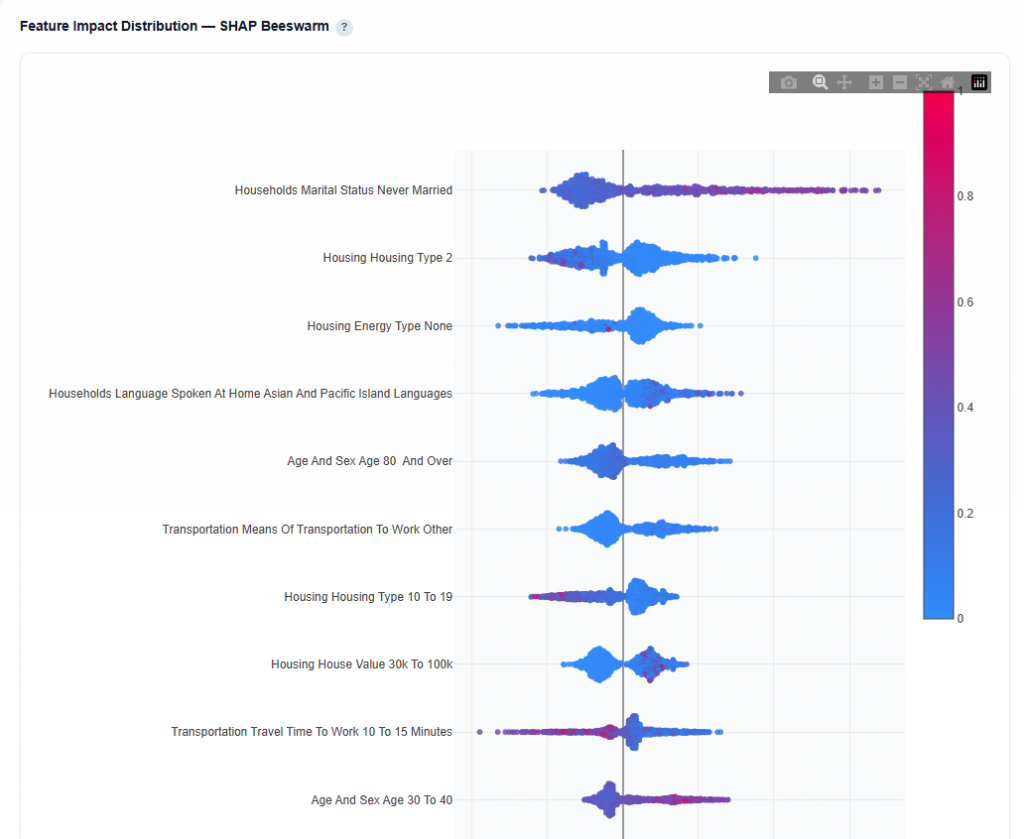
This section shows how each demographic feature impacts conversion predictions across all ZIP codes.
What It Shows:
- Each dot represents a single ZIP code prediction
- X-axis shows SHAP value (impact on predicted conversion rate)
- Color represents the feature value:
- Red = higher values
- Blue = lower values
- Features are ordered by importance (top = most important)
Interpretation:
- Points to the right increase predicted conversion rate
- Points to the left decrease predicted conversion rate
- Color helps identify whether higher or lower values drive performance
- Clusters indicate consistent impact patterns across ZIP codes
- Wide spread shows variable impact, while tight clusters show consistent behavior
Example Interpretation: This audience skews toward non-married individuals and people aged 30 to 40, who are more likely to convert, while higher-density housing areas tend to underperform.
- Households Marital Status: Never Married
- Takeaway: Prioritize ZIPs with higher concentrations of never-married populations as this is a strong positive signal for conversion.
- Many points extend to the right, indicating this feature often increases predicted conversion rate
- Higher values (red) are more concentrated on the right, showing that higher concentrations of never-married populations drive performance
- The distribution is relatively wide, meaning the impact varies across ZIP codes
- Visible clustering suggests consistent positive patterns in certain regions
- Takeaway: Prioritize ZIPs with higher concentrations of never-married populations as this is a strong positive signal for conversion.
- Housing Type 10 to 19
- Takeaway: Deprioritize areas with high concentrations of this housing type (mid- to high-density housing such as apartments or condos). Lower concentrations tend to perform more consistently.
- Points are distributed on both sides of zero, indicating this feature can both increase and decrease predicted conversion rate
- Red values (higher concentrations) extend more to the left, showing that higher values tend to decrease conversion likelihood
- Blue values (lower concentrations) are more clustered on the right, indicating lower values tend to increase conversion likelihood
- The spread is moderately wide, suggesting variable impact across ZIP codes
- Clusters near the center indicate more neutral or mixed performance overall
- Takeaway: Deprioritize areas with high concentrations of this housing type (mid- to high-density housing such as apartments or condos). Lower concentrations tend to perform more consistently.
- Age 30 to 40
- Takeaway: This is a stable, reliable positive signal and a good baseline demographic to include in targeting.
- Points lean slightly to the right, indicating a generally positive impact on conversion rate
- Higher values (red) tend to appear more on the right, suggesting higher concentrations in this age group improve performance
- The distribution is more tightly clustered, indicating a more consistent effect across ZIP codes
- Less spread means this feature behaves more predictably compared to others
- Takeaway: This is a stable, reliable positive signal and a good baseline demographic to include in targeting.
Demographic Sub-Feature Impact
This section breaks down a top demographic category into its individual sub-features to show how each one influences conversion predictions.
Household Income Example
This chart is a SHAP Beeswarm for the Household Income category.
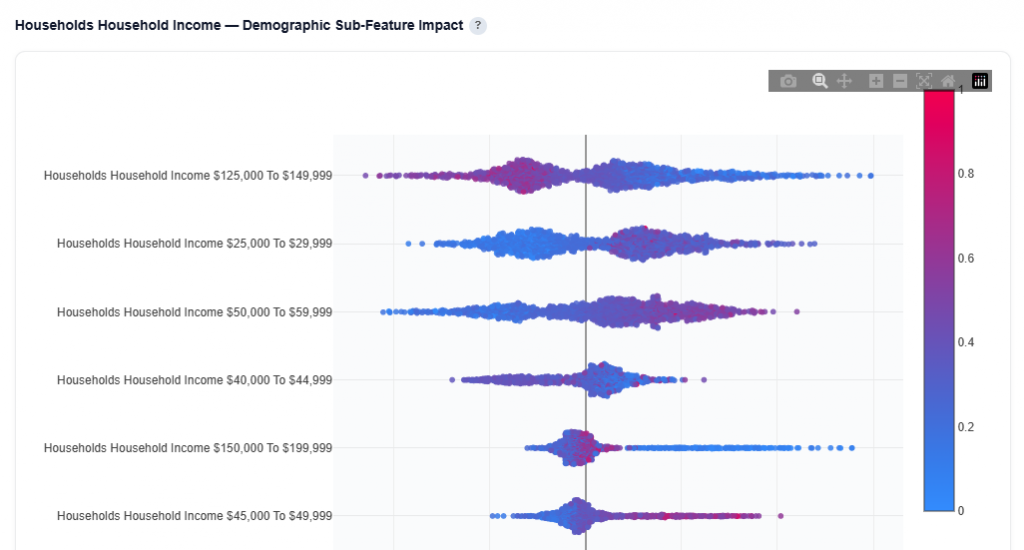
What It Shows:
- Each dot represents a ZIP code prediction
- Each row represents a specific sub-feature
- X-axis shows SHAP value (impact on predicted conversion rate)
- Color represents the feature value:
- Red = higher values
- Blue = lower values
- Features are ordered by importance (top = most important)
Interpretation:
- Points to the right increase predicted conversion rate
- Points to the left decrease predicted conversion rate
- Color helps identify whether higher or lower values drive performance
- Clusters indicate consistent impact patterns across ZIP codes
- Wide spread shows variable impact, while tight clusters show consistent behavior
Example Interpretation: This audience skews toward low to mid-income households, which are more likely to convert than higher-income segments.
- Household Income $125,000 to $149,999
- Takeaway: Higher concentrations of this income group tend to decrease conversion likelihood, while lower presence performs better.
- Red points (higher values) are concentrated left of zero, indicating a negative impact
- Blue points extend more to the right, showing lower concentrations improve performance
- Wide spread indicates variable impact across ZIP codes
- Takeaway: Higher concentrations of this income group tend to decrease conversion likelihood, while lower presence performs better.
- Household Income $25,000 to $29,999
- Takeaway: This income bracket is a strong positive signal when present at higher levels.
- Red points cluster to the right, indicating higher values increase predicted conversion rate
- Blue points appear more on the left, showing lower values reduce performance
- Moderate spread suggests some variability, but generally consistent direction
- Takeaway: This income bracket is a strong positive signal when present at higher levels.
- Household Income $50,000 to $59,999
- Takeaway: A strong and reliable positive segment worth prioritizing.
- Red points are clearly right-skewed, showing higher concentrations drive conversions
- Blue points are more left or neutral, indicating weaker performance when absent
- Wider spread shows impact varies, but direction is consistently positive
- Takeaway: A strong and reliable positive segment worth prioritizing.
Geographic Performance — Click a State to See ZIP Codes
This section provides an interactive map of conversion performance by geography, helping identify where your audience is performing best.
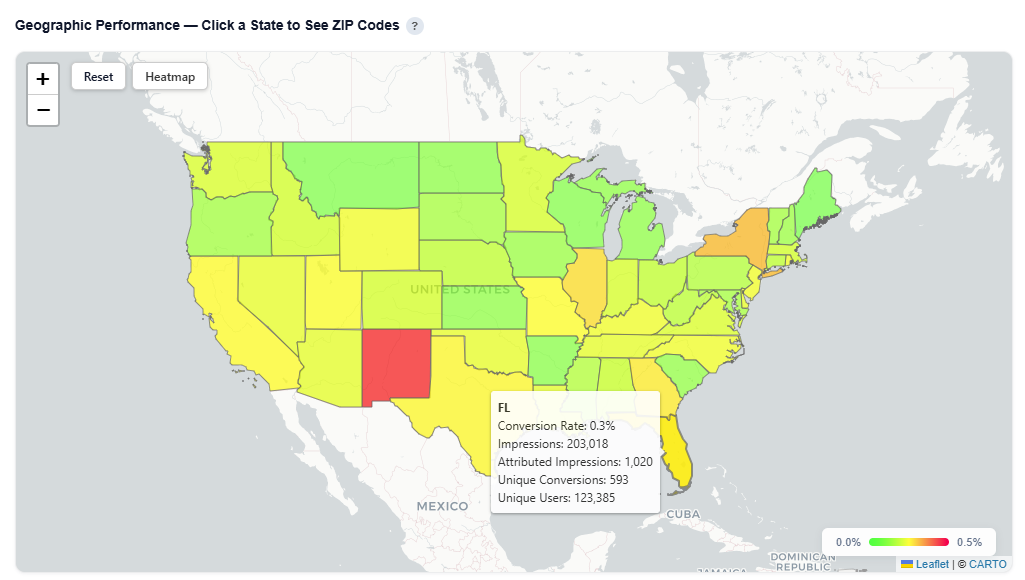
What It Shows:
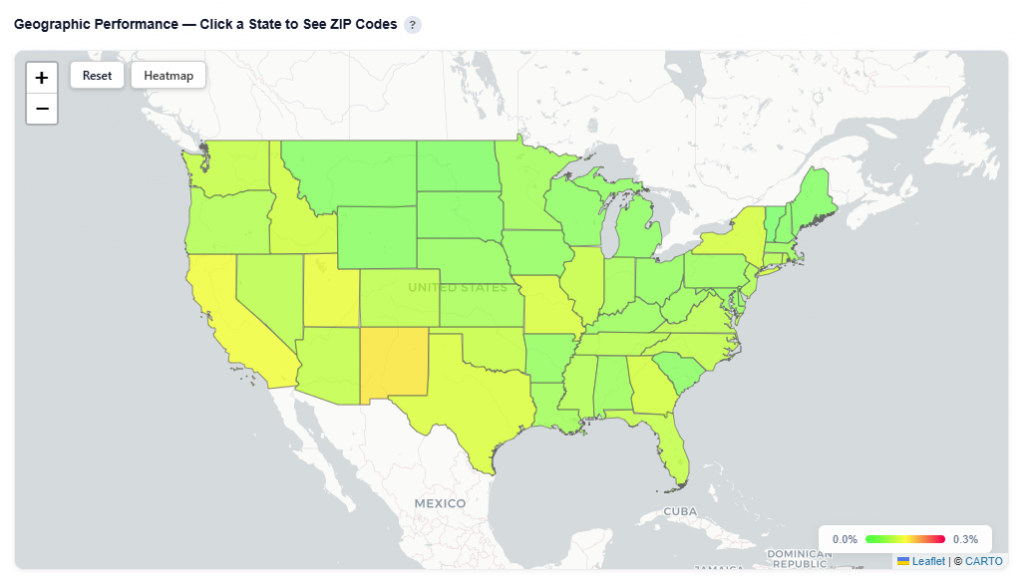
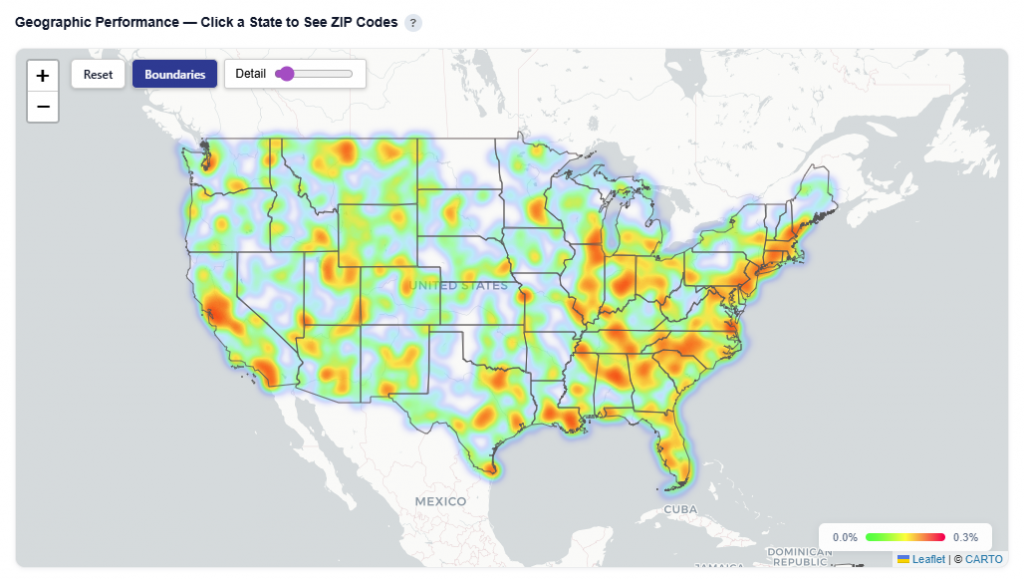
- States and ZIP codes colored by conversion rate
- Visual distribution of performance across regions and local markets
- Ability to analyze performance at both state and ZIP-level
- Toggle between Heatmap and Boundaries view:
- Boundaries: Clearly outlines geographic regions
- Heatmap: Highlights performance intensity across regions
Boundaries View
Heatmap View
Interactions:
- Hover over a state to view:
- State Name
- Conversion Rate
- Impressions
- Attributed Impressions
- Unique Conversions
- Unique Users
- Click a state to drill down into ZIP level performance – Zip code view:
- Zip code
- Zip code name
- Conversions
- Impressions
- Attributed Impressions
- Unique Conversions
- Unique Users
- Predicted Rate
Zip Code View
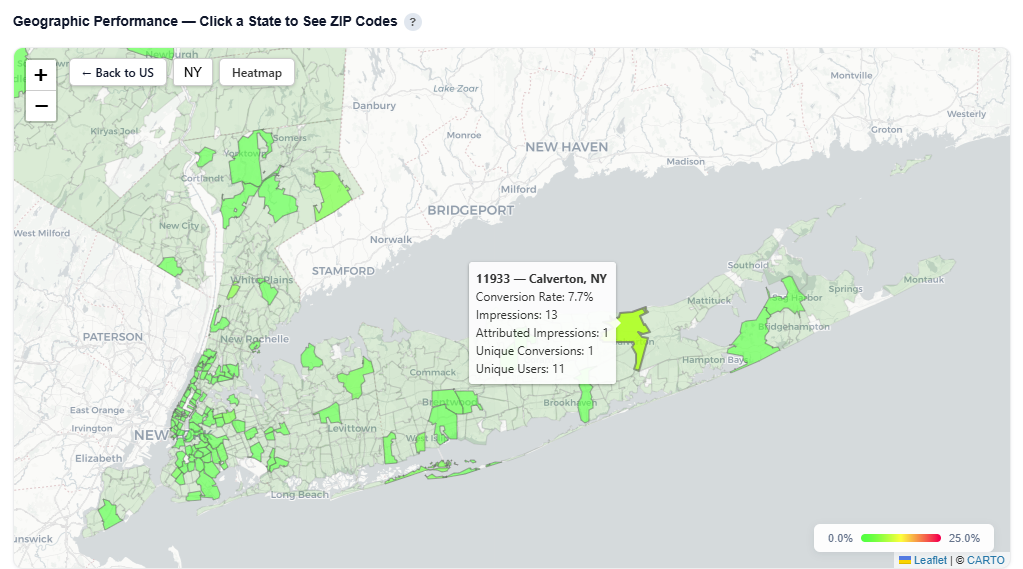
Table View
This table contains the underlying data used to power the Geographic Performance map, providing detailed metrics at the ZIP code level. Users can download this table as a CSV file for further analysis.
Each row represents a ZIP code and its associated performance, which is aggregated to render state-level views in the map.
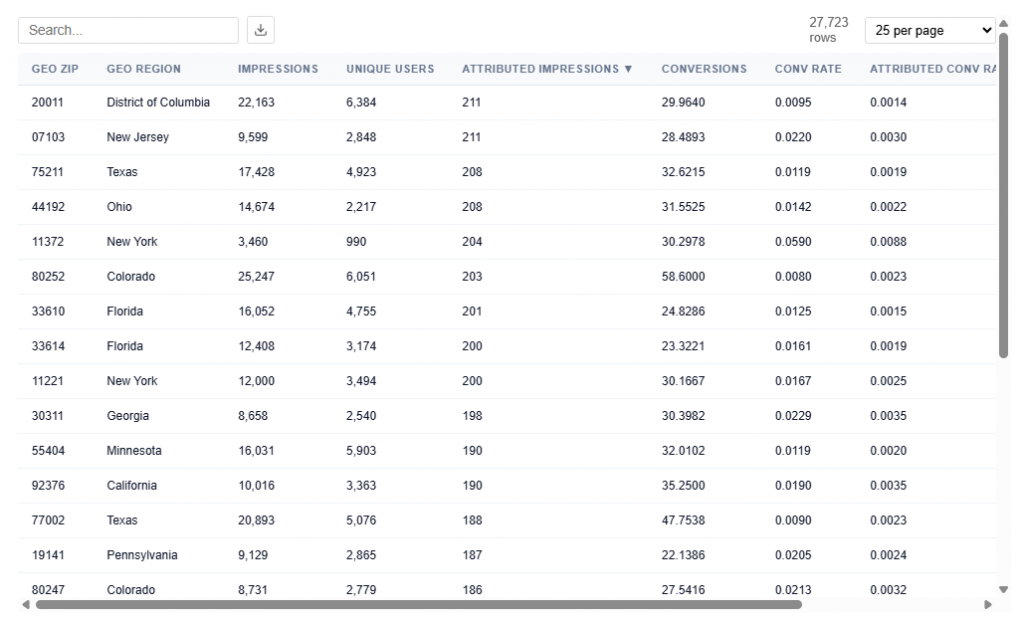
What It Includes:
- Geographic identifiers
- Geo Zip
- Geo Region Name
- City
- State ID
- Delivery Metrics
- Impressions: Total number of times ads were served
- Attributed Impressions: Impressions tied to users who later converted within the lookback window
- Unique Users: Number of distinct users exposed to ads
- Performance Metrics
- Conversions: Total number of conversion events attributed to the campaign
- Conversion Rate: Attributed Impressions / Impressions
- Attributed Conversion Rate: Conversions / Impressions
Example insight:
- 07103 (NJ) shows a Conversion Rate (2.20%) and Attributed Conversion Rate of 0.30%, indicating performance well above average (0.077% conversion rate from Executive Summary for this data).
Cost per Conversion by Demographic Category
This section shows how cost efficiency changes based on how strongly a demographic category is represented in a ZIP, helping identify which types of areas deliver the best ROI.
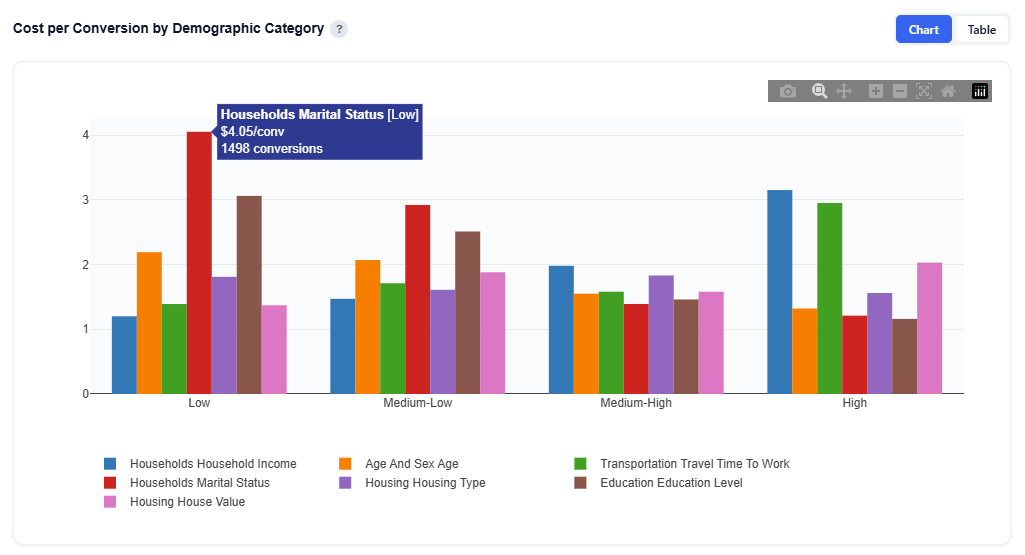
What It Shows:
- Each demographic category (e.g., Income, Age, Marital Status) is broken into quartiles based on its most important sub-feature
- Each bar represents a quartile segment (Low to High)
- Bar height represents cost per conversion (CPA)
Interpretation:
- Lower bars = cheaper conversions (more efficient)
- Higher bars = more expensive conversions (less efficient)
- Compare across quartiles to see how performance changes as the concentration of the demographic increases or decreases within a ZIP
- Differences across categories show which demographic dimensions drive efficiency vs. cost
Example Interpretation: Balance scale and efficiency by prioritizing ZIPs with strong marital status and age signals, while reducing spend in areas where income signals increase CPA.
- Households Marital Status
- Takeaway: ZIPs where this category has a stronger presence are more cost-efficient, while weaker presence is expensive.
- The Low quartile has the highest CPA ~$4.05, indicating poor efficiency
- CPA decreases steadily across quartiles, with High segments being much cheaper to ~$1.21
- Indicates areas where marital status signals are stronger perform more efficiently
- Takeaway: ZIPs where this category has a stronger presence are more cost-efficient, while weaker presence is expensive.
- Household Income
- Takeaway: ZIPs where income-related signals are stronger (based on the model’s top feature) tend to be less cost-efficient.
- CPA increases from Low to High quartiles (bins) (~$1.2 to ~$3.15)
- Indicates stronger income signal areas are more expensive to convert
- Lower-signal areas are more efficient
- Takeaway: ZIPs where income-related signals are stronger (based on the model’s top feature) tend to be less cost-efficient.
- Age
- Takeaway: ZIPs with stronger age-related signals are more cost-efficient.
- CPA decreases from Low to High quartiles
- Indicates areas where age is more predictive deliver cheaper conversions
- Takeaway: ZIPs with stronger age-related signals are more cost-efficient.
Table View
The table provides the underlying data behind the chart, showing how cost and performance vary across demographic category bins. Users can download this table as a CSV file for further analysis.
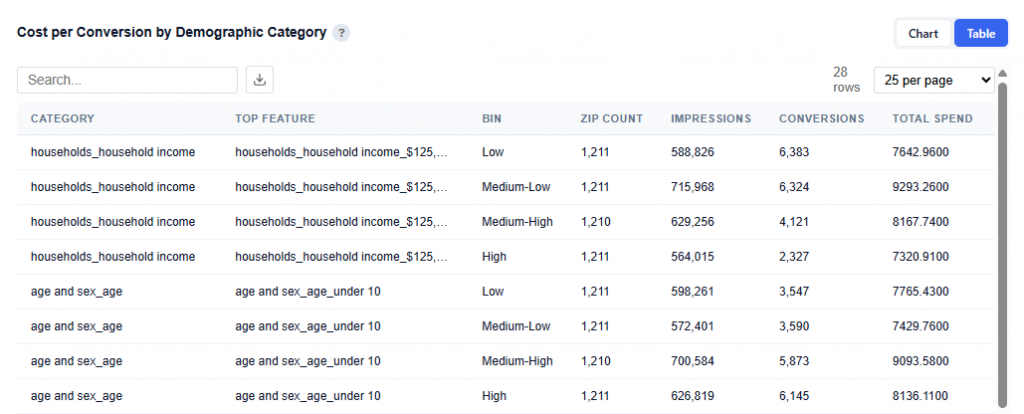
What It Shows:
- Each row represents a demographic category and its top contributing sub-feature
- Data is broken into quartile (bins): Low to High based on how strongly that feature is represented within each ZIP
- Columns included:
- Category: High-level demographic group (e.g., Household Income, Age, Marital Status)
- Top Feature: The most important sub-feature within that category driving the segmentation (e.g., a specific income bracket or age group)
- Bin: Quartile grouping (Low, Medium-Low, Medium-High, High)
- Represents relative concentration of that feature within a ZIP, not the value itself.
- Bins are calculated independently for each category based on that category’s top feature.
- ZIP Count: Number of ZIP codes in that bin
- Impressions: Total impressions delivered across those ZIPs
- Conversions: Total conversions generated in those ZIPs
- Total Spend: Total media spend across those ZIPs
Lookalike
Lookalike targeting uses the trained demographic model to predict conversion rates for all ~33,000 US ZIP codes not in your campaign. ZIPs with demographics similar to your high-performing areas are identified as expansion targets. Confidence tiers reflect prediction reliability — high confidence ZIPs are within the model’s training distribution with consistent predictions across all decision trees.
This section is only available when your campaign is not running nationally and is not already serving all ZIP codes, as lookalike modeling requires out-of-sample areas for expansion.
Tile Metrics

- Lookalike ZIPs: Total ZIP codes in the U.S. not in your campaign that were scored for demographic similarity.
- High Confidence: ZIPs within the training distribution, with low prediction variance and a positive score. Most reliable for targeting expansion.
- Medium Confidence: ZIPs within the training distribution but with higher prediction uncertainty or neutral scores. Consider for testing.
- Low Confidence: ZIPs that are demographically different from your campaign/analysis ZIPs (out-of-distribution). Predictions are unreliable. Shown on the map in gray for context, but not recommended for targeting.
- States Covered: Number of U.S. states with at least one lookalike ZIP.
- Est. Additional Reach: Estimated additional unique IPs reachable in high-confidence lookalike ZIPs. Based on average IPs per campaign ZIP — treat as a rough estimate.
- Model Confidence: Model quality weight (e.g., 3.4%). All lookalike scores are dampened by this factor to reflect model uncertainty.
Lookalike Expansion Map — Click a State to See ZIP Codes
This section provides an interactive map of lookalike opportunities, showing where to expand based on demographic similarity to your best-performing ZIPs.
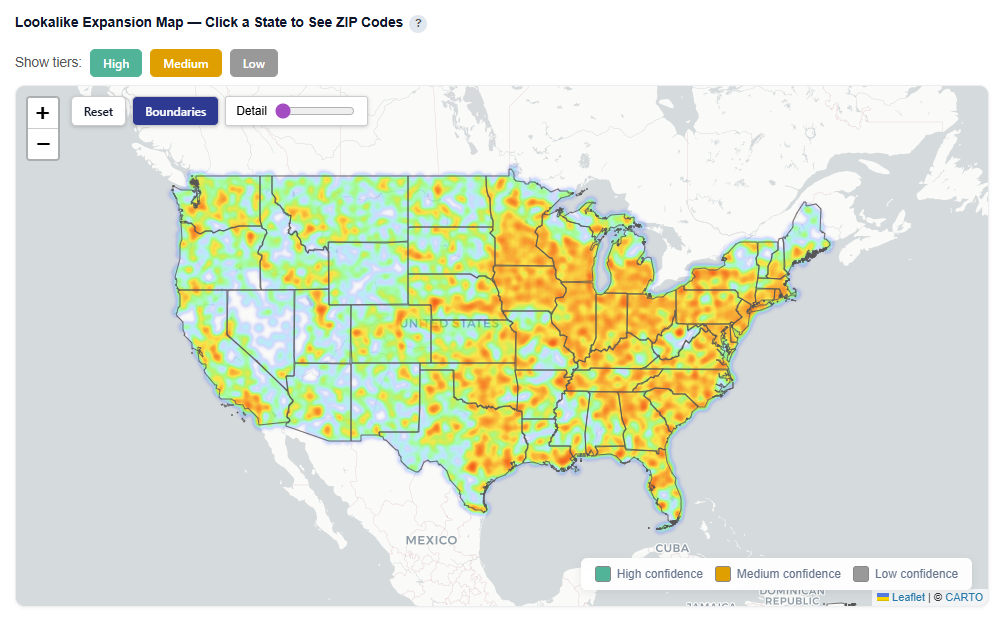
What It Shows:
- ZIP codes colored by confidence tier:
- High (green): Strongest expansion opportunities
- Medium (yellow): Test-and-learn opportunities
- Low (gray): Out-of-distribution, not recommended
- Geographic distribution of lookalike audiences across the U.S.
Toggle Tiers
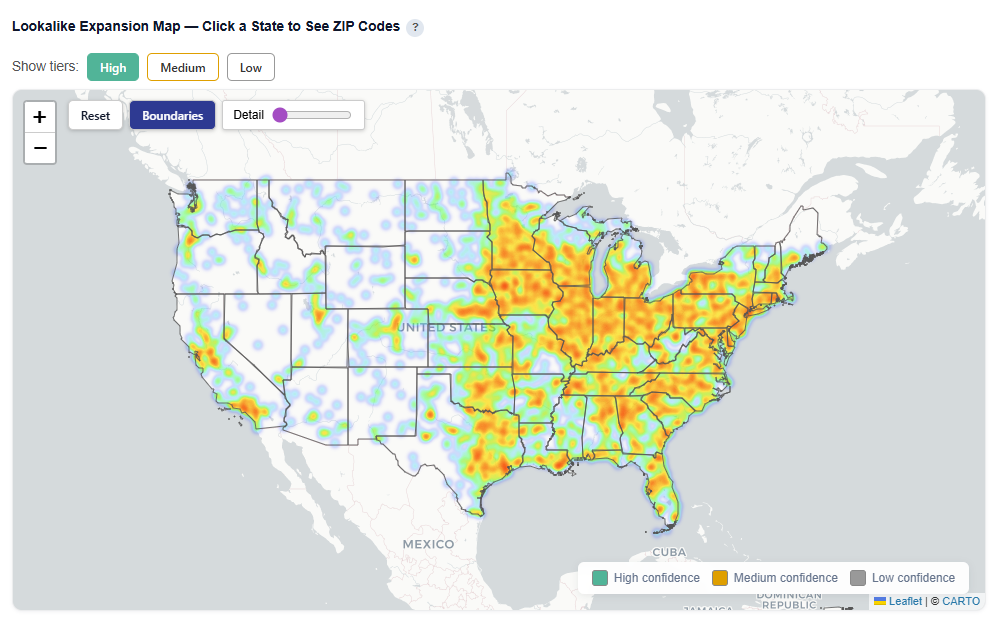
Show or hide High, Medium, ad Low confidence ZIPs for easy investigation and comparison.
Toggle Map View
Toggle views:
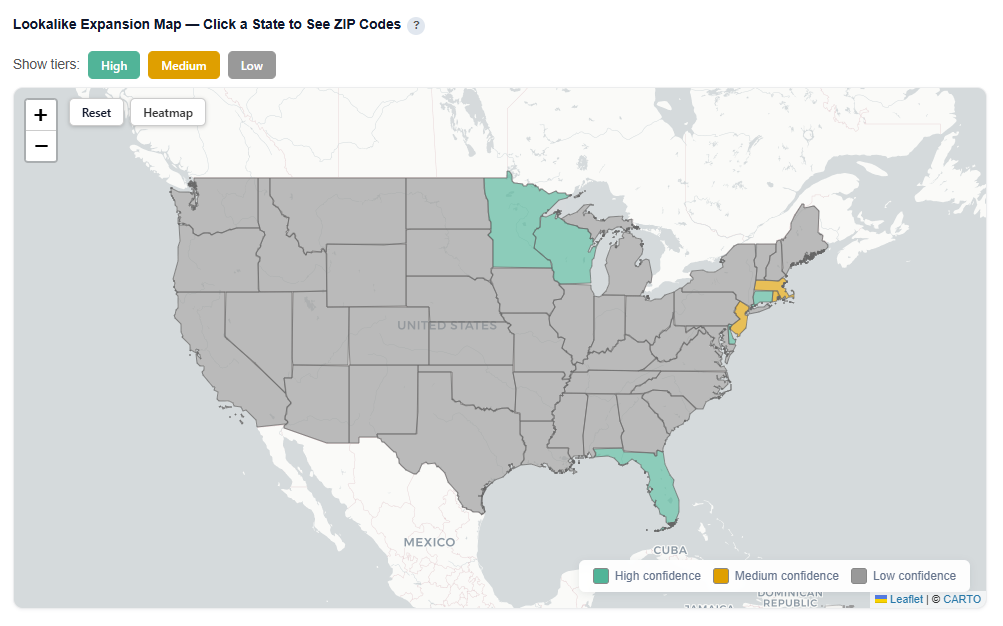
- Boundaries: Clearly outlines ZIP/state regions
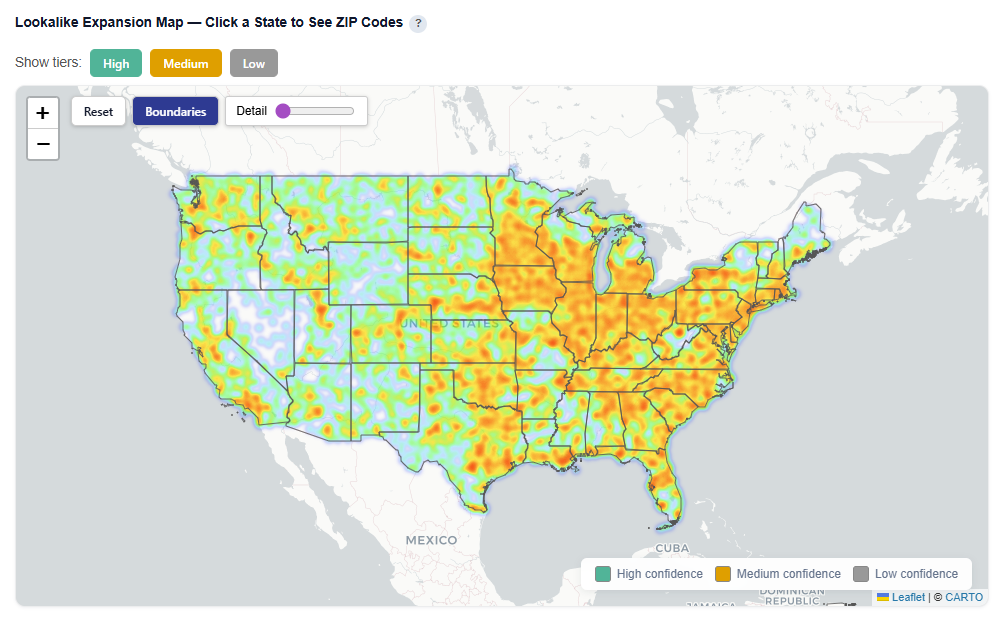
- Heatmap: Highlights density and intensity of lookalike opportunities
Boundaries View
Heatmap View
Zip Code View
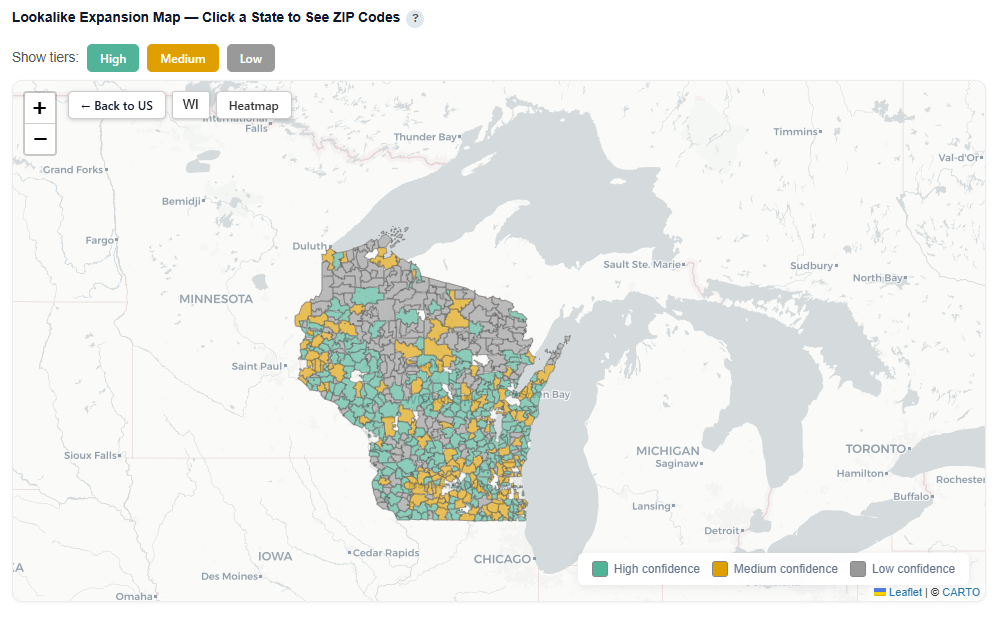
For each state, click onto it so see how the ZIP codes within that specific state map to the confidence tiers.
Lookalike ZIP Details
Full table of lookalike ZIPs sorted by score. Filter by confidence tier, search by city or ZIP. High confidence ZIPs are the safest expansion targets. Users can download this table as a CSV file for further analysis.
Columns:
- Geo ZIP: ZIP code being evaluated
- Predicted Rate: Model-predicted conversion rate for that ZIP
- Prediction Std: Standard deviation of predictions across decision trees
- Lower = more consistent predictions
- Higher = more uncertainty
- Confidence: Model confidence score (0–1) based on prediction stability and similarity to training data
- Score: Final model score used for ranking ZIPs
- Combines predicted performance and confidence
- Higher = better expansion opportunity
- Lift vs Avg: Predicted performance relative to campaign average
- Positive = above average
- Negative = below average
- Unique IPs: Estimated number of unique users in that ZIP (if available)
- Confidence Tier:
- High: Reliable, within training distribution
- Medium: Moderate confidence, test recommended
- Low: Out-of-distribution, not recommended
- Observed Impressions: Number of impressions seen in this ZIP (if any historical data exists)
- Needs More Data:
- TRUE: Limited data, predictions less stable
- FALSE: Sufficient data for more reliable estimates
- City: Associated city name
- State ID: State abbreviation
Interpretation:
- Prioritize:
- High confidence, high score, and positive lift are the best expansion targets
- Be cautious with:
- High score but low confidence should be tested before scaling
- Use:
- Prediction Std and Needs More Data to gauge reliability
- Lift vs Avg to benchmark against current campaign performance
Personas
The Personas section groups your audience into distinct segments using K-means clustering based on shared demographics. It highlights how each cluster performs, what defines it, and where it is concentrated, helping identify the personas that drive the most value.
Persona Sections:
- Tile Metrics
- Persona Performance — Top 10% vs Next 30% vs Bottom 60%
- Audience Clusters — PCA Projection
- Geographic Distribution — Click a State to See ZIP Codes
- Most Important Characteristics Across Personas
- What Differentiates Each Audience — Category Importance
- Persona Comparison (Dynamic Top 4 Features)
- Shows the most important differentiating features across personas based on your audience’s personas
- Per-Audience Deep Dive
Tile Metrics
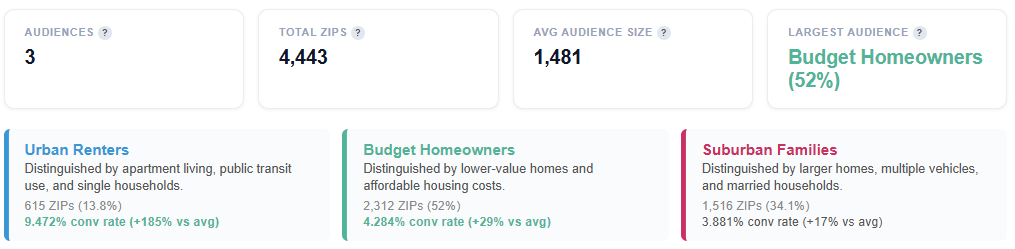
- Audiences: Number of distinct audience personas identified by K-means clustering. Each persona represents a group of ZIP codes with similar demographic profiles.
- Total ZIPs: Total number of converting ZIP codes that were clustered into audience personas.
- Avg. Audience Size: Average number of ZIPs per audience persona.
- Large variance may indicate a mix of broad (dominant) and niche (specialized) personas
- Largest Audience: Identifies the largest persona segment and its share of total clustered ZIPs.
- Includes the top defining trait for that persona
- Helps quickly understand the most dominant audience type in your campaign
- Persona Tiles: Each tile represents an audience segment with:
- A descriptive name
- A short explanation of its key distinguishing features
- ZIP count and percent of total ZIPs to indicate size
- Conversion rate and relative lift vs. average to indicate performance
Persona Performance — Top 10% vs Next 30% vs Bottom 60%
This section shows how performance is distributed within each persona by ranking ZIP codes based on conversion rate, conversion volume, or unique users, and splitting them into three tiers.
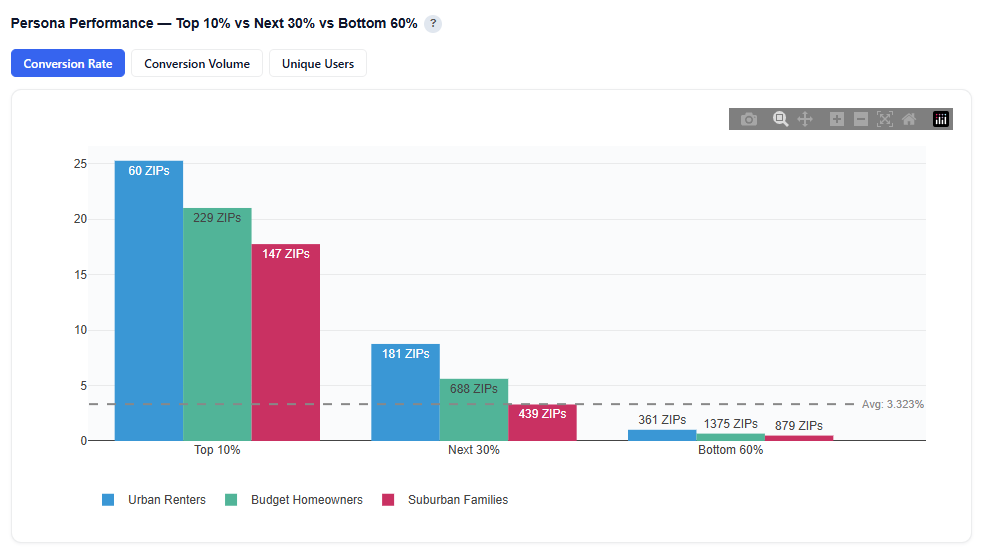
What It Shows:
- Each persona’s ZIPs are ranked based on the selected metric:
- Conversion Rate: Efficiency of each tier
- Conversion Volume: Total conversions generated per tier
- Unique Users: Audience size within each tier
- ZIPs are split into three tiers:
- Top 10%
- Next 30%
- Bottom 60%
- Bar charts display performance for each persona across these tiers
- The gray horizontal dotted line indicates the average conversion rate
Interpretation:
- A tall Top 10% bar indicates that a small portion of ZIPs drives a large share of performance
- A more even distribution across tiers suggests consistent performance across the persona
- The Bottom 60% highlights lower-performing areas or opportunities for optimization
- Identifies whether performance is concentrated or evenly distributed within a persona
- Helps determine if a persona should be:
- Scaled selectively (focus on top-tier ZIPs)
- Scaled broadly (consistent performance across tiers)
- Enables ZIP-level optimization within each persona
Audience Clusters — PCA Projection
Each dot represents one ZIP code projected into 2D space using Principal Component Analysis (PCA). PCA compresses the 130 demographic features into two dimensions that capture the most variance in the data.
- PCA 1 (x-axis) is the single direction that best separates the data. It typically captures the strongest demographic contrast (e.g., urban vs. suburban).
- PCA 2 (y-axis) captures the next most important contrast, orthogonal to PCA 1.
Colors represent audience persona assignments. Well-separated groups indicate distinct personas, while overlapping areas suggest shared demographic characteristics.
Chart View
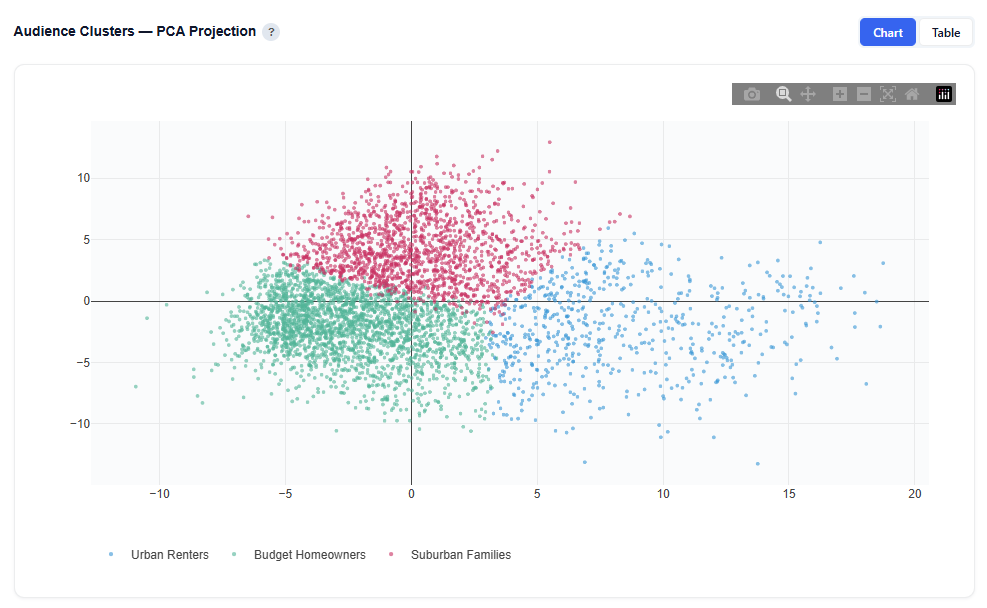
- Each point represents a ZIP code
- Position reflects similarity in demographic composition
- Color indicates persona cluster assignment
- Clusters show how clearly personas are differentiated:
- Tightly grouped clusters are more consistent personas
- Overlapping clusters have more shared characteristics across audiences
Table View
Provides the underlying data for each plotted ZIP code. Users can download this table as a CSV file for further analysis.
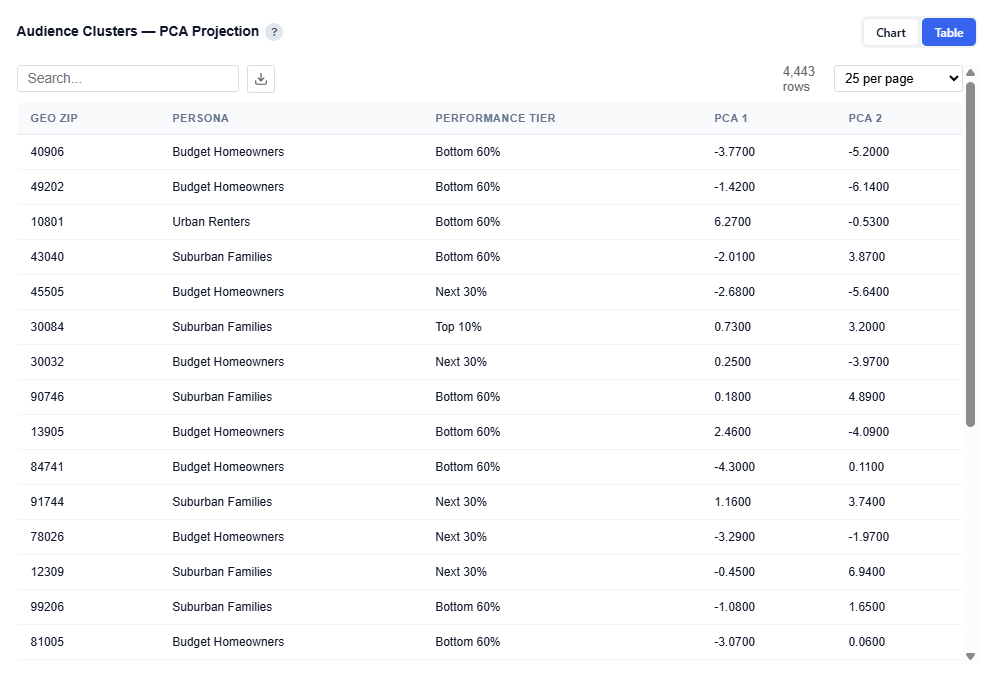
Columns:
- Geo ZIP: ZIP Code
- Persona: Assigned audience persona name
- Performance Tier: Top 10%, Next 30%, or Bottom 60%
- PCA 1: X-axis coordinate from PCA projection
- PCA 2: Y-axis coordinate from PCA projection
Tip: Download the CSV to easily create ZIP code lists by persona and performance tier, enabling direct activation for targeting, exclusions, or testing strategies.
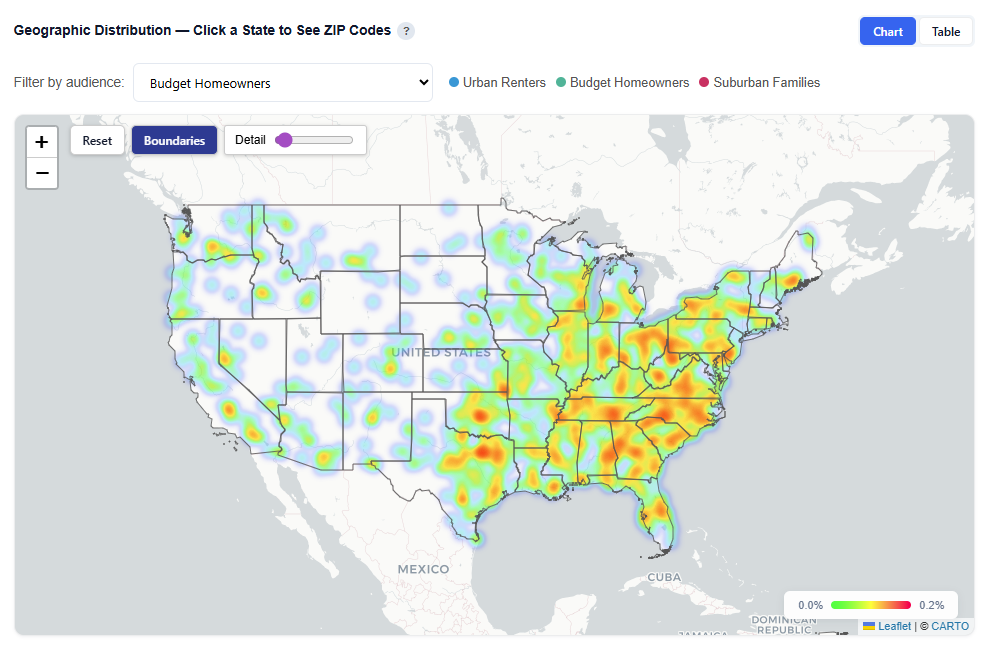
Geographic Distribution — Click a State to See ZIP Codes
This section provides an interactive map showing where each audience persona’s users are located, helping you understand geographic concentration and regional patterns.
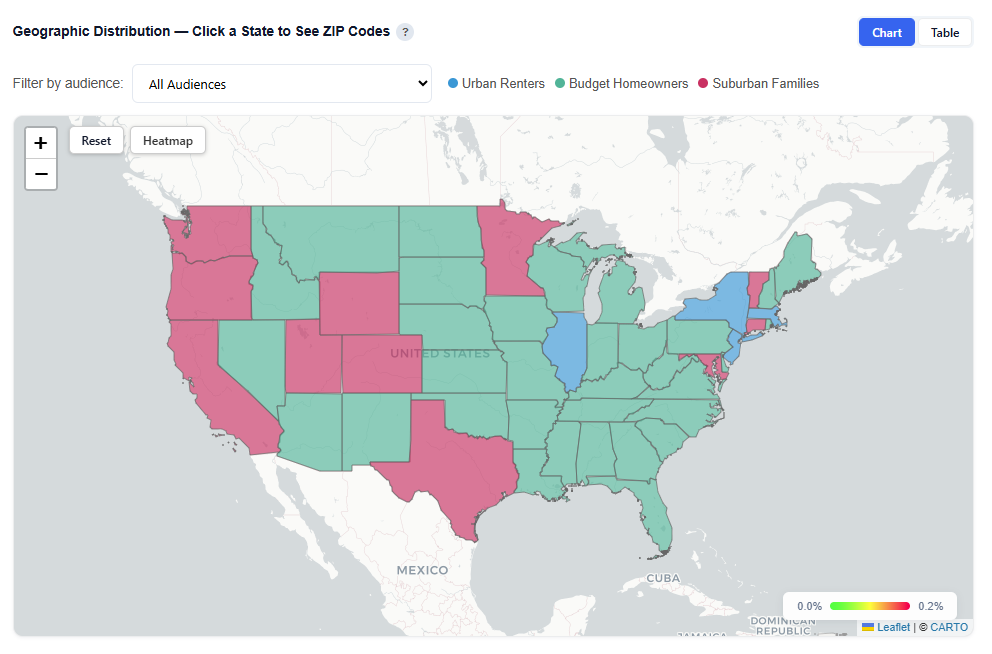
What It Shows:
- Geographic distribution of users across all combined audience personas and each persona individually
- Visual representation of where each persona is most concentrated
- Ability to compare geographic footprints across personas
Interactions:
- Filter by Audience:
- View All Audiences or isolate a specific persona
- Toggle Views:
- Boundaries: Clearly outlines geographic regions
- Heatmap: Highlights user density and concentration
- Hover to view ZIP-level details
- Conversion Rate
- Impressions
- Attributed Impressions
- Unique Conversions
- Unique Users
- Click a state to drill down into ZIP-level data
Toggle by Audience
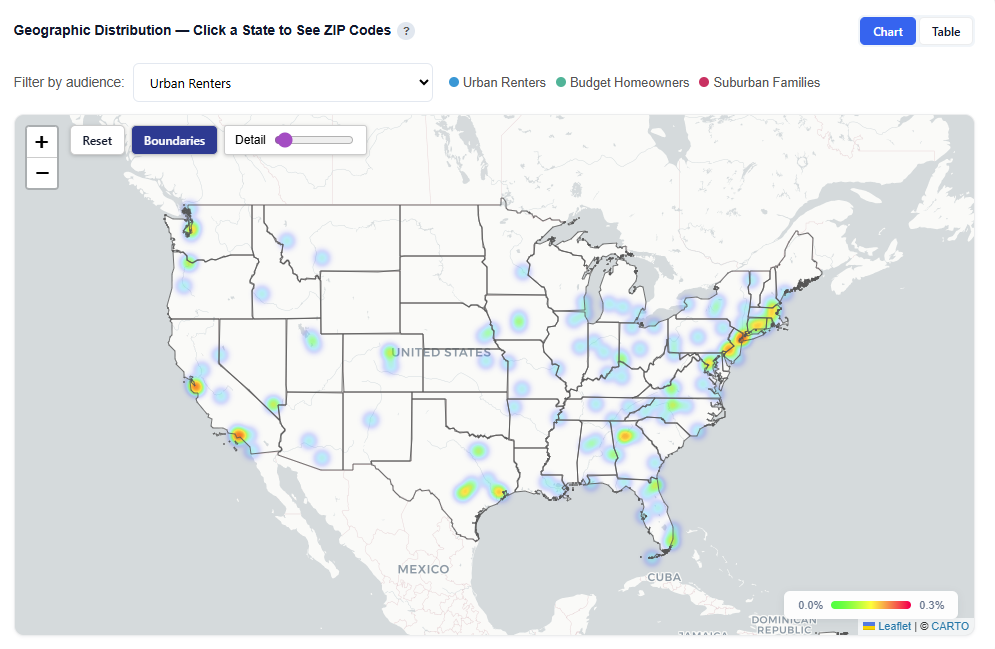
View All Audiences or isolate a specific persona.
Boundaries View
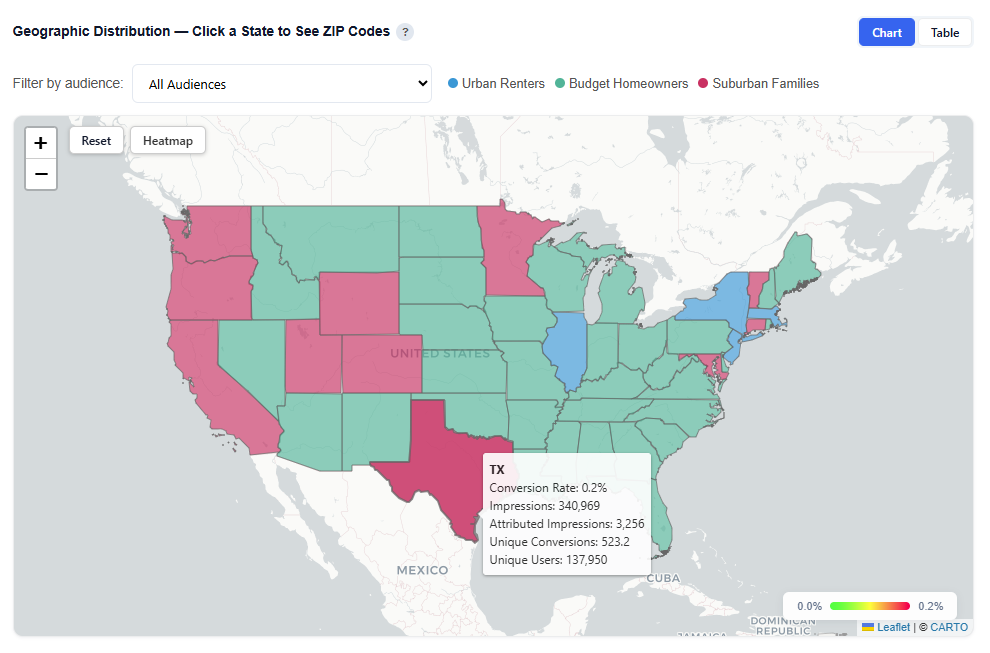
Heatmap View
Zip Code View
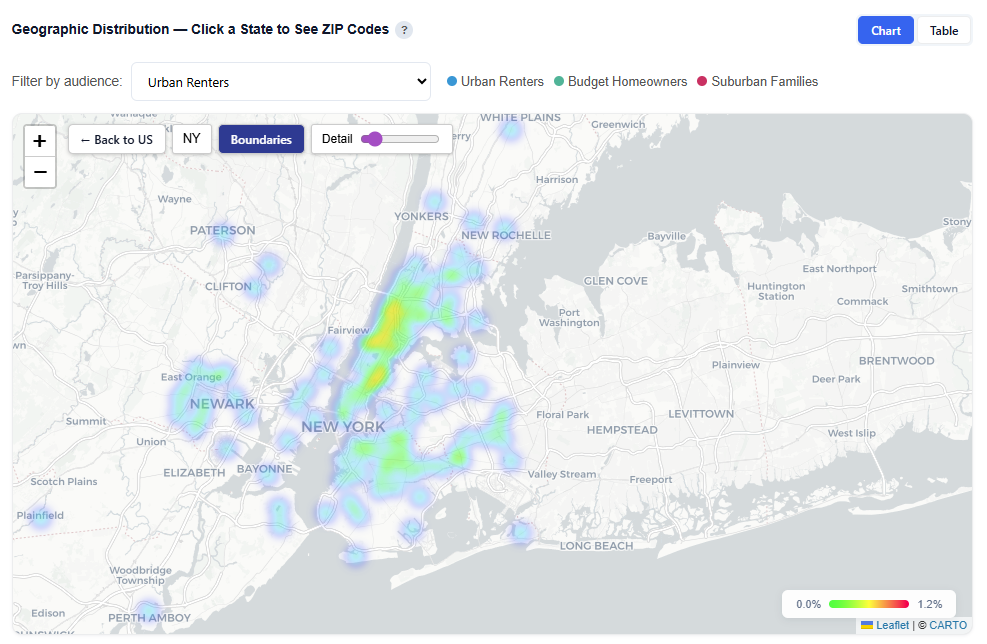
Table View
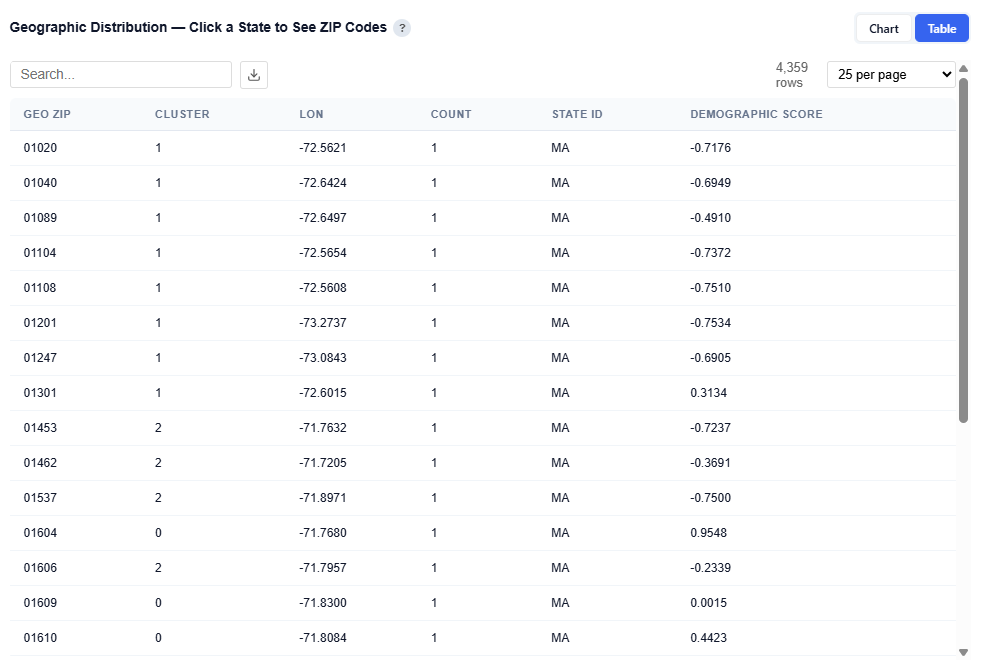
Provides detailed data for each ZIP code. Users can download this table as a CSV file for further analysis.
Columns:
- Geo ZIP: ZIP code
- Cluster: Numeric assigned audience persona
- Lon: Longitude (geographic coordinate)
- State ID: State abbreviation
- Demographic Score: Relative strength of demographic alignment for that persona
Most Important Characteristics Across Personas
This section compares the top demographic categories across all personas, showing which features are most important in defining each audience segment.
Chart View
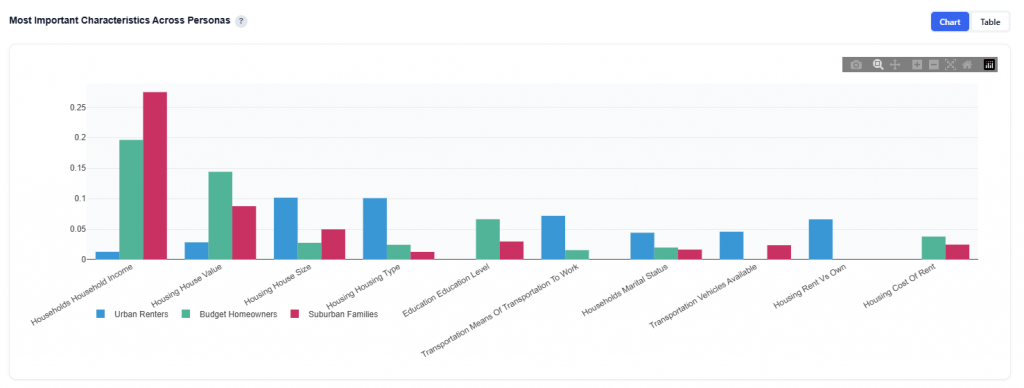
What It Shows:
- Top demographic categories ranked by overall importance
- Each category is displayed with one bar per persona
- Bar height represents the importance of that category for that specific persona
Interpretation:
- Taller bars indicate that a category is more important in defining that persona
- Compare across personas to see which demographics:
- Are shared across multiple personas
- Are unique drivers for specific audiences
- Categories with consistently high bars across personas represent broad drivers, while variation highlights key differences between segments
Table View
Provides the underlying data for each persona and its most important demographic categories. Users can download this table as a CSV file for further analysis.
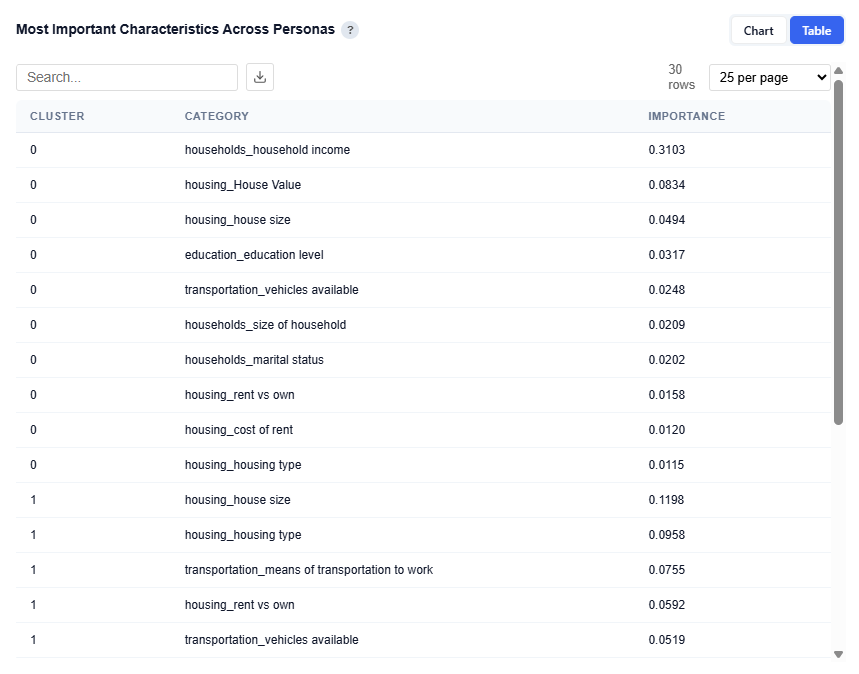
Columns:
- Cluster: Persona ID (corresponds to each audience segment)
- Category: Demographic category (e.g., Household Income, Housing Type, Education Level)
- Importance: Relative importance score of that category for the persona
- Higher values indicate stronger influence in defining that persona
- Values are comparable within and across personas
This provides a clear view of what drives each persona at a category level, supporting persona naming, messaging, and targeting strategies while validating insights from the chart with precise importance values.
What Differentiates Each Audience — Category Importance
This section highlights which demographic categories (e.g., income, education, age, housing) are most important for distinguishing each audience persona and how their importance differs across personas.
The analysis is based on SHAP values from per-audience Random Forest models, showing which features most strongly define membership in each persona. This presents the same underlying data as the category importance views, but in a heatmap-style, comparative format designed to emphasize how personas differ from one another.
Chart View
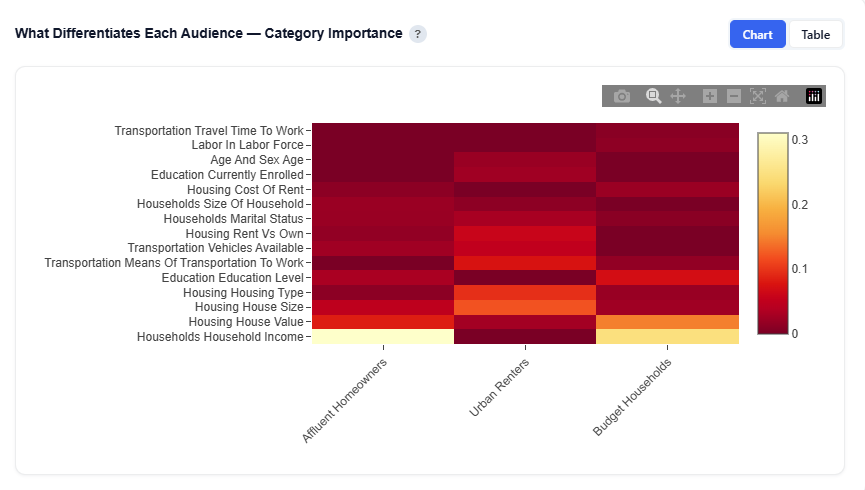
Table View
Provides the underlying data behind the heatmap, showing the importance of each demographic category for each audience persona.
Persona Comparison
This section compares all audience personas across the top 4 most differentiating features, helping highlight how each audience over- or under-indexes relative to the national average.
Household Income Example
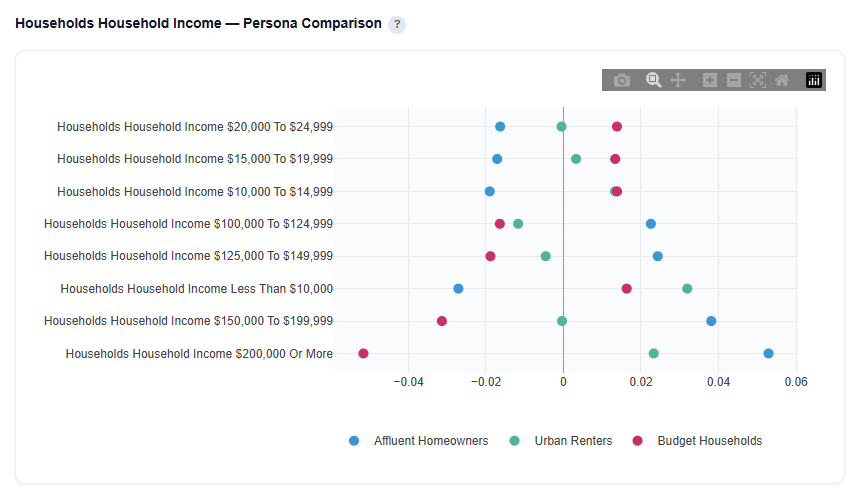
Example Interpretation: Household Income
- Affluent Homeowners: Strongly over-indexes in higher income brackets.
- Positive values for $150K+ and $200K+ indicate this audience skews toward high-income households
- Under-indexes in lower income ranges, reinforcing the affluent profile
- Urban Renters: Shows a polarized income profile typical of urban markets.
- Over-indexes in both $200K+ and less than $10K brackets
- Under-indexes across many middle income ranges
- Reflects a mix of high-income urban professionals and lower-income renter populations, a common pattern in dense urban areas
- Additionally, housing type and house size are more influential for this persona, aligning with an urban renter profile where living structure plays a key role
- Budget Households: Skews toward mid-to-lower income ranges.
- Positive values for sub-$50K ranges indicate strong presence in lower-income households
- Negative values for higher income brackets highlight clear differentiation from affluent audiences
Per-Audience Deep Dive
This section allows you to explore each persona individually, showing what defines the audience and where it is located.
Select a persona to view its feature importance, category-level drivers, SHAP impact, and geographic footprint. Toggle between personas to dynamically update all charts and tables, enabling you to analyze each audience independently and understand its key traits and distribution.
Feature Importance
This subsection shows the top demographic features that distinguish the selected persona from all other audiences. Higher importance means the feature is more useful for identifying members of this persona.
Chart View
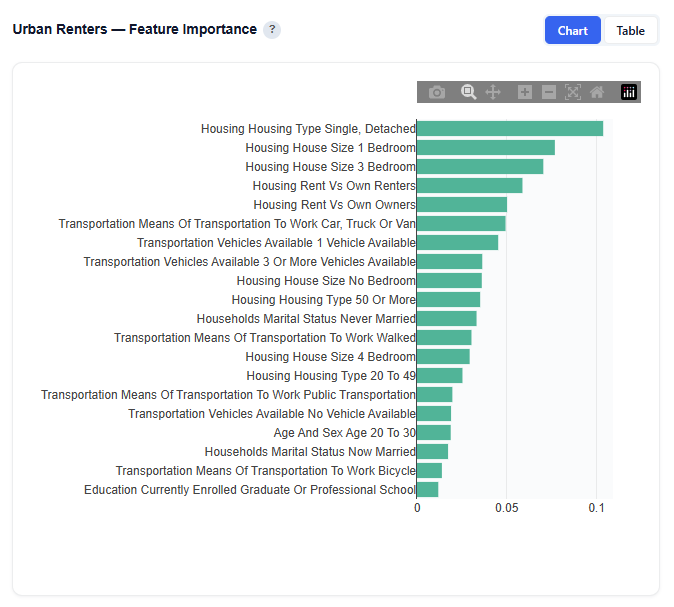
Interpretation:
For this persona, housing-related features are the most important drivers, including:
- Single, Detached
- 1 Bedroom
- 3 Bedrooms
Important Note: These features are the most useful for identifying members of this audience relative to others. Feature importance reflects how useful a feature is for distinguishing the persona, not whether it increases or decreases likelihood of membership. Directional impact (positive vs. negative influence) is shown in the SHAP Impact section.
Table View
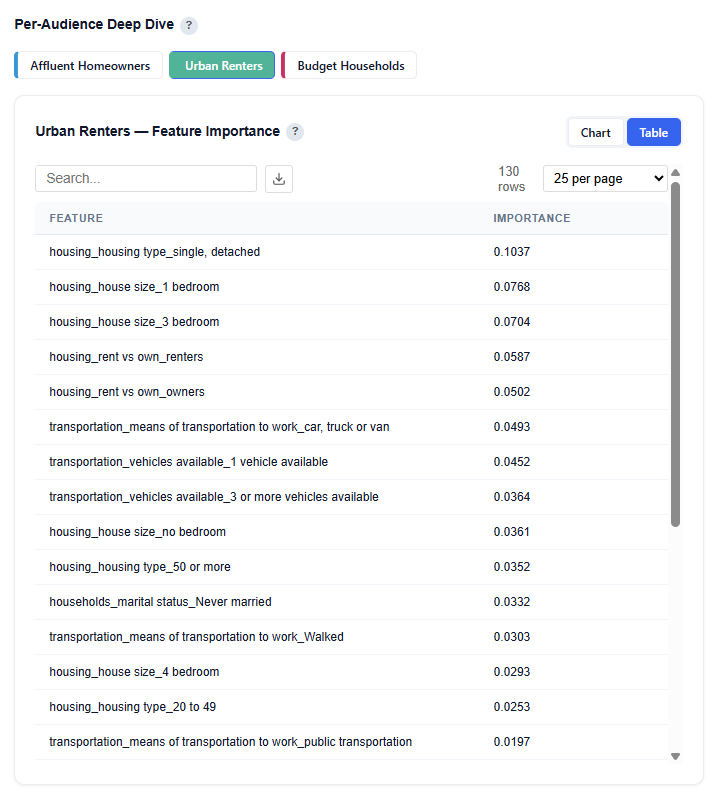
Category Importance
This section aggregates feature importance at the demographic category level for the selected persona, showing which broad dimensions are most defining.
Chart View
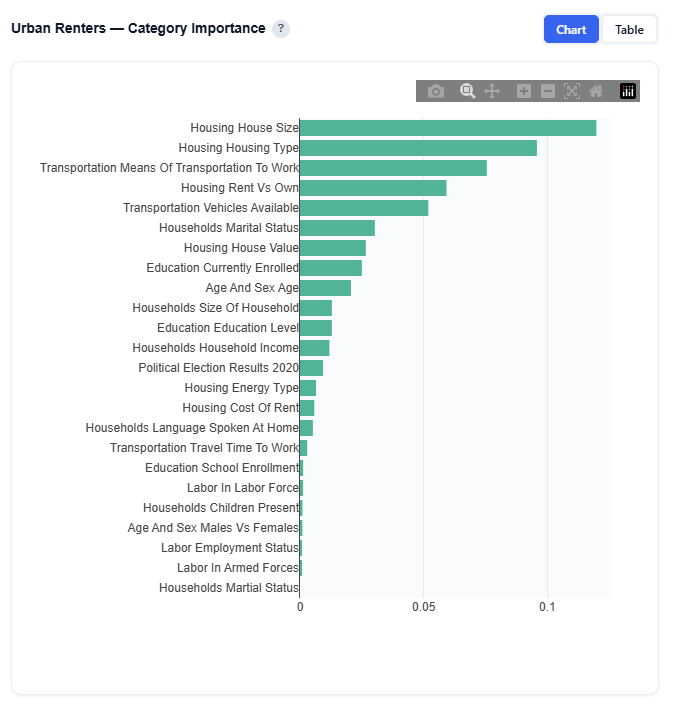
What It Shows:
- Feature importance grouped into categories such as:
- Income
- Education
- Age
- Housing
- Transportation, etc.
- Each category reflects the combined importance of its underlying features
- Available in both chart and table views
Interpretation:
- Higher values indicate that a category plays a larger role in defining the persona
- Compare categories to understand which broad demographic dimensions matter most Helps simplify detailed feature-level insights into high-level driversImportant
Important Note: Category importance reflects how useful a category is for identifying the persona, not whether it increases or decreases likelihood of membership. Directional impact is shown in the SHAP Impact section.
SHAP Impact
Displays the top 3 most impactful features using SHAP Beeswarm charts.
- Each dot represents one observation
- Color:
- Red = high feature value
- Blue = low feature value
- Position (x-axis):
- Right = pushes toward this persona
- Left = pushes away
Helps explain how specific features drive membership into the persona.
House Size Example
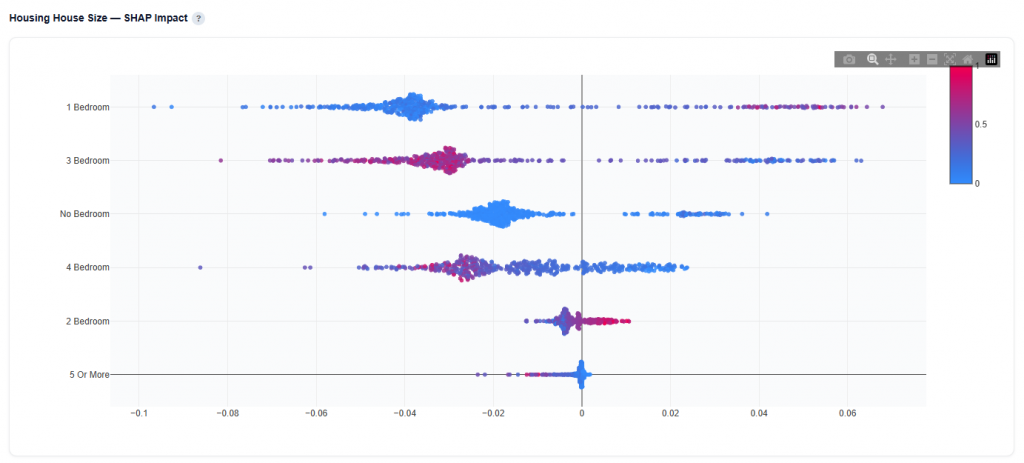
Example Interpretation: House Size
From the Feature Importance chart, 3-bedroom homes appear as one of the top features defining this persona. However, SHAP analysis reveals a more nuanced story.
- 1 Bedroom: Higher concentrations increase likelihood of belonging to this persona.
- Red points extend to the right, showing positive impact on membership
- Blue points cluster more to the left, indicating lower values are less aligned
- 3 Bedrooms: While this feature is important, higher values actually decrease likelihood of belonging to this persona.
- Red points (higher values) are concentrated on the left, indicating they push away from this persona
- Blue points (lower values) are more centered or slightly right, suggesting lower presence is more aligned with the audience
Feature importance tells you what matters, while SHAP shows how it matters. In this case, although 3-bedroom homes are an important differentiator for Urban Renters, higher concentrations actually reduce the likelihood of belonging to this persona, reinforcing a profile centered around smaller, renter-aligned housing such as apartments and studios.
Geographic Footprint
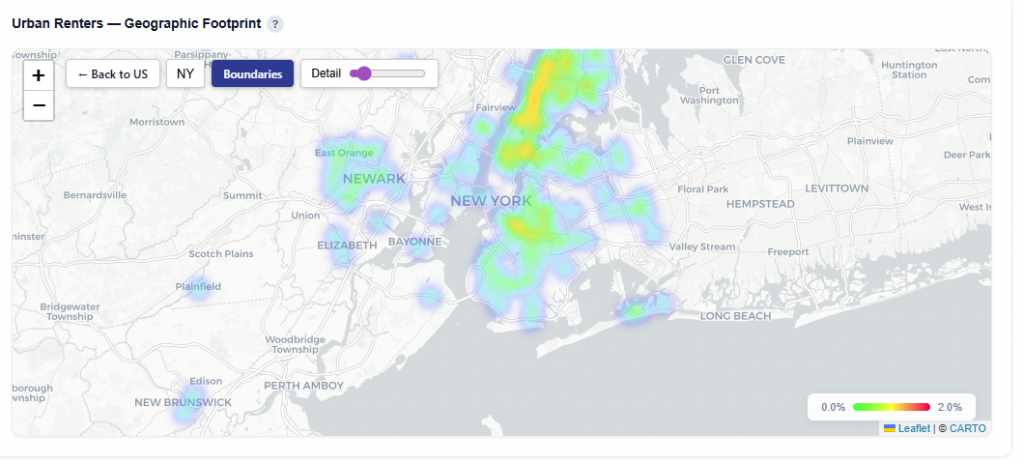
This section shows where the selected persona is geographically concentrated, helping connect demographic insights to real-world locations. Hover over states to see the Conversion Rate, Impressions, and Unique Conversions. Click into each state to drill down.
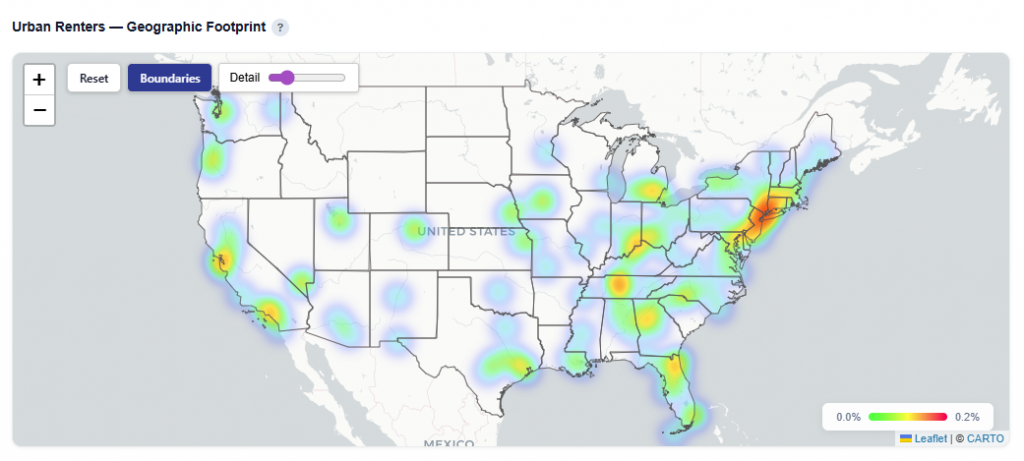
What It Shows:
- States where the persona is present
- User density by location, indicating where the audience is most concentrated
- Visual distribution of the persona across states and regions
Interactions:
- Toggle Views:
- Boundaries: Clearly outlines ZIP and state regions
- Heatmap: Highlights density and concentration of users
- Click a state to drill down into ZIP-level details
- ZIP Code and Name
- Conversion Rate
- Impressions
- Attributed Impressions: Impressions that led to a conversion
- Unique Conversions
- Unique Users
Zip Code View
Explorer
The Explorer tab allows you to browse and interact with all available datasets used in the model. Select a dataset to view its chart and table. Use the metric buttons above charts to switch between available metrics.
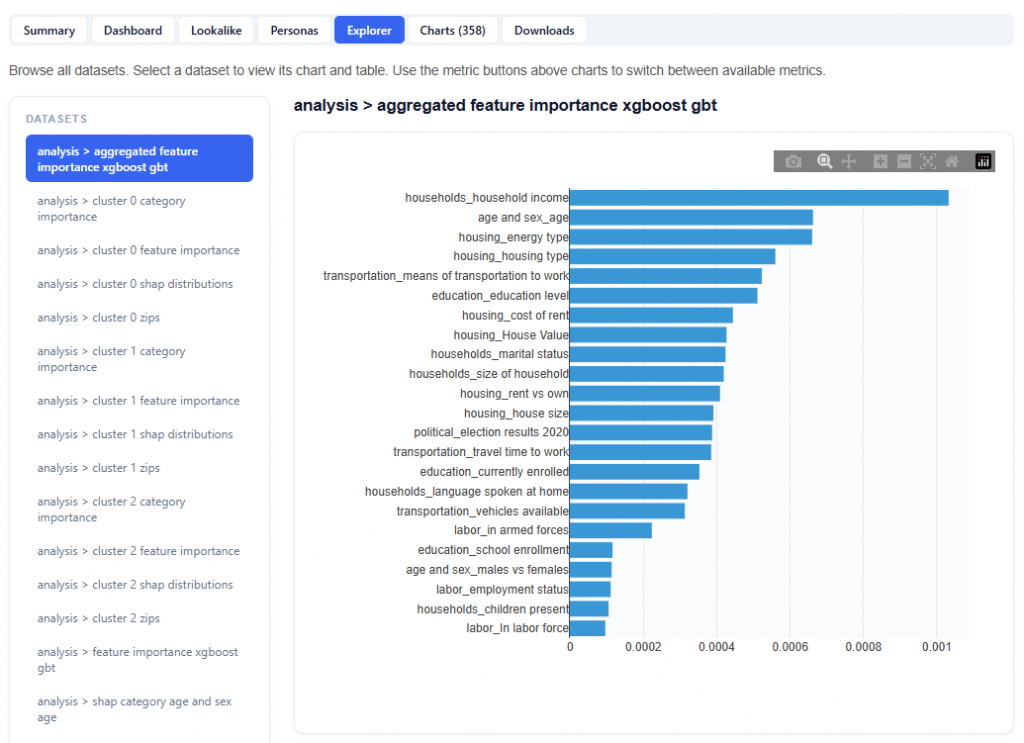
What It Does:
- Lists all datasets in the left-hand panel
- Displays each selection as a chart and table
This section is intentionally extensive and exploratory. Users are encouraged to navigate different datasets and metrics to uncover additional insights.
Charts
The Charts tab provides access to all visualizations generated by the model, organized into categories for easier navigation and analysis.
This section is intentionally extensive and exploratory. Users are encouraged to explore different chart visualizations to uncover additional insights and include in presentations.
Downloads
The Downloads section provides full access to all model outputs, enabling deeper analysis, reporting, and sharing across teams. These outputs can be used for investigation and validation, but more importantly, the model can be applied directly to campaigns or line items, allowing insights to seamlessly translate into real-time bidding and optimization.
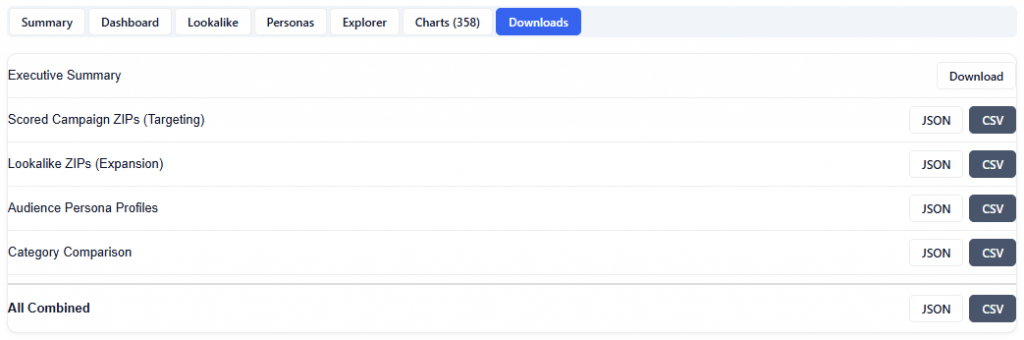
Available Downloads (JSON & CSV):
- Executive Summary: High-level narrative of key findings and recommendations
- Scored Campaign ZIPs (Targeting): ZIP-level performance and model scores for areas included in the campaign
- Lookalike ZIPs (Expansion): Scored ZIPs outside the campaign identified as expansion opportunities
- Audience Persona Profiles: Clustered audience segments with demographic and geographic characteristics
- Category Comparison: Performance comparison across key demographic categories
- All Combined: Full dataset including all outputs for comprehensive analysis