Analytics Model Association
Insights are only as powerful as your ability to act on them. With our Analytics Suite capabilities, you can apply Analytics-generated optimization models or your own User Defined Models (UDMs) directly to your campaigns.
No manual translation. No workflow gaps. Just seamless activation.
The Custom Model tab, available at both the Campaign and Line levels, brings your models directly into the Targeting workflow, giving you greater control over how and where your models are applied to your campaigns.
To learn more about the analytics models and for instructions on how to generate a report/model, see here: Analytics Documentation
From Analysis to Activation:
- Generate a Targeting, Audience, or Incrementality model through Pontiac Analytics, or upload a User Defined Model
- Navigate to the Targeting section at the Campaign or Line level
- Select the Custom Model tab
- Enable the Use Custom Models feature
- Choose a model from the available list
Once enabled, a table will display all available models associated with the advertiser. Each model includes the following information to help guide selection:
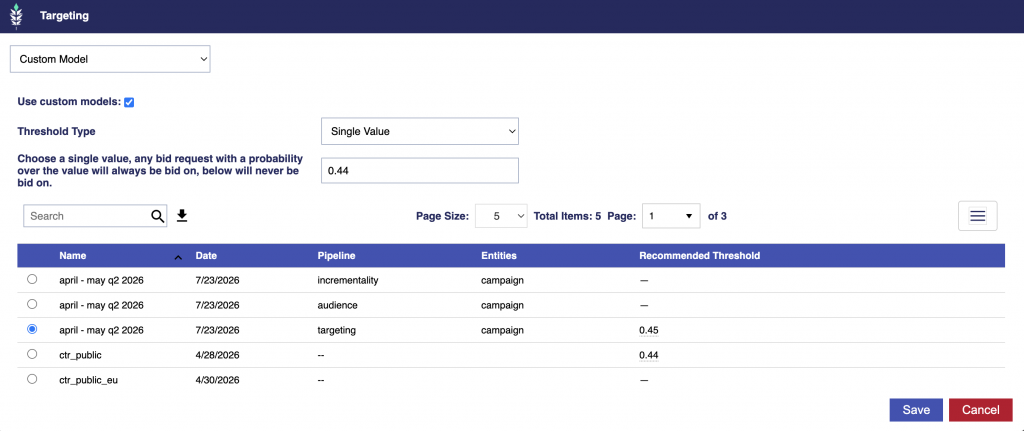
- Name: The name of the report/model
- Date: When the Analytics model was generated or the User Defined Model was uploaded/updated. Analytics models automatically update when the source report is saved and rerun
- Pipeline: The Analytics pipeline used to generate the model, or identifies the model as User Defined.
- Entities: Indicates whether the model was built at the Advertiser, Campaign, or Line level
- Recommended Threshold: The model’s available recommended threshold options, when available, and the estimated percentage of observed bid opportunities associated with each setting.
Model Weights
Field weights, when present, are part of the model itself and are not configured when the model is associated with a Campaign or Line.
- Pontiac Analytics models may include field weights measured automatically from the model’s training data.
- User Defined Models use equal weighting by default but may include custom field weights supplied in the uploaded model file.
These weights affect how multiple matching model entries are combined into the request-level bidder score. The Threshold Type and threshold values configured below determine how that resulting bidder score affects bidding.
Resources:
- For details about how field weights affect scoring, see Model Scoring Overview.
- For instructions on adding custom field weights to a User Defined Model, see User Defined Models.
- Set the Threshold Type and threshold value(s).
- Threshold settings control how the bidder uses the model’s request-level bidder scores.
- Single Value applies one hard cutoff and is selected as the default Threshold Type.
- Spread uses separate minimum and maximum thresholds to create a probabilistic bidding band.
- See the Recommended Threshold section below for available values.
- Click Save button.
- Save the entire Campaign or Line.
Single Value: Sets the minimum and maximum thresholds to the same value, creating a hard cutoff. Bid requests with a bidder score at or below the selected value do not bid, while requests above it always bid.
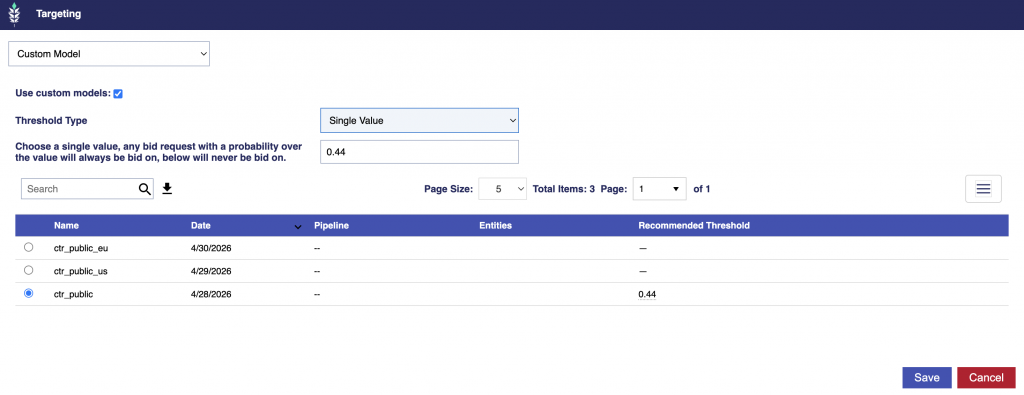
For example, if the selected threshold is 0.44:
- A request with a bidder score of
0.38will not bid. - A request with a bidder score of
0.65will bid.
Spread: Sets a lower minimum threshold and an upper maximum threshold.
- Requests at or below the minimum never bid
- Requests at or above the maximum always bid
- Requests between the two bid with probability equal to their bidder score.
The bidder score is used directly as the probability within the band. It is not rescaled based on the minimum and maximum thresholds.
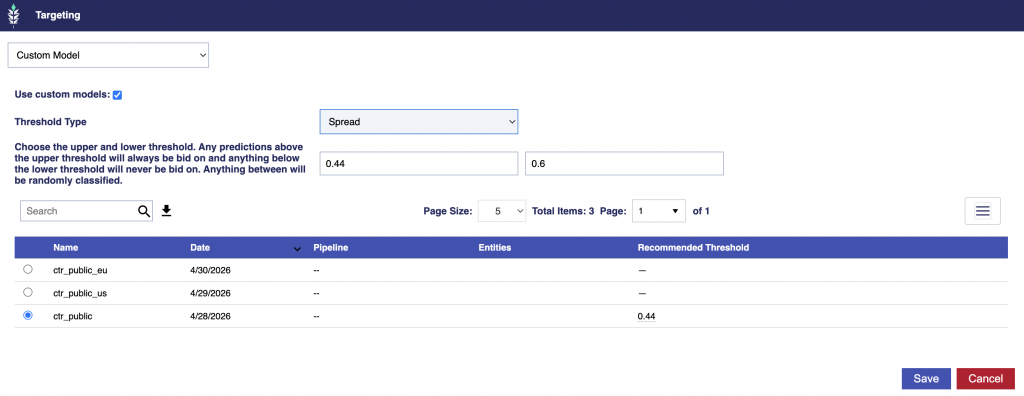
For example, with a lower threshold of 0.44 and an upper threshold of 0.60:
- A bidder score of
0.65always bids. - A bidder score of
0.38never bids. - A bidder score of
0.52bids approximately 52% of the time.
For additional details about how bidder scores and threshold settings affect bidding, see Model Scoring Overview.
Recommended Threshold
Hover over the Recommended Threshold value to view the model’s available threshold options and the estimated percentage of bid opportunities associated with each setting.
Recommended Threshold values are generated from the bidder-score distribution observed when the model was created and can be used when configuring either Single Value or Spread thresholds.

Each row shows:
- Trim %: The approximate percentage of observed bid opportunities with bidder scores at or below the recommended threshold.
- Threshold: A recommended bidder-score value that can be applied to the selected Threshold Type.
- Bids on %: The approximate percentage of observed bid opportunities with bidder scores above the recommended threshold.
For Spread, the Trim % and Bids on % shown for each recommended value describe the observed bidder-score distribution relative to that individual value. The actual bidding behavior of the Spread configuration depends on both the selected minimum and maximum thresholds.
For example:
- Bid on ~everything (floor) → threshold 0.30 (bids on ~100%)
- This is the least restrictive recommended threshold shown. Based on the model’s sampled bidder-score distribution, nearly all observed bid opportunities score above this value.
- Trim ~9% → threshold 0.44 (bids on 91%)
- Approximately 9% of observed opportunities score at or below
0.44, while approximately 91% score above it.
- Approximately 9% of observed opportunities score at or below
- Trim ~20% → threshold 0.45 (bids on 79.6%)
- Approximately 20% of observed opportunities score at or below
0.45, while approximately 79.6% score above it.
- Approximately 20% of observed opportunities score at or below
- Trim ~38% → threshold 0.46 (bids on 62.3%)
- Trim ~52% → threshold 0.47 (bids on 47.7%)
- Trim ~80% → threshold 0.49 (bids on 20.1%)
- This is the highest recommended threshold shown, with only the highest-scoring portion of observed opportunities above the value.
How the recommended values affect bidding depends on the selected Threshold Type:
- With Single Value, the selected threshold is used as both the minimum and maximum, creating a hard cutoff. Requests at or below the threshold do not bid, while requests above it always bid.
- With Spread, recommended values can be used to set separate minimum and maximum thresholds. Requests at or below the minimum never bid, requests at or above the maximum always bid, and requests between the two bid probabilistically according to their bidder score.
For Single Value, higher thresholds are more selective and generally reduce available scale, while lower thresholds allow a broader range of bidder scores to qualify.
For Spread, the overall bidding behavior depends on both values: the minimum determines which lower-scoring requests never bid, while the maximum determines which higher-scoring requests always bid. Requests between them continue to bid probabilistically according to their bidder score.
This streamlined workflow makes it easy to select the most relevant model and move from insight to action.