Pontiac Wiki Pontiac Wiki

Clone Campaign – Display All Lines by Default

September 2026

  • Advertiser Campaign Setup Download Update
  • Banner Creative Trackers UI Update
  • Clone Campaign – Display All Lines by Default
  • Creatives Table Flights Column Tooltip
  • Default Creative Type for New Creative Uploads
  • Share Master Seat Site, App, and Deal Lists with Sub Seats
  • Standard Reporting Geo Map Views
  • App Name Targeting
  • Audience Groups
  • Completion Events Chart Renamed
  • Scheduled Reporting Time Zone Reporting Window Update
  • Frequency Cap Alignment Troubleshoot Check
  1. Home
  2. Platform Updates
  3. New Features
  4. September 2026
  5. Clone Campaign – Display All Lines by Default

Clone Campaign – Display All Lines by Default

Release Date: September 9th, 2026

When cloning a campaign, the Lines section now defaults to Filter Status: All instead of Active.
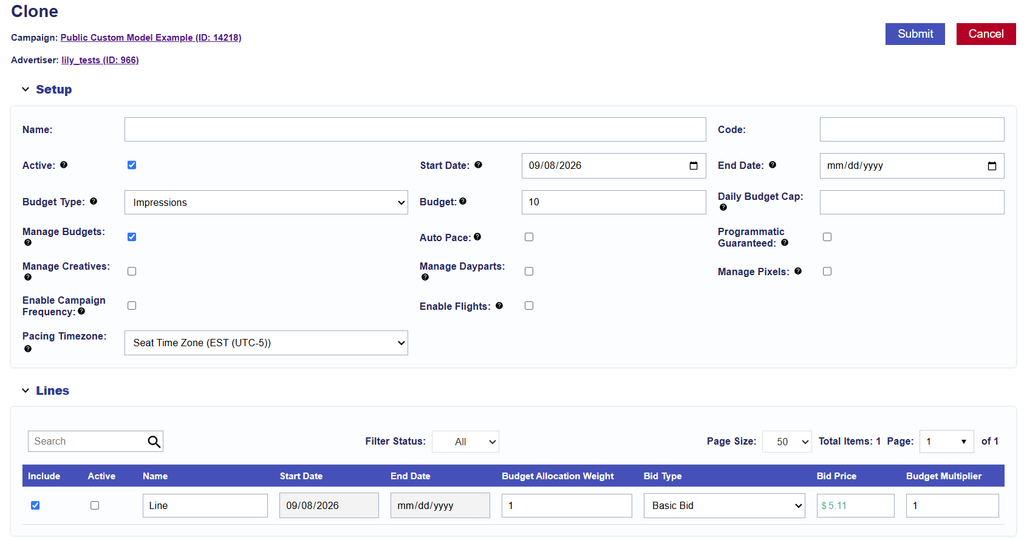
This ensures that all lines being carried over from the original campaign are visible during the cloning process, including inactive lines from campaigns that have already ended.

Users can review the included lines and update their status to Active while cloning, if needed. All other campaign cloning behavior remains unchanged.

© 2026 Pontiac Wiki Sec · All Rights Reserved · Developed by RDK

  • Contact Us
  • Privacy Policy
  • Terms & Conditions
  • Pontiac.media