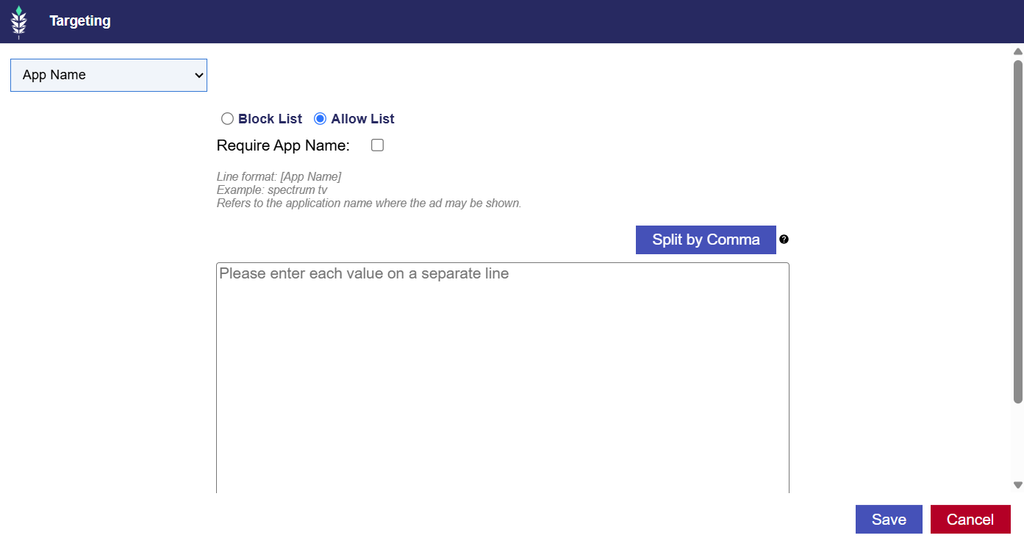
App Name Targeting
Release Date: September 23rd, 2026
App Name Targeting has been added as a separate targeting option, allowing users to target inventory based on the name of the application where an ad may be shown.
App Name Targeting supports the same functionality as App Bundle Targeting, including:
- Allow List: Target specific application names.
- Block List: Exclude specific application names.
- Require: Only impressions where the App Name field is present are eligible.
- Split by Commas: Enter multiple application names separated by commas.
The existing validation and save functionality also applies to App Name Targeting.
Configuring App Name Targeting
- Navigate to the Targeting section of the applicable Campaign or Line and select Edit Targeting.
- Select App Name from the Targeting dropdown menu.
- Enter the application names you want to allow or block.
- Configure Require and Split by Commas, if applicable.
- Select Save to apply the targeting configuration.
Input Format:
- Line format:
[App Name] - Example:
spectrum tv
App Name refers to the name of the application where the ad may be shown. Unlike App Bundle Targeting, which uses an application’s bundle identifier, App Name Targeting allows users to target the application by name.