Pontiac Wiki Pontiac Wiki

Advertiser Campaign Setup Download Update

September 2026

  • Advertiser Campaign Setup Download Update
  • Banner Creative Trackers UI Update
  • Clone Campaign – Display All Lines by Default
  • Creatives Table Flights Column Tooltip
  • Default Creative Type for New Creative Uploads
  • Share Master Seat Site, App, and Deal Lists with Sub Seats
  • Standard Reporting Geo Map Views
  • App Name Targeting
  • Audience Groups
  • Completion Events Chart Renamed
  • Scheduled Reporting Time Zone Reporting Window Update
  • Frequency Cap Alignment Troubleshoot Check
  1. Home
  2. Platform Updates
  3. New Features
  4. September 2026
  5. Advertiser Campaign Setup Download Update

Advertiser Campaign Setup Download Update

Release Date: September 9th, 2026

The Download Campaign Setup option on the Advertiser Details page has been updated for a more streamlined layout.

The existing Download Campaign Setup button has been removed and replaced with a download icon displayed next to the Advertiser Name at the top of the page.
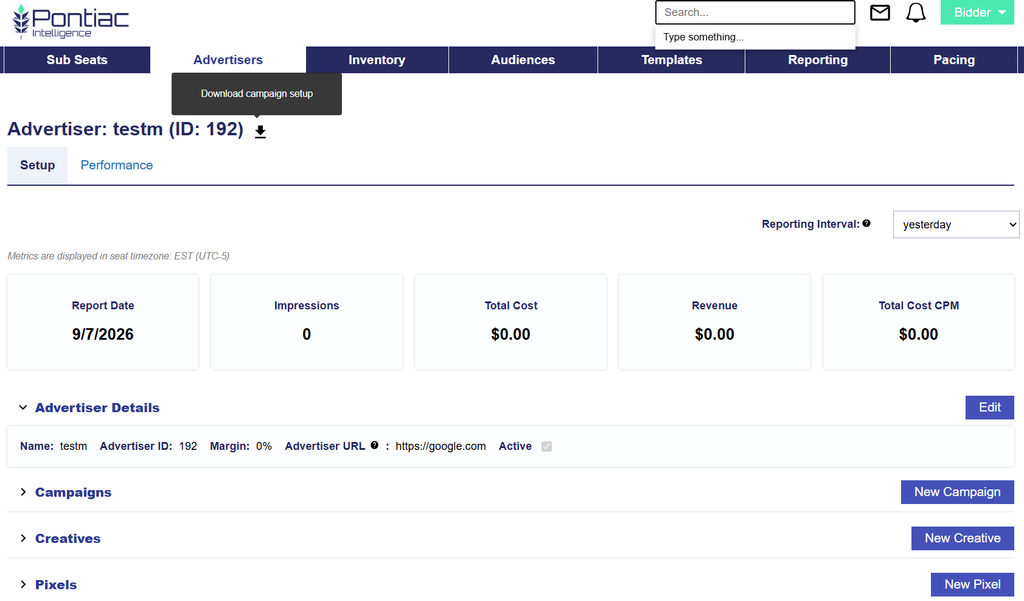
Hover over the download icon to display the tooltip “Download campaign setup.” Select the icon to download the campaign setup as usual.

This is a UI update only and does not change the existing download functionality.

© 2026 Pontiac Wiki Sec · All Rights Reserved · Developed by RDK

  • Contact Us
  • Privacy Policy
  • Terms & Conditions
  • Pontiac.media