Pontiac Wiki Pontiac Wiki

Pacing & Dayparts Weights Curve Update

October 2026

  • Active Status Troubleshoot Check Update
  • Campaign & Line Pacing Columns
  • Campaign Download Updates
  • Custom Reporting: Organized Dimensions, Metrics, and Columns
  • Native Creative Audit Status
  • Need Help?
  • Sensitive Supply Handling for Deals
  • Lat Long Custom Audiences
  • Associate Audience Pagination Updates
  • Bid at Total eCPM
  • Campaign Line Allocation Updates
  • Companion Banners for Audio Creatives
  • Deal Exchange Compatibility Check Update
  • Flight Pacing Added to Pacing Tab
  • Geo Fencing Tooltip
  • Inventory Availability Report Selectable Lookback
  • Microsoft Native Creative Audit
  • Pacing & Dayparts Weights Curve Update
  • Percent of Lat Long Defined Added to Deal Landscape
  • Wildcard Support for Site Targeting
  1. Home
  2. Platform Updates
  3. New Features
  4. October 2026
  5. Pacing & Dayparts Weights Curve Update

Pacing & Dayparts Weights Curve Update

Release Date: October 6th, 2026

The Pacing & Dayparts weights curve has been updated to make it clearer which time zone is being used for hourly pacing.

When Daily Pacing is set to Primetime or Custom, the Campaign’s selected Pacing Time Zone is now displayed beneath the hourly weights curve.

For example: Campaign Pacing Time Zone: EST (UTC-5)
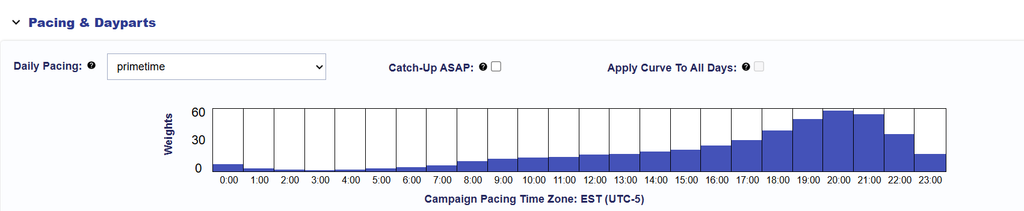
This label appears at both the Campaign and Line levels and automatically reflects the Pacing Time Zone selected in Campaign Setup.

This is a UI update only and does not change how pacing or dayparting is applied.

© 2026 Pontiac Wiki Sec · All Rights Reserved · Developed by RDK

  • Contact Us
  • Privacy Policy
  • Terms & Conditions
  • Pontiac.media