Pontiac Wiki Pontiac Wiki

CPC Metric

October 2025

  • Curation Audience
  • Downloadable Pacing Table
  • Master Seat > Sub Seats Pacing Tab
  • Advance Bid Controls – Updates
  • CPC Metric
  • Creative Dialog Error Messages – Click URL
  • Import Deal Warning Message
  • Third-Party Tag GDPR Error Message
  • Advance Bid Controls – Warning Message
  • Inventory Deal Availability
  • Line Pacing Tooltip
  • Master Seat > Sub Seat Custom Reporting
  1. Home
  2. Platform Updates
  3. New Features
  4. October 2025
  5. CPC Metric

CPC Metric

Release Date: October 13th, 2025

We had added CPC (Cost Per Click) as an optional column! CPC is calculate as: Clicks/Total Cost. Click on the hamburger menu, to the right of the desired table and select CPC to add the column.
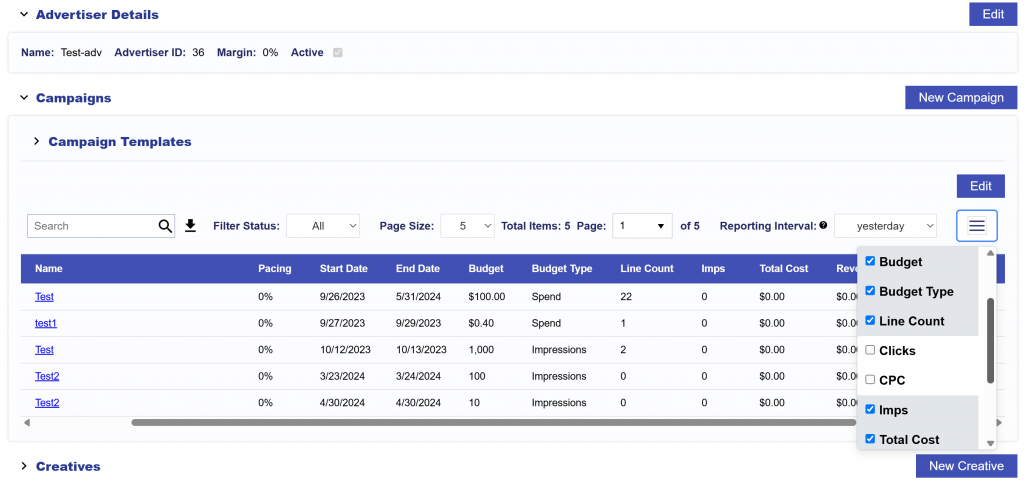
CPC, Clicks, and CTR are all selectable in the Advertiser table, Campaigns and Creatives table on the Advertiser level, Lines and Creatives table on the Campaign level, Creatives table on the Line level, as well as the Performance tab’s tables on all levels.

Note that, in Custom Reporting, when pulling a Custom Report, Clicks is a selectable report Metric. Use this to calculate CTR and CPC for your report needs.

© 2025 Pontiac Wiki Sec · All Rights Reserved · Developed by RDK

  • Contact Us
  • Privacy Policy
  • Terms & Conditions
  • Pontiac.media