Advance Bid Controls – Warning Message
Release Date: October 28th, 2025
In the Advance Bid Controls dialog box, users can configure bid settings for eligible Deals: the intersection of Deals targeted at both the Campaign and Line levels or all Deals targeted on one level.
At the top of the dialog, users can set:
- Default Bid Price – applied automatically when new eligible Deals are added.
- Max Bid Price – serves as the upper limit (cap) for all bid prices.
Below this section, the table lists all eligible Deals, where users can manually enter individual bid prices for each PMP. If a Deal’s entered Bid Price exceeds the Max Bid Price, a caution symbol appears to the right of the input box. When hovered, the following warning message is displayed:
“This bid price exceeds the max bid price. To bid on this inventory, increase the max bid price. If you want to maintain the current cap, no change is needed, but you will not bid on this inventory.”
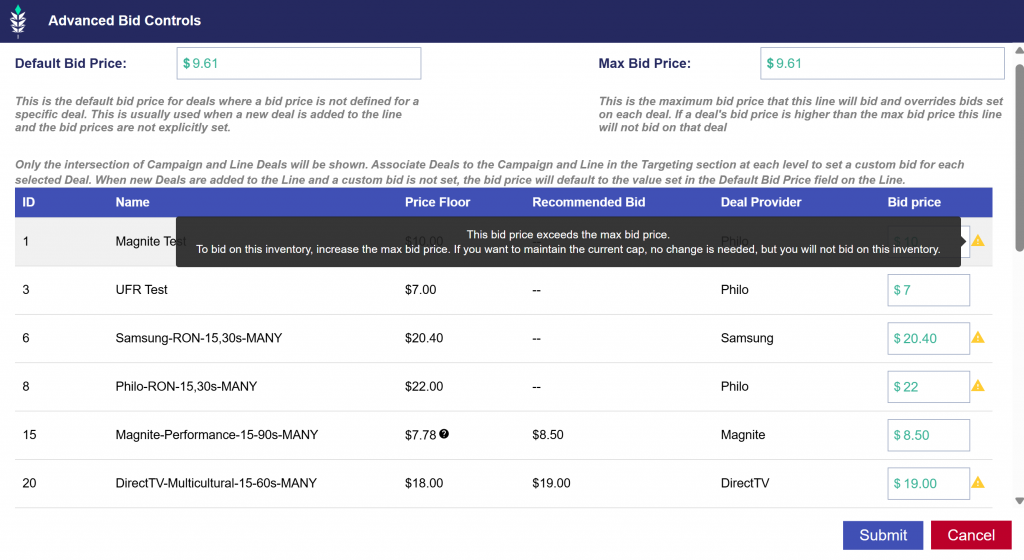
In the above example, the Max Bid Price is set to $9.61, so all Deals with a higher Bid Price will not be bid on.