Pontiac Wiki Pontiac Wiki

Flight Status Caution Tool Tips

July 2026

  • Advertiser URL Auto Populates Hosted Creative Click URL
  • Auction Win Validation Troubleshoot Check Tooltip
  • Campaign Setup Tooltips
  • JS Creative Tracker Support
  • Pagination Added to Advertisers View
  • IFA-Ip Frequency Capping Option
  • Creative Sizes UI Update
  • Duration Metrics
  • Creative Flighting Updates
  • New Line Competition Charts
  • First Party Creative Max File Sizes
  • Associated Audience Valid Records Check
  • Campaign Builder from Planning Tool
  • Video: Hosted (16:9) Size Updates
  • Flight Status Caution Tool Tips
  • Targeting Dropdown List
  • Onspot Geo Fencing Audience Generator
  1. Home
  2. Platform Updates
  3. New Features
  4. July 2026
  5. Flight Status Caution Tool Tips

Flight Status Caution Tool Tips

Release Date: July 15th, 2026
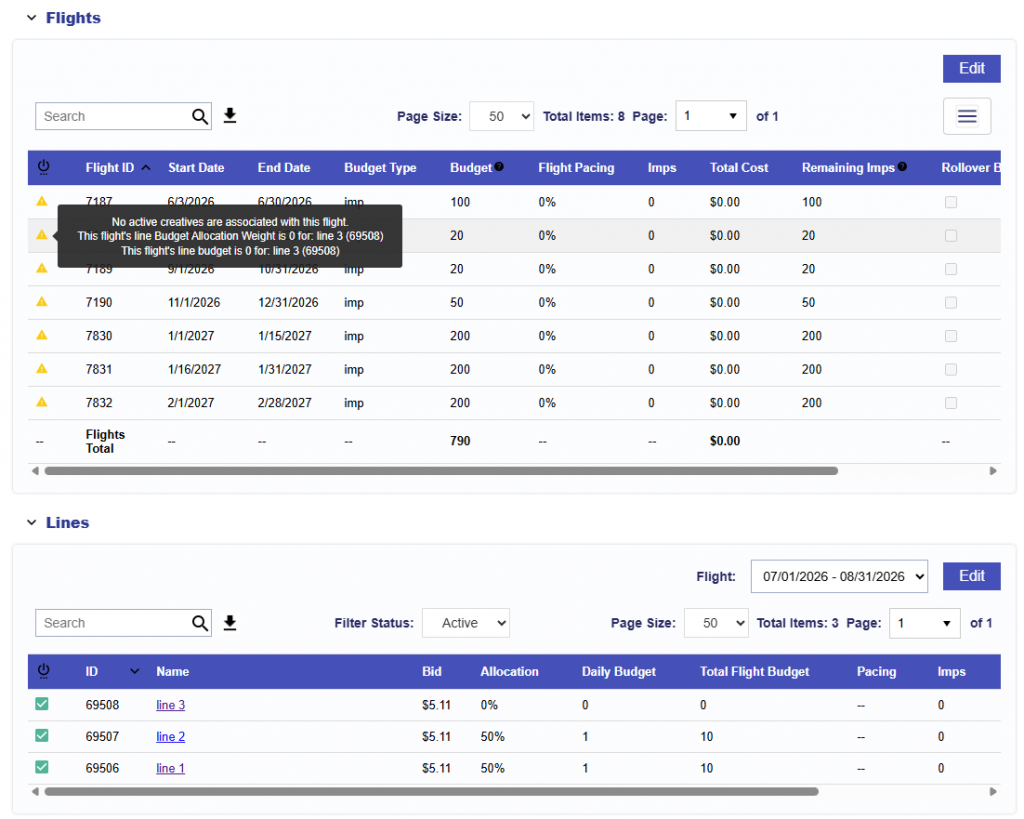
When Flights are enabled, the Flight Status indicator helps identify configuration issues that may prevent a flight from serving.

A caution icon appears when a flight may not serve because of one or more of the following:

  • An associated active line has no available budget
  • An associated active line has a Budget Allocation Weight of 0
  • An associated active line has a Budget Multiplier of 0
  • No active lines are associated with the flight
  • No active creatives are associated with the flight

Hover over the caution icon to view the specific issue or issues affecting the flight. When multiple issues apply, each is listed separately.

These warnings provide an additional way to identify setup issues before or during campaign delivery.

© 2026 Pontiac Wiki Sec · All Rights Reserved · Developed by RDK

  • Contact Us
  • Privacy Policy
  • Terms & Conditions
  • Pontiac.media