Custom Model Thresholds
Release Date: July 22nd, 2026
Pontiac Analytics models now provide probability thresholds that allow users to control how predicted bid opportunities are handled. Thresholds determine how selective the model is when deciding which bid opportunities to include. A higher threshold is stricter and limits bidding to opportunities the model considers more likely to perform. A lower threshold is less restrictive and allows the model to bid on a broader range of opportunities, which may increase scale.
Single Value
Choose one threshold. Bid opportunities with a predicted probability above the selected value will be included, while those below it will be excluded.
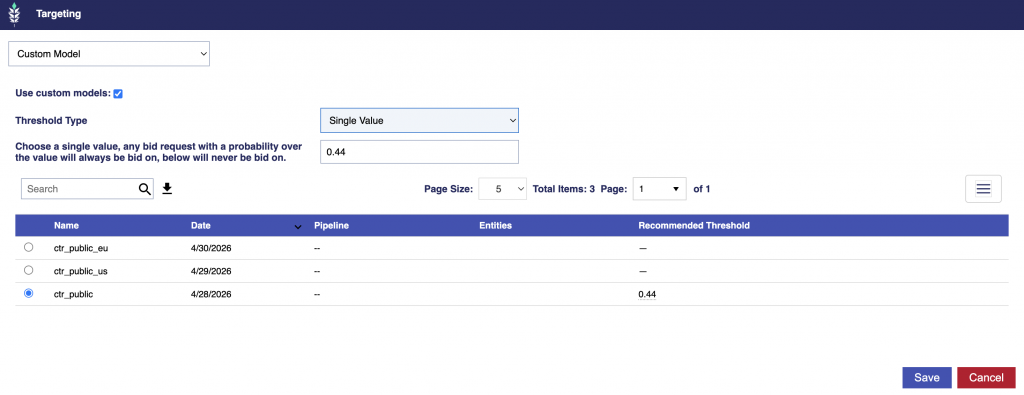
For example, if the selected threshold is 0.44, Pontiac will bid on a request with a probability of 0.65 and will not bid on a request with a probability of 0.38.
Spread
Choose an upper and lower threshold. Bid opportunities above the upper threshold will always be included, while those below the lower threshold will always be excluded. Opportunities between the two thresholds will be selected randomly.
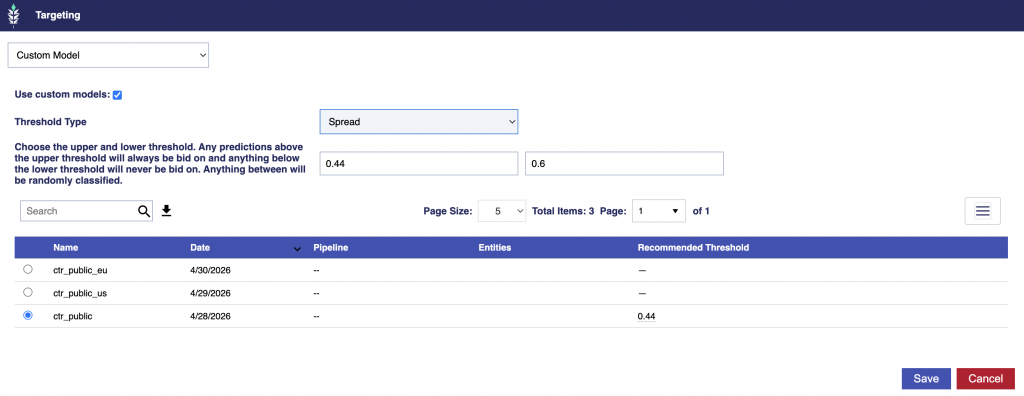
For example, with a lower threshold of 0.44 and an upper threshold of 0.60:
- A probability of 0.65 will always be included.
- A probability of 0.38 will always be excluded.
- A probability of 0.52 will be randomly included or excluded.
By default, the platform uses a Single Value threshold and selects the first available non-zero recommended value.
Recommended Threshold Hover Message
Hover over the Recommended Threshold value to view the model’s available threshold options and the estimated percentage of bid opportunities included at each setting.

Each row shows:
- Trim %: The approximate percentage of bid opportunities that would be excluded.
- Threshold: The minimum predicted probability required for a bid opportunity to be included.
- Bids on %: The approximate percentage of eligible bid opportunities the model would continue to bid on.
For example:
- Bid on ~everything (floor) → threshold 0.30 (bids on 100%)
- This is the least restrictive option. Nearly all eligible bid opportunities are included.
- Trim ~9% → threshold 0.44 (bids on 91%)
- Opportunities below 0.44 are excluded, while approximately 91% remain eligible for bidding.
- Trim ~20% → threshold 0.45 (bids on 79.6%)
- The model becomes more selective and bids on approximately 79.6% of opportunities.
- Trim ~38% → threshold 0.46 (bids on 62.3%)
- Trim ~52% → threshold 0.47 (bids on 47.7%)
- Trim ~80% → threshold 0.49 (bids on 20.1%)
- This is the strictest option shown. Only the opportunities with the highest predicted probabilities remain eligible.
Higher thresholds make the model more selective and may improve efficiency, but they also reduce scale. Lower thresholds allow more opportunities to qualify and support greater delivery.