Campaign Setup Tooltips
Release Date: July 1st, 2026
New and updated tooltips have been added at the Campaign level to help users better understand campaign setup and configuration options.
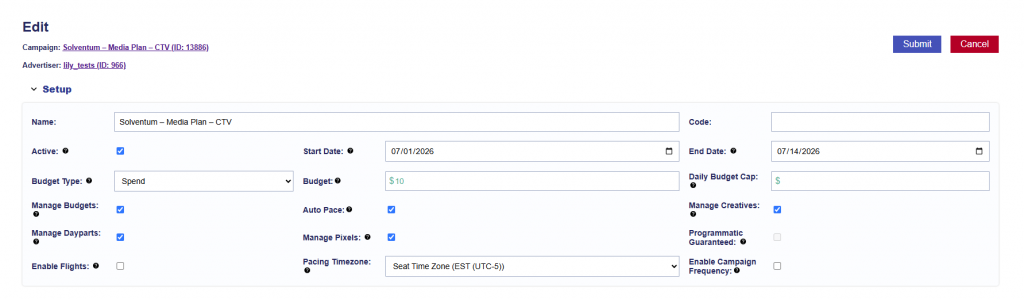
- Active: Must be checked for the campaign to run. Leave unchecked to pause the campaign.
- Start Date: The date the campaign becomes eligible to begin delivering.
- End Date: The final date the campaign is eligible to deliver.
- Budget Type: Set the campaign budget as either a dollar amount or an impression goal.
- Budget: Enter the campaign’s total dollar amount or impression goal based on the selected budget type.
- Manage Budgets: When selected, all lines under the campaign will be modified to match the campaign’s start date, end date, and budget type. Budgets must be allocated below using budget allocation weights.
- Auto Pace: Available when Manage Budgets is enabled. Automatically keeps budgets fluid between Lines and optimizes delivery to pace toward the Campaign goal.
- Enable Campaign Frequency: Apply frequency and recency caps across all lines under the campaign using the selected identifier.
- Manage Creatives: Associate creatives at the campaign level so they are targeted by all lines under the campaign.
- Manage Dayparts: Control pacing and dayparting at the campaign level for all associated lines.
- Manage Pixels: Associate conversion pixels at the campaign level for attribution across all lines under the campaign.
- Programmatic Guaranteed: Enable for campaigns using a Programmatic Guaranteed deal negotiated directly with a publisher at a fixed rate and committed impression volume. The campaign must target the associated PG deal. Targeting is controlled by the publisher, while the campaign budget and flight dates are used for monitoring only.
- Enable Flights: Used to split the campaign into flight date ranges with separate budgets.
- Average Bid: The average of the bid values configured across all lines in the campaign. For lines using Basic Bid, the configured bid is included in the average. For lines using Bid at Floor or Advanced Bid Controls, the configured maximum bid is included. This value reflects campaign setup and may not match the actual bid submitted for each impression.
- Pacing Time Zone: Determines the time zone used to define the start and end of each day for campaign pacing.
These updates provide consistent guidance in both Campaign Edit and Campaign View modes.