Pontiac Wiki Pontiac Wiki

Campaign and Line Template Custom Model Support

July 2026

  • Advertiser URL Auto Populates Hosted Creative Click URL
  • Auction Win Validation Troubleshoot Check Tooltip
  • Campaign Setup Tooltips
  • JS Creative Tracker Support
  • Pagination Added to Advertisers View
  • IFA-Ip Frequency Capping Option
  • Creative Sizes UI Update
  • Duration Metrics
  • Creative Flighting Updates
  • New Line Competition Charts
  • First Party Creative Max File Sizes
  • Associated Audience Valid Records Check
  • Video: Hosted (16:9) Size Updates
  • Campaign Builder from Planning Tool
  • Flight Status Caution Tool Tips
  • Targeting Dropdown List
  • First Party Creatives File Content Validation
  • Onspot Geo Fencing Audience Generator
  • Third Party Audience Update
  • Pixel Filter Added to Cookies Path to Conversion Report
  • Custom Variable 1 Added to Pixel Selectable Query String Macros
  • Custom Model Thresholds
  • Campaign and Line Template Custom Model Support
  • Deal Auto Refresh
  • Publisher Specs Eligibility Creative Tab
  1. Home
  2. Platform Updates
  3. New Features
  4. July 2026
  5. Campaign and Line Template Custom Model Support

Campaign and Line Template Custom Model Support

Release Date: July 22nd, 2026

Custom models can now be included in both Line and Campaign Templates. When a template is applied, the selected custom model settings are carried over to the new line or campaign.
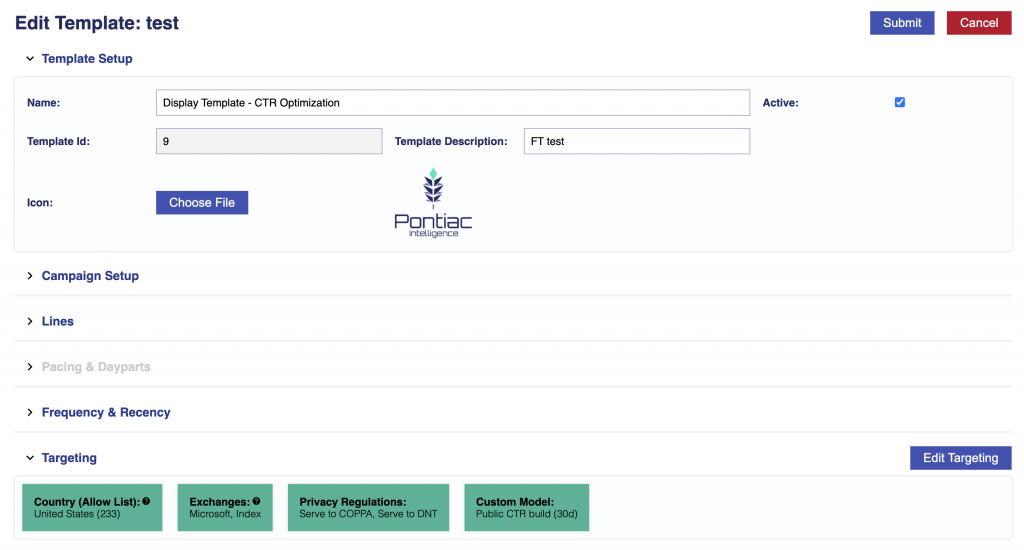
When a Campaign Template is used, all associated custom model settings will be carried over to the New Campaign.
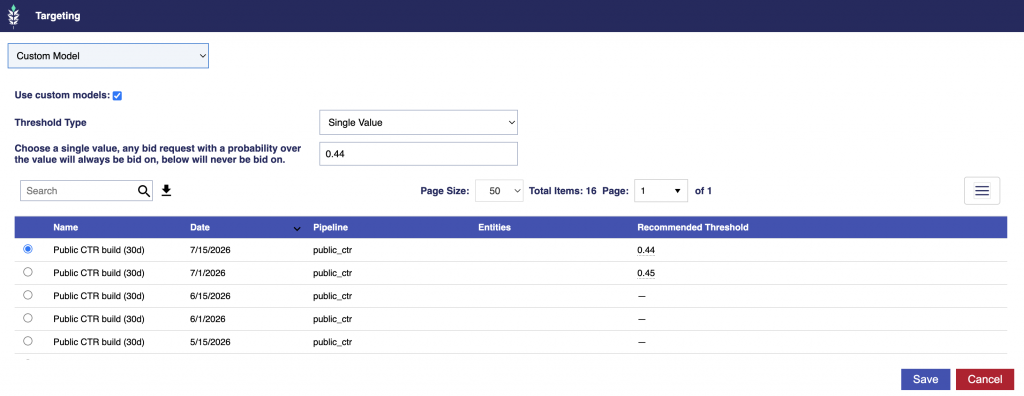
For more information on Templates, see the following documentation: Templates

© 2026 Pontiac Wiki Sec · All Rights Reserved · Developed by RDK

  • Contact Us
  • Privacy Policy
  • Terms & Conditions
  • Pontiac.media