Pontiac Wiki Pontiac Wiki

First Party Audio Creatives

February 2026

  • Custom Audience Tooltip
  • Pixel Updates
  • Update to API Metric Endpoints
  • Standard Reporting Data Spinner
  • Updated Creative Tracker Message
  • First Party Audio Creatives
  • Performance Tab Full Report Link
  • Previous Report Name
  • Inventory Discovery Multi Field
  • Hide Subseat Margin Option
  • Auto Pace Tooltip
  1. Home
  2. Platform Updates
  3. New Features
  4. February 2026
  5. First Party Audio Creatives

First Party Audio Creatives

Release Date: February 10th, 2026

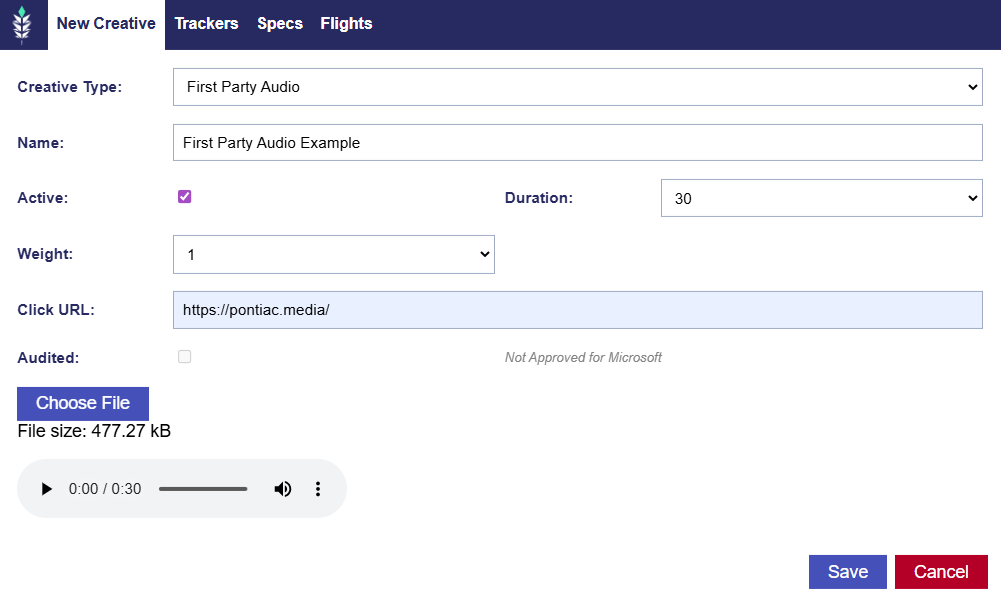
On the Bidder, Pontiac has added support for a First Party creative option for Audio creatives.

Navigate to Advertiser > Creatives > Click the New Creative button. On the New Creative window, select First Party Audio as the Creative Type, enter a Creative Name, then choose:

  • Duration: 5, 10, 15, 30, 45, 60, 75, or 90 seconds
  • Creative Weight: 1–10
  • Enter Click URL

Select the audio creative file and upload it. Click Save to submit the creative for audit.
© 2026 Pontiac Wiki Sec · All Rights Reserved · Developed by RDK

  • Contact Us
  • Privacy Policy
  • Terms & Conditions
  • Pontiac.media