Release Popup Notification
Release Date: August 26th, 2026
A Release Announcement popup is displayed when new features and platform improvements are deployed.
The popup appears the first time a user logs in on the release date and highlights the features included in that release. Once the announcement has been viewed, it will not appear again if the user logs out and logs back in later that same day.
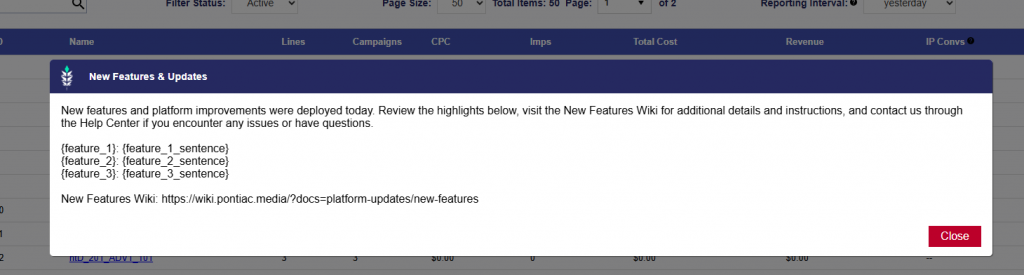
Each release announcement includes a brief summary of the deployment, a list of the released features and descriptions, and a link to the New Features Wiki for additional details and instructions.
The popup uses the following standard message:
New features and platform improvements were deployed today. Review the highlights below, visit the New Features Wiki for additional details and instructions, and contact us through the Help Center if you encounter any issues or have questions.
The released features are listed beneath the message with a short description of each update.
New Features Wiki:
https://wiki.pontiac.media/?docs=platform-updates/new-features
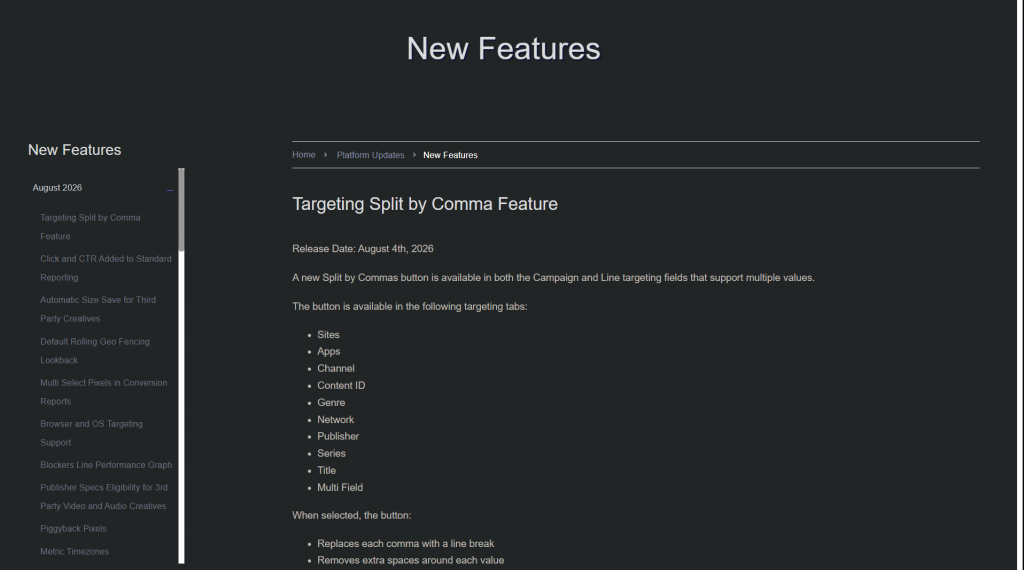
The link will take you to the New Features page. Releases are organized by month and year. Expand the applicable section, then select a feature name to open the corresponding article and view additional details and instructions for that feature.