Pontiac Wiki Pontiac Wiki

Piggyback Pixels

August 2026

  • Targeting Split by Comma Feature
  • Click and CTR Added to Standard Reporting
  • Automatic Size Save for Third Party Creatives
  • Default Rolling Geo Fencing Lookback
  • Multi Select Pixels in Conversion Reports
  • Browser and OS Targeting Support
  • Blockers Line Performance Graph
  • Publisher Specs Eligibility for 3rd Party Video and Audio Creatives
  • Piggyback Pixels
  • Metric Timezones
  • Clone Campaign Inherit Line Budget Settings
  • Custom Reports Over 90 Days
  • Standard Reporting Timezone Filter
  • Release Popup Notification
  • Chrome Conversions Depreciated
  • Latitude Longitude Radius Geo Fencing
  • Pacing & Dayparts Updates
  1. Home
  2. Platform Updates
  3. New Features
  4. August 2026
  5. Piggyback Pixels

Piggyback Pixels

Release Date: August 18th, 2026

Support for Piggyback Pixels has been added so additional third-party pixels can fire through a Pontiac JavaScript or Image pixel. A new Piggyback Pixels tab is available when creating or editing a pixel. The interface follows the existing tracker setup, allowing users to add each piggyback pixel and enter its URL.
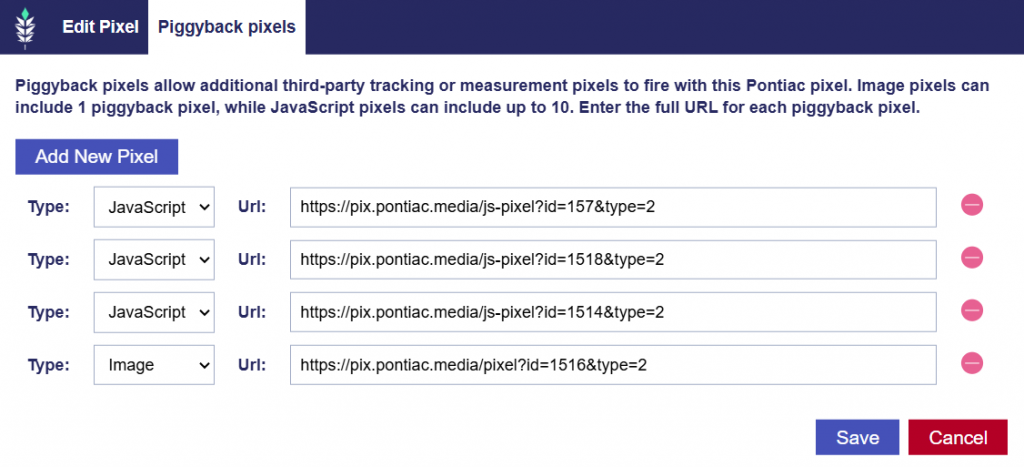
For JavaScript pixels:

  • Up to 10 piggyback pixels can be added.
  • When the Pontiac JavaScript pixel fires, it uses document.write to fire the associated piggyback image pixels.

For Image pixels:

  • A maximum of 1 piggyback pixel can be added.
  • When the Pontiac Image pixel fires, the request redirects to the configured piggyback pixel URL.

© 2026 Pontiac Wiki Sec · All Rights Reserved · Developed by RDK

  • Contact Us
  • Privacy Policy
  • Terms & Conditions
  • Pontiac.media