Blockers Graph
The Blockers section helps identify which types of restrictions are preventing bid requests from becoming eligible for the Line.
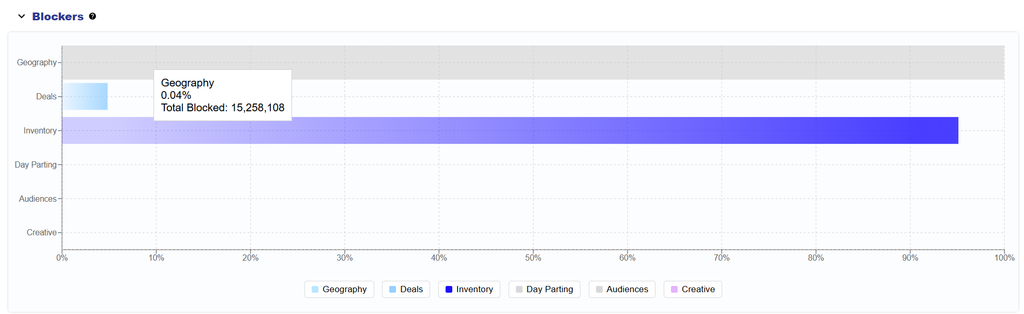
The horizontal bar chart groups blocked requests into the following categories:
- Geography: Requests blocked by geographic Targeting requirements.
- Deals: Requests blocked because they do not meet the applicable Deal Targeting or Deal eligibility requirements.
- Inventory: Requests blocked by inventory-related Targeting or eligibility requirements.
- Day Parting: Requests blocked because they fall outside the configured Daypart schedule.
- Audiences: Requests blocked by applicable Audience Targeting requirements.
- Creative: Requests blocked by Creative-related eligibility requirements.
Each blocker category is calculated independently. The chart is not a sequential bid funnel, and the same bid request may be blocked by more than one category.
Hover over a category to view:
- Blocked %: The category’s share of the total blocked counts across the blocker categories currently displayed.
- Total Blocked: The total number of bid requests blocked by that category.
All visible Blocked % values add up to 100%.
Use the legend below the chart to hide or restore individual blocker categories. The chart automatically rescales based on the categories currently displayed.
A larger Blocked % can help identify which part of the Line configuration is contributing most heavily to restricted inventory.
Important: A request can be blocked by multiple categories. Reducing one blocker does not guarantee that the request will become eligible if another Targeting or eligibility requirement still blocks it.
Use Blockers together with Bid Data and Troubleshoot Checks when investigating delivery. Blockers shows where requests are being filtered at a high level, while Troubleshoot Checks provides more specific validation and recommended areas to review.