Find and Manage Campaign Templates
Saved Campaign Templates are managed at the Seat level from the Templates tab.
Use this area to locate existing Campaign Templates, review their saved configuration, update the Template for future Campaign creation, or create a new Template variation by cloning an existing one.
Find a Campaign Template
To locate an existing Campaign Template:
- Navigate to the Templates tab.
- Expand the Campaign Templates section.
- Locate the Template by its Name, ID, or Description.
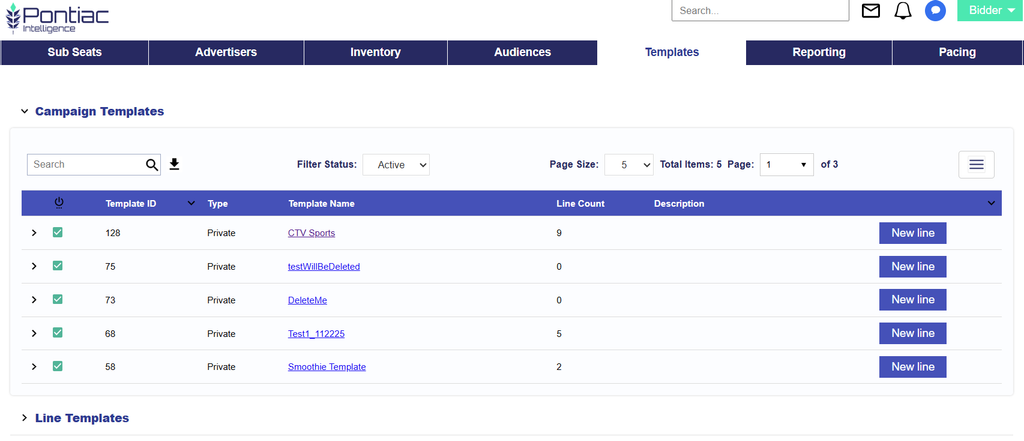
- Select the Template Name to open the Campaign Template.
Review a Campaign Template
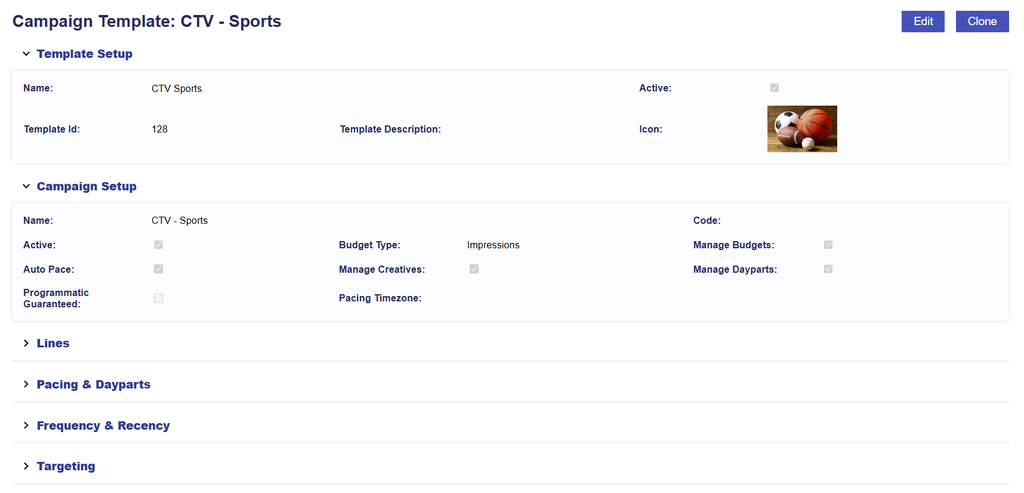
Opening a Campaign Template allows users to review the configuration that will be applied when the Template is used to create a new Campaign.
Depending on the Template configuration, this can include:
- Template Setup
- Campaign Setup
- Included Lines
- Campaign-level Targeting
- Pacing & Dayparts
- Frequency & Recency
- Other applicable Campaign settings
Reviewing the Template before use can help confirm that the saved configuration still reflects the intended Campaign structure and strategy.
- View the saved Campaign configuration.
- Edit the Template to update its configuration.
- Clone the Template to create a new variation while preserving the original.
Changes made to a saved Campaign Template are used when the Template is selected for future Campaign creation. They do not modify Campaigns that were previously created from the Template.
Template Setup
Template Setup controls the saved Template itself. These fields describe and manage the reusable Template as an object in the Templates section.
It includes:
- Name: The name used to identify the Campaign Template.
- Active Status: Whether the Campaign Template itself is Active or Inactive.
- Template Setup > Name / Active Status = the saved Template.
- Template Description: Describes the intended purpose or strategy of the Template.
- Icon: The visual identifier used to recognize the Template.
These settings are about how the Template is identified and managed, not the Campaign that will eventually be created from it. Pasted text
Campaign Setup
Campaign Setup controls the Campaign configuration stored inside the Template. These are the settings that will be used as the starting configuration when the Template is selected to create a new Campaign.
It includes settings such as:
- Name
- Code
- Budget Type
- Active Status
- Campaign Setup > Name / Active Status = the new Campaign configuration created from that Template.
- Manage Budgets
- Auto Pace
- Manage Creatives
- Manage Dayparts
- Programmatic Guaranteed
- Enable Flights
- Pacing Time Zone
Manage a Campaign Template
From the Campaign Template page, users can:
- View the saved Campaign configuration.
- Edit the Template to change the configuration that will be used for future Campaigns.
- Manage Included Lines to control which Line structures are recreated with the Campaign.
- Clone the Template to create a new reusable variation while preserving the original.
When editing a Campaign Template, changes are saved to the Template itself and are used the next time the Template is selected to create a Campaign.
Important: Changes made to a Campaign Template do not update Campaigns that were previously created from it. Likewise, changes made to an individual Campaign created from a Template do not update the original Template.
Edit vs. Clone
Use Edit when the existing Template should be updated for future use.
Use Clone when a new Template variation is needed but the original Template should remain unchanged.
For example, cloning can be useful when creating a second version of an existing Campaign strategy with different Targeting, Lines, pacing settings, or other configuration while preserving the original Template.
For detailed instructions on modifying a saved Template, see Edit a Campaign Template.
For instructions on creating a variation of an existing Template, see Clone a Campaign Template.