Location & Device
Location & Device Targeting controls the geographic locations and device environments where a Campaign or Line is eligible to serve. These settings allow advertisers to define where their ads can appear and restrict delivery based on Device Type, Browser, or Operating System.
Location & Device Targeting can be configured at both the Campaign and Line levels:
- Campaign Targeting: Applies shared requirements to all Lines within the Campaign.
- Line Targeting: Allows users to apply additional restrictions to an individual Line.
How to Access Location & Device Targeting
To configure Location & Device Targeting:
- Create a new Campaign or Line, or open an existing one in Edit mode.
- Navigate to the Targeting section.
- Select Edit Targeting.
- Under Location & Device, select the applicable targeting method from the Targeting dropdown menu.
- Configure the desired targeting options and select Save.
- Complete and save the Campaign or Line configuration.
The following sections explain each available targeting option, how to configure it, and important considerations for inventory eligibility.
Important: Campaign and Line targeting are evaluated together. An impression must satisfy all applicable geographic and device requirements at both levels to be eligible to serve. Conflicting or overly restrictive settings can reduce available inventory or prevent delivery.
Geo
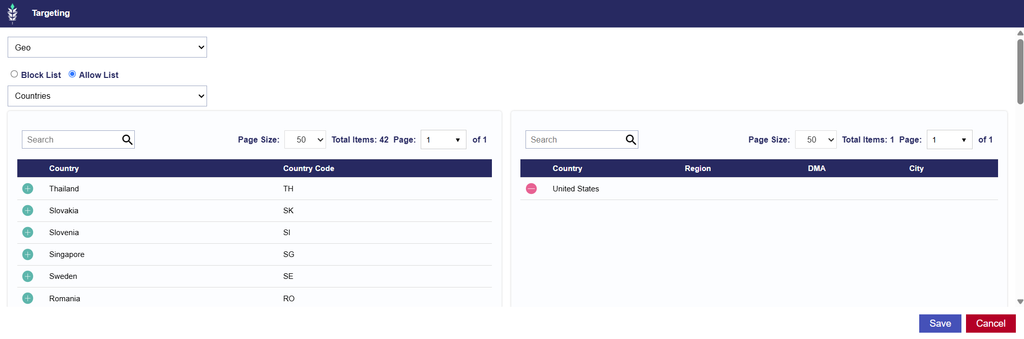
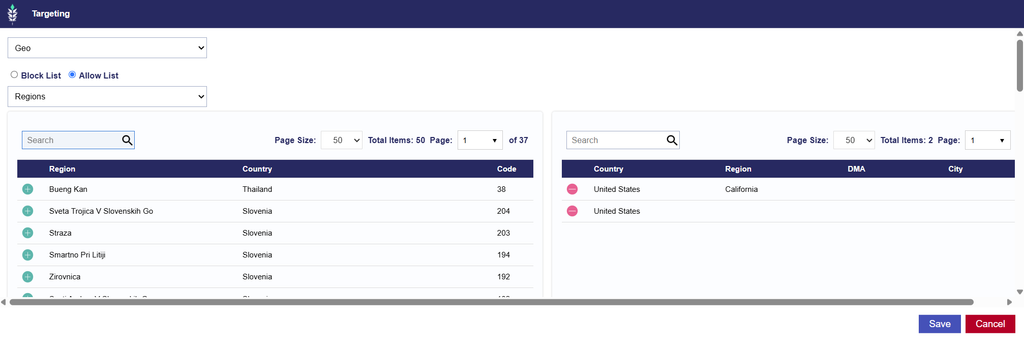
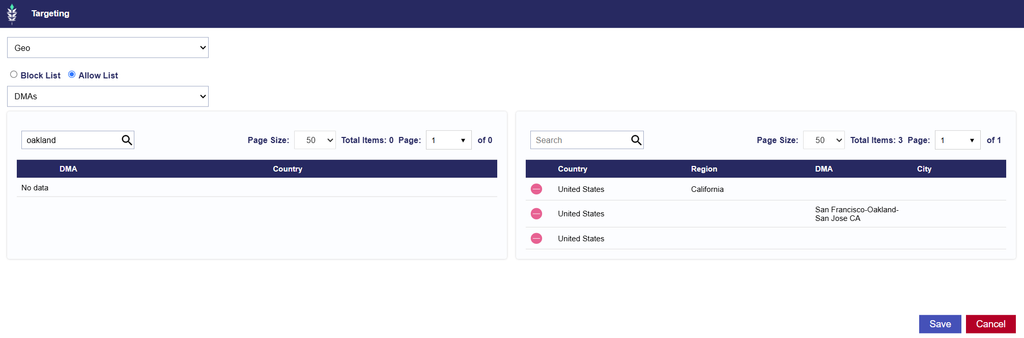
Geo Targeting allows users to target or exclude impressions based on their geographic location. Advertisers can define eligible locations at the Country, Region, or Designated Market Area (DMA) level.
The following geographic targeting options are available:
| Geographic Level | Description | Format |
|---|---|---|
| Country | Target or exclude entire countries. Country level targeting is required. | Two-letter country code (ISO 3166-1 alpha-2), e.g., US, CA |
| Region/State | Refine geographic targeting to specific states, provinces, or other supported regional divisions within a country. | Numeric Region Code |
| DMA | Target or exclude specific geographic markets, commonly used to reach audiences within a particular media market. | DMA Name, e.g., Detroit |
Configuring Geo Targeting
- Navigate to the Targeting section of the applicable Campaign or Line and select Edit Targeting.
- Under Location & Device, select Geo from the Targeting dropdown menu.
- Select the applicable Country.
- Optionally, refine the geographic area by selecting Regions/States or DMAs.
- Configure the geographic selections as an Allow List or Block List, as applicable.
- Review the selected locations and select Save to apply the targeting configuration.
Geo > Countries
Geo > Regions
Geo > DMAs
Targeting Methods
- Allow List: Restricts delivery to the selected geographic locations. For example, selecting California as the only Region in an Allow List restricts delivery to eligible inventory within California.
- Block List: Excludes the selected geographic locations from delivery. For example, adding California to a Region Block List prevents delivery to impressions identified as originating from California.
Important Considerations
- Geographic Targeting Hierarchy
- Geographic targeting works as a series of cumulative requirements. When multiple geographic targeting levels are applied, an impression must satisfy each applicable condition.
- For example, selecting the United States, California, and the San Francisco-Oakland-San Jose CA DMA restricts eligible delivery to inventory that satisfies all three requirements.
- Conflicting Geographic Requirements
- All geographic targeting requirements must be compatible.
- For example, selecting Alabama as the only Region while also targeting the Detroit DMA creates conflicting requirements because Detroit is not located in Alabama. No impressions can satisfy both conditions.
- Review the selected Countries, Regions, and DMAs together to ensure they represent compatible geographic areas.
- Campaign and Line Targeting
- Geographic targeting configured at the Campaign level applies to all Lines within that Campaign. Additional geographic requirements can be configured at the Line level.
- For example, a Campaign targeting the United States can contain individual Lines targeting California, Texas, and Florida.
- However, if a Campaign targets only California and a Line targets only Texas, the conflicting requirements will prevent the Line from serving.
- Geographic Data Availability
- Geo Targeting relies on location information available in bid requests. The precision and availability of geographic data can vary by publisher, Exchange, and inventory source.
- When applying restrictive geographic targeting, review available inventory to confirm that sufficient impressions meet the selected requirements.
- Additional Geographic Restrictions
- Geo Targeting should be reviewed alongside ZIP Code Targeting, geographic Audiences, ART Audiences, and curated Deals.
- An impression must satisfy all applicable geographic targeting requirements, regardless of where they are configured.
Zip Codes
ZIP Code Targeting allows users to target or exclude specific ZIP or postal codes within a selected country.
This provides more granular geographic control than targeting entire Countries, Regions, or DMAs. It is useful when advertisers want to reach audiences within specific neighborhoods, service areas, or groups of postal codes.
ZIP Code Targeting supports Allow Lists and Block Lists.
Configuring ZIP Code Targeting
- Navigate to the Targeting section of the applicable Campaign or Line and select Edit Targeting.
- Under Location & Device, select Zip Codes from the Targeting dropdown menu.
- Select the applicable Country.
- Enter or paste the desired ZIP or postal codes into the input field.
- Select Validate Zips to confirm that the entered values use the correct format.
- Select an Allow List or Block List based on the desired targeting strategy.
- Optionally, use Expand Zip Targets to find additional ZIP Codes within a specified radius.
- Review the selected ZIP Codes and select Save to apply the targeting configuration.
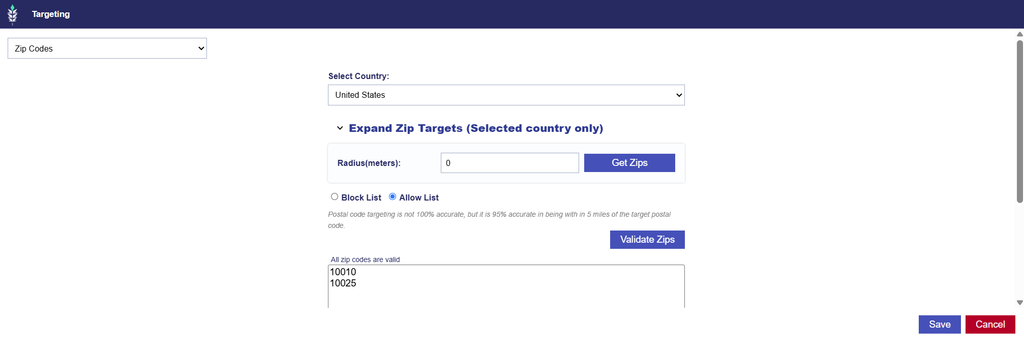
Targeting Methods
- Allow List: Restricts delivery to impressions associated with the selected ZIP or postal codes.
- Block List: Excludes impressions associated with the selected ZIP or postal codes.
Additional Options
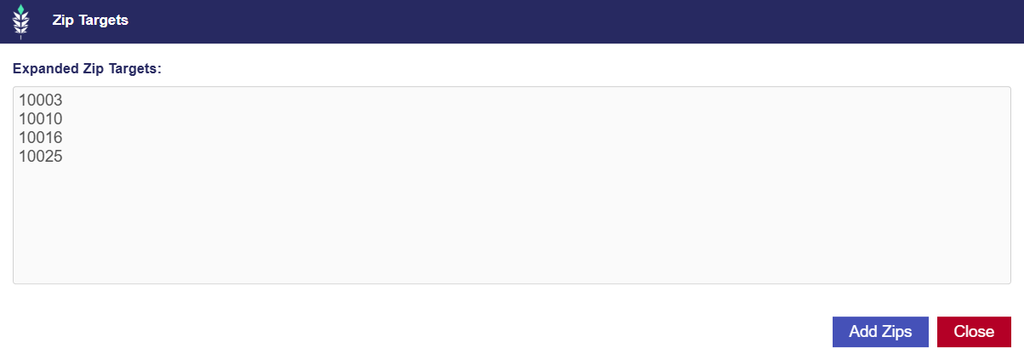
- Expand Zip Targets: Allows users to find additional ZIP Codes within a specified radius of the ZIP Codes originally entered.
- To expand your ZIP Code targeting:
- Enter and validate the original ZIP Codes.
- Enter the desired radius in meters.
- Select Get Zips.
- Review the additional ZIP Codes returned in the results window.
- Select Add Zips to add the expanded results to your targeting, or select Close to keep the original list unchanged.
- For example, enter the ZIP Codes
10010and10025with a radius of1000meters. Select Get Zips to view the additional ZIP Codes identified within the specified radius. - Important: Expanding ZIP targets adds geographic areas to the original targeting list. Review the results before selecting Add Zips to ensure that the additional locations align with your intended targeting strategy.
- To expand your ZIP Code targeting:
- Validate Zips: Select Validate Zips after entering your ZIP or postal codes to check that the values use the appropriate format for the selected country. ZIP or postal code requirements vary by country, so select the correct Country before entering and validating the values.
ZIP Code Formatting
ZIP or postal code formats vary by country.
For example:
| Country | Supported format example | Notes |
|---|---|---|
| United States | 10001 | |
| Canada | L4M | For Canadian postal code targeting, Pontiac supports the three-character Forward Sortation Area (FSA) format rather than the full six-character postal code. |
Select Validate Zips before saving to confirm that the entered values are formatted correctly.
Countries That Support ZIP Code Targeting
The following countries are available for ZIP or postal code targeting:
| Country Name | Country Code |
|---|---|
| Australia | AU |
| Canada | CA |
| Colombia | CO |
| Germany | DE |
| Denmark | DK |
| Spain | ES |
| Finland | FI |
| France | FR |
| United Kingdom | GB |
| Indonesia | ID |
| Italy | IT |
| Japan | JP |
| Lithuania | LT |
| New Zealand | NZ |
| Poland | PL |
| Portugal | PT |
| Sweden | SE |
| Singapore | SG |
| Thailand | TH |
| United States | US |
Important Considerations
- Geographic Compatibility
- ZIP Code targeting must be compatible with any Country, Region, or DMA targeting applied to the Campaign or Line.
- For example, targeting the United States and the Miami DMA while adding a New York ZIP Code to an Allow List creates conflicting geographic requirements and prevents delivery.
- Review all geographic selections to ensure that the targeted ZIP Codes fall within the intended areas.
- Campaign and Line Targeting
- ZIP Code targeting can be configured at both levels, and all applicable restrictions are evaluated together.
- For example, if a Campaign targets one set of ZIP Codes and a Line targets a different, non-overlapping set, the Line may have no eligible inventory.
- Additional ZIP Code Restrictions
- ZIP Code targeting can also be applied through Audiences, ART Audiences, and curated Deals.
- Ensure that all ZIP Code-based targeting is aligned across these configurations to avoid conflicting requirements or unintended delivery limitations.
- Postal Code Availability
- ZIP Code targeting depends on the geographic information available in bid requests.
- Not all inventory sources provide ZIP or postal code information at the same level of precision. Restrictive ZIP Code targeting may reduce eligible inventory when the required geographic information is unavailable.
- Inventory Availability
- Before applying a large or highly restrictive ZIP Code list, review available inventory to understand whether sufficient impressions are available within the selected locations.
Device Types
Device Type Targeting allows users to restrict delivery based on the type of device associated with an impression. This setting is useful when advertisers want to reach users on specific device categories, such as Connected TVs, mobile phones, tablets, or desktop computers.
Device Type targeting can be configured at both the Campaign and Line levels.
Pontiac supports the following Device Types:
| Value | Description |
| 1 | Mobile/Tablet |
| 2 | Personal Computer |
| 3 | Connected TV |
| 4 | Phone |
| 5 | Tablet |
| 6 | Connected Device |
| 7 | Set Top Box |
The numeric values identify the Device Type classifications. Mobile/Tablet is a broader classification, while Phone and Tablet are separate device categories.
Configuring Device Type Targeting
- Navigate to the Targeting section of the applicable Campaign or Line and select Edit Targeting.
- Under Location & Device, select Device Types from the Targeting dropdown menu.
- Select the Device Types you want to target.
- Review your selections and select Save to apply the targeting configuration.
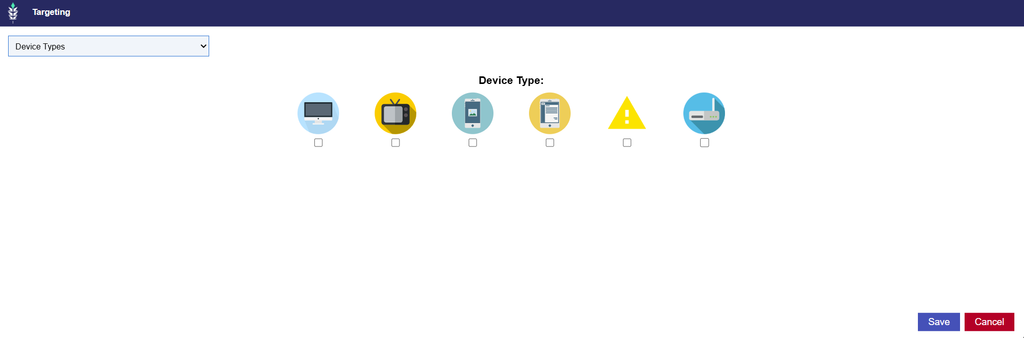
Multiple Device Types can be selected to include more than one device category.
If no Device Types are selected, the Campaign or Line is not restricted by Device Type targeting.
Device Targeting and Deal Compatibility
When using Device Type Targeting with Deals, ensure that the selected Device Types align with the inventory available through the targeted Deals. In the Inventory tab, the Deals table includes a Device Types field displaying the percentage breakdown of bid requests by Device Type for each Deal. This information allows users to review the types of devices associated with a Deal before configuring Device Type Targeting.
For example, a Deal may include a mix of OTT inventory across multiple device categories. If the objective is to serve exclusively within CTV environments, Device Type Targeting can be used to restrict eligibility to Connected TV and Set Top Box inventory.
To review Device Type availability for a Deal:
- Navigate to the Inventory tab.
- Locate the applicable Deal in the Deals table.
- Review the Device Types field to identify the percentage breakdown of requests by device category.
- Use this information to select compatible Device Types when configuring Campaign or Line targeting.
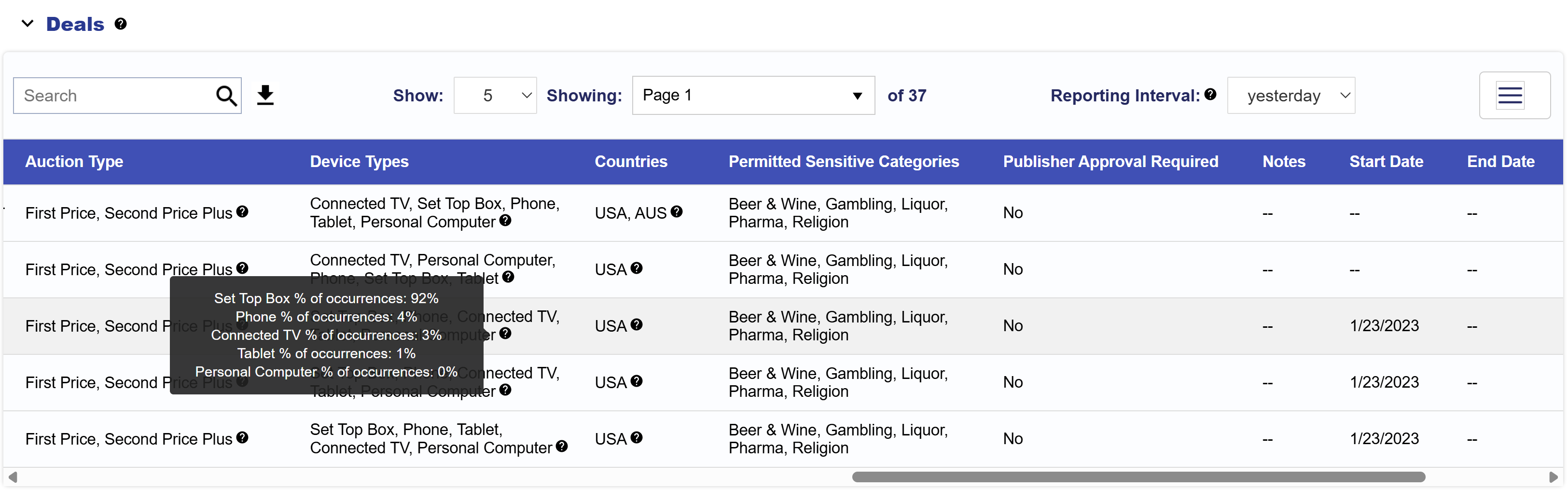
Important: The Device Types breakdown reflects the distribution of requests associated with the Deal. It does not guarantee delivery for a particular device category. Other targeting, bidding, and inventory requirements must still be satisfied.
Important Considerations
- Device Type vs. Inventory Type
- Device Type and Inventory Type are separate targeting settings.
- Inventory Type determines whether eligible inventory originates from Web, In App, or both environments.
- Device Type determines the category of device associated with the impression.
- For example, selecting In App as the Inventory Type does not automatically restrict delivery to Connected TV devices. Mobile Apps and other application inventory may also be eligible.
- To target CTV inventory specifically, select the appropriate Inventory Type and Device Type combination.
- Device Type and Inventory Type are separate targeting settings.
- Media Type Compatibility
- Select Device Types that align with the intended advertising format and inventory environment.
- For example, a Campaign designed exclusively for Connected TV delivery should use Device Type targeting that reflects the intended CTV environment.
- Campaign and Line Targeting
- Device Type targeting is evaluated at both levels.
- For example, if a Campaign is restricted to Connected TV while an individual Line is restricted to Mobile Phone, the Line will have no eligible inventory because the device requirements conflict.
- Device Classification
- Device Types are determined using information provided in the bid request. Device classification may vary depending on the publisher, Exchange, or inventory source.
- Review available inventory and reporting data when determining which Device Types correspond to your intended audience and delivery environment.
- Inventory Availability
- Selecting fewer Device Types restricts the range of eligible inventory.
- If delivery is limited, review Device Type targeting alongside Inventory Type, Exchanges, Deals, and other applicable requirements.
Browser
Browser Targeting allows users to include or exclude inventory based on the web browser identified in the bid request.
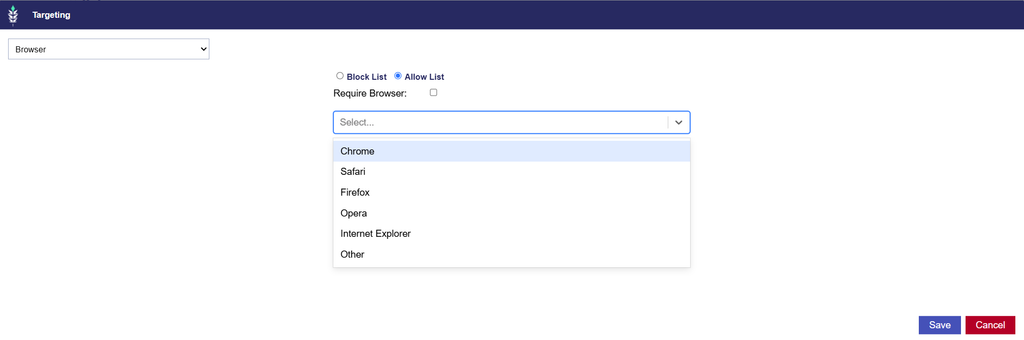
Browser Targeting is available at both the Campaign and Line levels. Users can select multiple Browsers from the dropdown menu and configure them as an Allow List or Block List.
Available Browsers
The Browser dropdown includes the following options:
- Chrome
- Safari
- Firefox
- Opera
- Internet Explorer
- Other
- Other represents inventory where the browser is classified but does not fall into one of the other listed categories. It should not be confused with impressions where browser information is missing.
Configuring Browser Targeting
- Navigate to the Targeting section of the applicable Campaign or Line and select Edit Targeting.
- Under Location & Device, select Browser from the Targeting dropdown menu.
- Open the Browser dropdown and select one or more Browsers.
- Choose Allow List or Block List based on your targeting strategy.
- Optionally, enable Require Browser to require browser information in the bid request.
- Review your selections and select Save to apply the targeting configuration.
Targeting Methods
- Allow List: Restricts delivery to impressions associated with the selected Browser.
- Block List: Excludes impressions associated with the selected Browser.
Additional Options
- Require Browser: Enable this option to require the bid request to contain browser information. Impressions without a Browser value will be ineligible to serve. This option can be used alongside an Allow List or Block List when browser information must be available for eligible inventory.
Important Considerations
- Browser Information Availability
- Browser Targeting relies on the browser information provided in the bid request.
- Not all inventory environments provide the same browser information. Browser data may be unavailable or less relevant for certain application-based environments, including CTV Apps.
- Inventory Type Compatibility
- Review Browser Targeting alongside Inventory Type.
- For example, Browser Targeting is generally more relevant when purchasing Web inventory, where impressions are associated with browser-based environments.
- Applying restrictive Browser Targeting to an In App Campaign may significantly reduce the available inventory.
- Campaign and Line Targeting
- Browser Targeting configured at both levels is evaluated together.
- Ensure that the selected Browsers are compatible to avoid conflicting requirements.
- Inventory Availability
- Restricting delivery to specific Browsers reduces the available inventory to impressions that satisfy the selected browser requirements.
- Review available inventory when applying highly restrictive Browser Targeting.
Operating Systems
Operating System Targeting allows users to restrict delivery based on the operating system identified for the device associated with an impression.
This setting can be configured at both the Campaign and Line levels. Users can select multiple Operating Systems to target specific device environments or exclude operating systems that do not align with their campaign strategy.
Configuring Operating System Targeting
- Navigate to the Targeting section of the applicable Campaign or Line and select Edit Targeting.
- Under Location & Device, select Operating Systems from the Targeting dropdown menu.
- Select the applicable Operating Systems based on your targeting strategy.
- Configure the selected Operating Systems as an Allow List or Block List.
- Optionally, enable Require Operating System to require operating system information in the bid request.
- Review your selections and select Save to apply the targeting configuration.
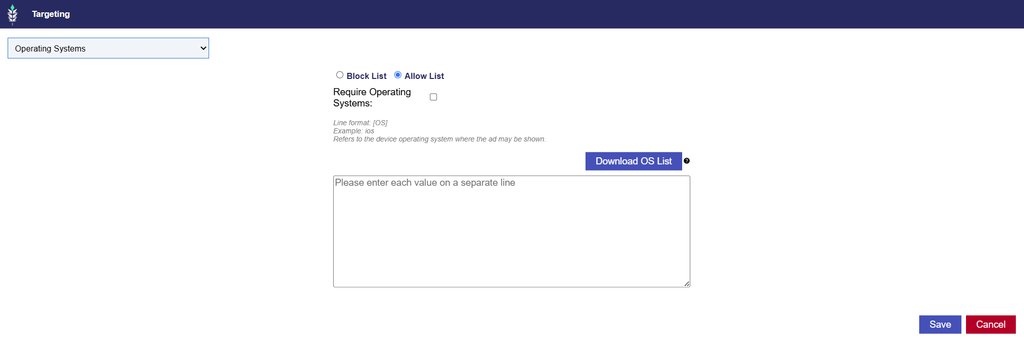
Download OS List
Select Download OS List to download a reference file containing the available Operating System options. Use this file to identify the appropriate values before configuring targeting.
Targeting Methods
- Allow List: Restricts delivery to impressions associated with any of the selected Operating Systems.
- Block List: Excludes impressions associated with any of the selected Operating Systems.
Additional Options
- Require Operating System: Enable this option to require the bid request to contain operating system information. Impressions without an Operating System value will be ineligible to serve.
Important Considerations
- Operating System vs. Device Type
- Operating System Targeting and Device Type Targeting serve different purposes.
- Device Type identifies the category of device, while Operating System identifies the software platform associated with that device.
- For example, targeting Mobile Phone as a Device Type restricts delivery to mobile phones, while Operating System Targeting can further refine which operating systems are eligible.
- Both settings can be used together to create a more specific device strategy.
- Application Compatibility
- Applications may be available on different operating systems and use different App Bundle identifiers.
- When combining Operating System Targeting with App Bundle or App List targeting, ensure that the selected identifiers correspond to applications available on the intended operating systems.
- Campaign and Line Targeting
- Operating System Targeting configured at both levels is evaluated together. Ensure that Campaign level requirements do not conflict with the Operating Systems selected for individual Lines.
- Operating System Information Availability
- Operating System Targeting relies on the device information provided in the bid request. The availability and accuracy of this information may vary by publisher, Exchange, and device environment.
- Inventory Availability
- Restricting delivery to specific Operating Systems can reduce eligible inventory.
- Review Operating System Targeting alongside Device Types, Inventory Type, App Bundles, App Lists, and other applicable requirements when investigating limited delivery.