Inventory
Inventory Targeting controls the supply sources, Deals, Sites, and Apps where a Campaign or Line is eligible to serve. These settings allow advertisers to define which inventory they want to purchase and exclude inventory that does not align with their campaign strategy.
Inventory Targeting can be configured at both the Campaign and Line levels:
- Campaign Targeting: Applies shared inventory requirements to all Lines within the Campaign.
- Line Targeting: Allows users to apply additional inventory restrictions to an individual Line.
How to Access Inventory Targeting
To configure Inventory Targeting:
- Create a new Campaign or Line, or open an existing one in Edit mode.
- Navigate to the Targeting section.
- Select Edit Targeting.
- Under Inventory, select the applicable targeting method from the Targeting dropdown menu.
- Configure the desired targeting options and select Save.
- Complete and save the Campaign or Line configuration.
The following sections explain each available Inventory Targeting option and how to configure it.
Important: Campaign and Line targeting are evaluated together. An impression must satisfy all applicable targeting requirements at both levels to be eligible to serve. Conflicting or overly restrictive settings can reduce available inventory or prevent delivery.
Inventory Type
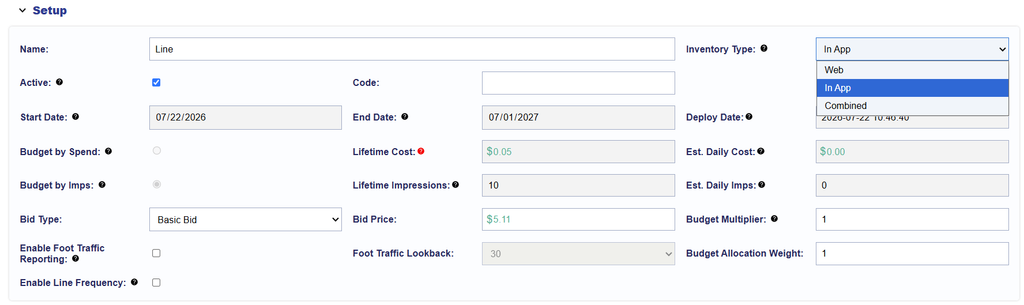
Inventory Type determines the environment in which a Line is eligible to serve. This setting allows advertisers to restrict delivery to websites, applications, or both environments.
The following options are available:
- Web: Inventory associated with websites accessed through a browser.
- In App: Inventory associated with applications, including mobile and Connected TV Apps.
- Combined: Includes both Web and In App inventory.
Configuring Inventory Type
Inventory Type is configured in the Line Setup section, rather than within the Edit Targeting window.
When creating or editing a Line, select the Inventory Type that corresponds to the environment in which you want your ads to appear.
Important Considerations
- Device Type Compatibility: Inventory Type and Device Type targeting serve different purposes. Inventory Type determines the Web or In App environment, while Device Type identifies the device associated with an impression. For example, selecting In App does not automatically restrict delivery to Connected TV inventory. Additional Device Type targeting may be needed.
- Additional Inventory Restrictions: Configure Inventory Type alongside other applicable targeting settings, including Exchanges, Deals, Sites, Site Lists, App Bundles, and App Lists. For example, selecting Web inventory while applying an App List Allow List creates incompatible inventory requirements and can prevent delivery.
Supply Source
Supply Source refers to the method through which advertising inventory is made available for purchase.
Pontiac supports the following supply sources:
- Open Exchange: Inventory made available through an Exchange for eligible buyers to bid on without targeting a specific private Deal.
- Private Marketplace (PMP) Deals: Inventory made available through a Deal negotiated with a publisher or supply partner. A Deal ID identifies the inventory and associated transaction.
- Programmatic Guaranteed (PG) Deals: Inventory purchased through a Programmatic Guaranteed Deal with agreed delivery commitments and terms between the buyer and seller.
Configuring Supply Sources
Supply Source is not a separate selection within the Targeting menu. Inventory eligibility is controlled through the applicable Deals, Deal Lists, and Exchanges settings.
Use the corresponding sections below to configure these targeting options.
Important Considerations
- Deal and Exchange Compatibility: When targeting PMP or PG Deals, ensure that Exchange targeting does not exclude the Exchanges associated with those Deals.
- Inventory Availability: Selecting a supply source does not guarantee available impressions or delivery. Inventory must be available through the relevant Exchange or Deal and satisfy all applicable targeting requirements.
For additional information about inventory availability, Deal types, and Exchange eligibility, see the Inventory Documentation .
Deals
Deals allow users to target specific inventory arrangements available to their Seat. Deal targeting enables advertisers to purchase inventory through existing publisher or supply partner agreements rather than relying exclusively on Open Exchange availability.
Deals are organized into two categories.
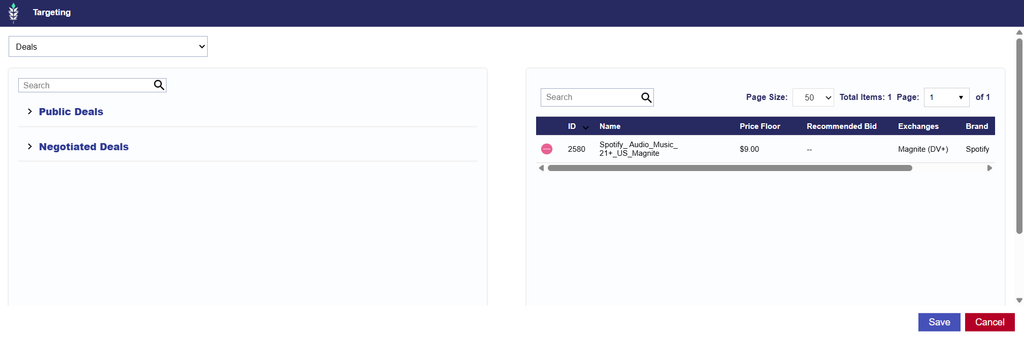
- Public Deals: Pontiac provides pre-negotiated CTV, OTT, OLV, Display, Native, and Audio Deals across various publishers and content categories. Select the Public Deals dropdown to view available options.
- Negotiated Deals: Negotiated Deals are Deals associated with your Seat through your own arrangements with publishers or supply partners. Select the Negotiated Deals dropdown to view Deals associated with your Seat. If an expected Deal is unavailable, contact the Pontiac Help Center.
- For instructions on how to import your own PMP Deals, see the Import Deal documentation.
Configuring Deal Targeting
- Navigate to the Targeting section of the applicable Campaign or Line.
- Open Deals under Inventory. This is the default selection.
- Expand the Public Deals or Negotiated Deals dropdown.
- Select the green plus sign (+) next to the applicable Deal or Deals.
- To remove a selected Deal, use the red minus sign (−).
- Review your selections and select Save to apply the targeting configuration.
Important Considerations
- Exchange Compatibility
- Deals are associated with specific Exchanges. Ensure the Exchange associated with each selected Deal is included in the Exchange targeting configuration.
- For example, if a Deal is associated with Magnite but Exchange targeting excludes Magnite, the Deal will not be eligible to serve.
- Campaign and Line Targeting
- Deal targeting configured at the Campaign and Line levels is evaluated together. Ensure that the Deal selections at both levels are aligned.
- For example, if a Campaign is restricted to Deal A and an individual Line is restricted to Deal B, the Line will not have eligible inventory if the two Deal selections do not overlap.
- Inventory Availability
- Selecting a Deal does not guarantee available impressions or delivery. Availability depends on the publisher sending eligible bid requests, the Deal’s configuration and status, and all applicable Campaign and Line targeting requirements.
- If a targeted Deal is not receiving eligible inventory, confirm that the Deal is active on both the publisher and Pontiac sides, that bid requests are being sent, and that the remaining targeting requirements are aligned.
For more information about Deal discovery, access, and configuration, see the Deals Documentation .
Deal Lists
Deal Lists allow users to organize multiple Deals into a reusable list that can be applied to Campaign or Line Targeting.
Rather than selecting individual Deals each time a Campaign or Line is created, users can create a Deal List containing the desired Deals and reuse it across multiple targeting configurations. This is particularly useful when the same group of Deals is frequently used across Campaigns or when multiple Lines should target an identical set of inventory arrangements.
Deal Lists are created and managed under Inventory > Deal Lists. For detailed creation, editing, and management instructions, see the Deal Lists Documentation .
Once created, a saved Deal List becomes available for selection within Campaign or Line Targeting.
Configuring Deal List Targeting
- Navigate to the Targeting section of the applicable Campaign or Line.
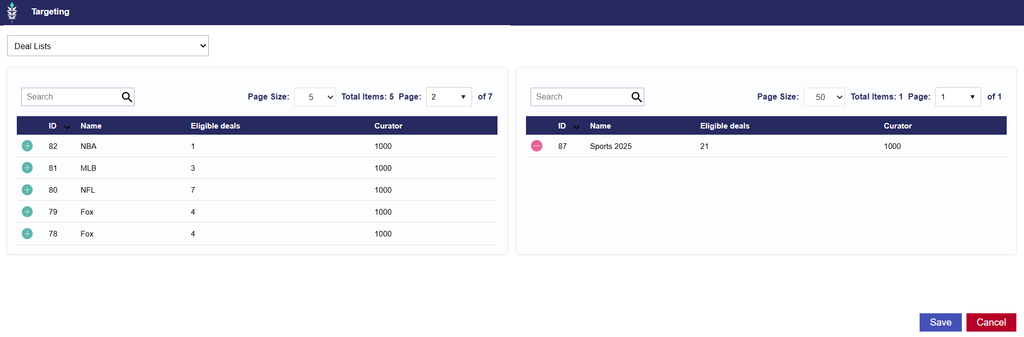
- Under Inventory, select Deal Lists from the Targeting dropdown menu.
- Select the green plus sign (+) next to the Deal List(s) you want to target.
- To remove a selected Deal List, use the red minus sign (−).
- Review the selected Deal List and select Save to apply the targeting configuration.
The Deals included in the selected list will be used as part of the Campaign or Line’s inventory targeting requirements.
Important Considerations
- Reusable Targeting
- A single Deal List can be used across multiple Campaigns and Lines, reducing the need to configure the same group of Deals repeatedly. This is useful when advertisers have a consistent set of preferred publisher Deals or inventory arrangements.
- Deal Availability
- Only Deals available and approved for the applicable Seat can be used for targeting.
- Exchange Compatibility
- Ensure that Exchange targeting does not exclude the Exchanges associated with the Deals contained in the selected Deal List.
- For example, if a Deal List includes Deals from Magnite, OpenX, and Index, all three Exchanges must remain eligible for their respective Deals to serve.
- Best Practice: When targeting inventory exclusively through Deals, either select all Exchanges or leave Exchange targeting unselected. Both approaches avoid unintentionally excluding an Exchange associated with a targeted Deal.
- Deal targeting will continue to restrict delivery to the selected Deals, regardless of whether all Exchanges are selected or Exchange targeting is left unselected.
- Campaign and Line Restrictions
- When Deal Lists are applied at both levels, review the included Deals to avoid conflicting or overly restrictive requirements.
- Inventory Availability
- Applying a Deal List does not guarantee delivery. The Deals included in the list must be active, available to the Seat, and receiving bid requests that satisfy the remaining Campaign and Line targeting requirements.
For additional instructions on creating and managing reusable Deal Lists, see the Deal Lists Documentation .
Exchanges
Exchanges control which supply-side platforms (SSPs) a Campaign or Line is eligible to purchase inventory through.
An Exchange connects buyers with inventory made available by publishers and supply partners. Exchange targeting allows users to select specific inventory sources or restrict delivery to a subset of supported Exchanges.
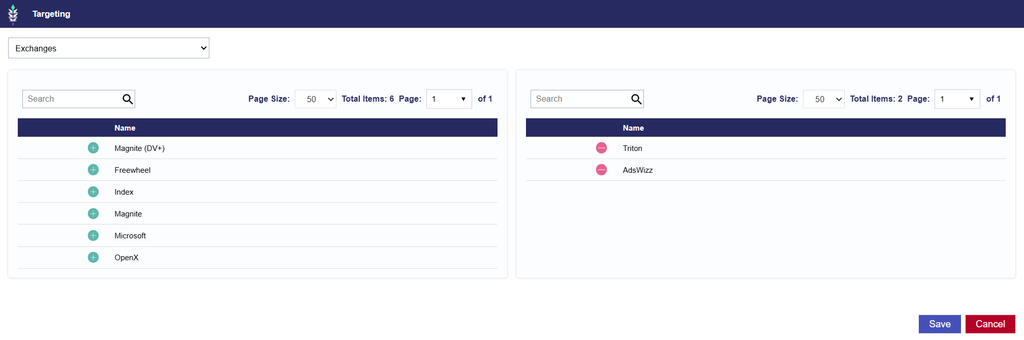
Select the applicable Exchanges to include them in the targeting configuration.
Pontiac supports the following Exchanges and media types:
| Exchange | Supported Media Types |
|---|---|
| AdsWizz | Audio |
| Magnite (DV+) | OLV, Audio, Display |
| Freewheel | Streaming/CTV, OLV |
| Index | Streaming/CTV, OLV, Display, Native, Audio |
| Magnite | Streaming/CTV, OLV |
| Microsoft | Streaming/CTV, OLV, Display |
| OpenX | Streaming/CTV, OLV, Display |
| Triton | Audio |
Configuring Exchange Targeting
- Navigate to the Targeting section of the applicable Campaign or Line.
- Under Inventory, select Exchanges from the Targeting dropdown menu.
- Select the Exchanges through which you want to purchase inventory.
- Review your selections and select Save to apply the targeting configuration.
Multiple Exchanges can be selected to access inventory across different supply sources.
If Exchange targeting is left unselected, no additional Exchange restriction is applied by this setting.
Important Considerations
- Media Type Compatibility
- Not every Exchange supports every media type. Select Exchanges that support the media type associated with your Campaign or Line.
- For example, a Campaign running exclusively Audio creatives should use Exchanges that support Audio inventory.
- Deal Compatibility
- When targeting Deals or Deal Lists, ensure that Exchange targeting does not exclude their associated Exchanges.
- For example, if a targeted Deal is available through OpenX but only Microsoft is added to the Exchange targeting, the Deal will not be eligible to serve. Either Target OpenX as an exchange or remove all exchanges.
- Campaign and Line Targeting
- Exchange restrictions are evaluated at both levels.
- Inventory Availability
- Selecting an Exchange does not guarantee that it will provide eligible inventory for every targeting combination.
- Available inventory may vary by media type, geography, device, publisher, and other targeting criteria.
Sites
Sites allow users to target or exclude individual website domains directly within Campaign or Line Targeting without creating a reusable Site List.
This option is useful when targeting a small number of specific websites or when a reusable list is not needed. Site targeting relies on the website domain information provided in the bid request to determine whether an impression satisfies the selected requirements.
Configuring Site Targeting
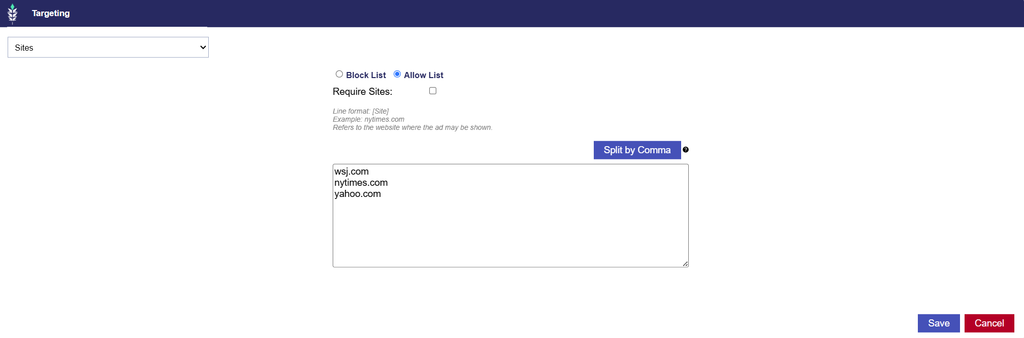
- Navigate to the Targeting section of the applicable Campaign or Line.
- Under Inventory, select Sites from the Targeting dropdown menu.
- Enter the applicable website domains.
- Select an Allow List or Block List based on the desired targeting strategy.
- Configure any additional options, such as Require Site.
- Select Save to apply the targeting configuration.
Targeting Methods
- Allow List: Restricts delivery to the specified website domains.
- Block List: Excludes the specified website domains from delivery.
Additional Options
- Require Site
- Enable this option to require the bid request to contain a Site value. Impressions without a Site value will be ineligible to serve.
- Split by Commas
- When entering multiple website domains separated by commas, select Split by Commas to automatically separate them into individual entries. This eliminates the need to enter each separately.
Important Considerations
- Site Information Availability
- Site targeting relies on the Site information provided in the bid request. If Require Site is enabled, impressions without the required Site information will be ineligible to serve.
- Direct Targeting vs. Site Lists
- Use Sites when targeting or excluding a small number of individual domains.
- For larger collections of domains or groups that need to be reused across multiple Campaigns or Lines, consider creating a Site List instead.
- Campaign and Line Targeting
- Site targeting configured at both levels is evaluated together. Ensure that the selected domains and targeting methods are aligned.
- For example, if a Campaign uses an Allow List containing one set of domains and an individual Line uses an Allow List containing a completely different set, the conflicting requirements will prevent delivery.
- Additional Inventory Restrictions
- Review Site targeting alongside Inventory Type, Site Lists, and other applicable inventory restrictions to ensure the settings are compatible.
Site List
Site Lists allow users to organize website domains into reusable lists that can be applied to Campaign or Line Targeting.
Rather than entering individual domains each time a Campaign or Line is created, users can create a Site List containing the desired domains and reuse it across multiple targeting configurations. This is particularly useful when advertisers want to consistently target or exclude the same group of websites across multiple Campaigns or Lines.
Site Lists are created and managed under Inventory > Site Lists. For detailed creation, editing, and management instructions, see the Site Lists Documentation .
Once created, a saved Site List becomes available for selection within Campaign or Line Targeting.
Configuring Site List Targeting
- Navigate to the Targeting section of the applicable Campaign or Line.
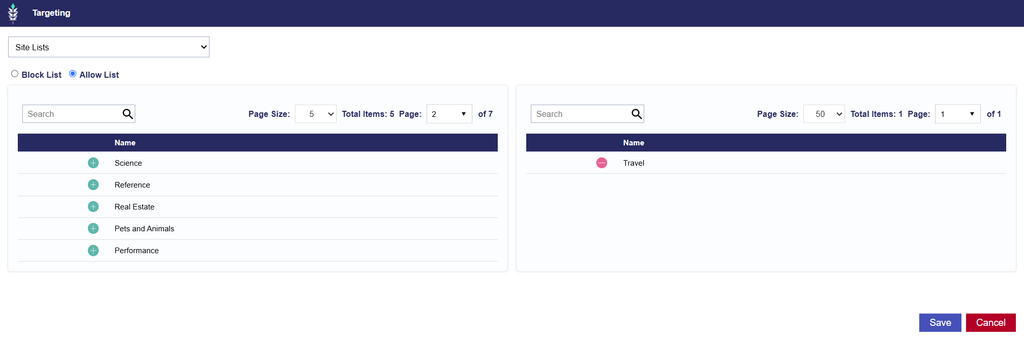
- Under Inventory, select Site Lists from the Targeting dropdown menu.
- Select an Allow List or Block List based on your targeting strategy.
- Select the green plus sign (+) next to each Site List you want to apply.
- To remove a selected Site List, select the red minus sign (−).
- Review the selected Site Lists and select Save to apply the targeting configuration.
Targeting Methods
- Allow List: Restricts delivery to the website domains included in the selected Site List.
- Block List: Excludes the website domains included in the selected Site List.
Important Considerations
- Reusable Targeting
- A single Site List can be applied to multiple Campaigns and Lines, reducing the need to repeatedly configure the same website domains.
- Site List Formatting
- When creating a Site List, enter each website domain on a separate line.
- When creating a Site List, enter each website domain on a separate line.
- Campaign and Line Targeting
- Site List targeting applied at the Campaign and Line levels is evaluated together. Review the selected lists and their included domains to ensure that the targeting requirements are compatible.
- Direct Sites Targeting
- If direct Sites targeting is also configured, review the individual domains and selected Site Lists together to avoid conflicting restrictions.
App Bundle
App Bundle allows users to target or exclude application inventory using the App Bundle identifier provided in the bid request.
An App Bundle is an identifier associated with a specific application. It allows advertisers to target an application using its identifier rather than relying on the reported App Name.
App Bundle identifiers may vary depending on the application, device, or operating system.
For example:
| App Bundle | Identifier format |
|---|---|
com.spectrumtv | Alphanumeric App Bundle identifier |
569077959 | Numeric App identifier |
Configuring App Bundle Targeting
- Navigate to the Targeting section of the applicable Campaign or Line.
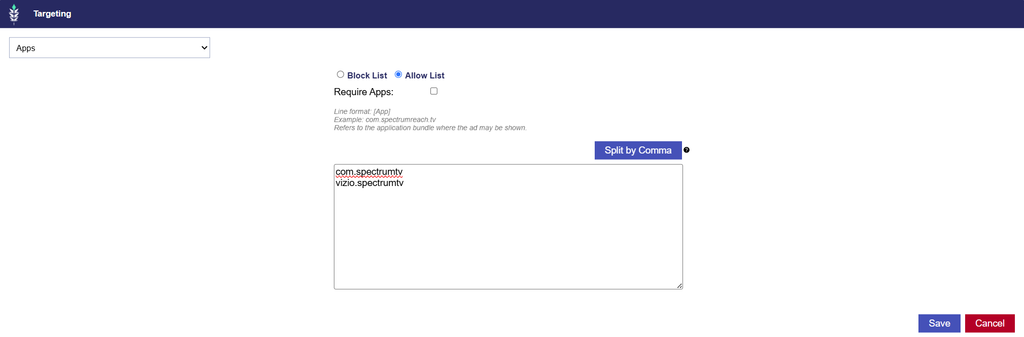
- Under Inventory, select App Bundle from the Targeting dropdown menu.
- Enter the applicable App Bundle identifiers.
- Select an Allow List or Block List based on your targeting strategy.
- Review the entered values and select Save to apply the targeting configuration.
Targeting Methods
- Allow List: Restricts delivery to inventory matching the specified App Bundle identifiers.
- Block List: Excludes inventory matching the specified App Bundle identifiers.
Additional Options
- Require Apps
- Enable this option to require the bid request to contain an App Bundle value. Impressions without an App Bundle value will be ineligible to serve.
- Split by Commas
- When entering multiple App Bundles separated by commas, select Split by Commas to automatically separate them into individual entries. This eliminates the need to enter each separately.
Important Considerations
- App Bundle Accuracy
- App Bundle targeting relies on the identifier provided in the bid request.
- Ensure that the entered values correspond to the applications you intend to target or exclude.
- Pull a custom report and select the App Bundle dimensions so see what is passed in the bid request.
- Operating System Differences
- The same application may use different App Bundle identifiers across operating systems or devices.
- For example, an application available on both Android and iOS may have different identifiers for each operating system.
- When targeting the same application across multiple environments, ensure that the applicable identifiers are included.
- App Bundle vs. App Name
- App Bundle targeting uses an application identifier, while App Name targeting uses the application name provided in the bid request.
- App Bundle targeting can provide a more specific way to identify an application when the correct identifier is known.
- Campaign and Line Targeting
- App Bundle targeting configured at both levels is evaluated together. Ensure that the selected identifiers and targeting methods are compatible.
- Direct Targeting vs. App Lists
- Use App Bundle targeting when applying individual identifiers directly.
- For larger groups of App Bundle identifiers or targeting that needs to be reused across multiple Campaigns or Lines, consider creating an App List instead.
App Name
App Name allows users to target or exclude application inventory based on the App Name provided in the bid request.
Unlike App Bundle targeting, which uses an application’s identifier, App Name targeting uses its reported name.
This option allows advertisers to include or exclude inventory based on application names rather than individual App Bundle IDs.
Configuring App Name Targeting
- Navigate to the Targeting section of the applicable Campaign or Line.
- Under Inventory, select App Name from the Targeting dropdown menu.
- Enter the applicable App Names.
- Select an Allow List or Block List based on your targeting strategy.
- Review the entered values and select Save to apply the targeting configuration.
Targeting Methods
- Allow List: Restricts delivery to inventory matching the specified App Name.
- Block List: Excludes inventory matching the specified App Name.
Additional Options
- Require Apps
- Enable this option to require the bid request to contain an App Name value. Impressions without an App Name value will be ineligible to serve.
- Split by Commas
- When entering multiple App Names separated by commas, select Split by Commas to automatically separate them into individual entries. This eliminates the need to enter each separately.
Important Considerations
- App Name Availability
- App Name targeting relies on the application name provided in the bid request.
- The availability and formatting of this information may vary by publisher and inventory source.
- Naming Variations
- The same application may be reported under slightly different names across different inventory sources.
- For example, an App’s display name may differ from the value passed by a publisher or SSP.
- Review available inventory or reporting data to confirm that the entered App Names align with the values provided in bid requests.
- App Name vs. App Bundle
- App Name targeting uses the reported application name, while App Bundle and App Lists targeting uses an application identifier.
- When a specific application identifier is known, App Bundle targeting can be used to target that identifier directly.
- App Name targeting can be used when the desired targeting strategy is based on application names.
- Campaign and Line Targeting
- App Name targeting configured at both levels is evaluated together. Ensure that the selected names and targeting methods are compatible.
- Additional App Restrictions
- If App Bundle targeting or App Lists are also applied, review all selected values together to avoid conflicting requirements or unintentionally restricting eligible inventory.
App List
App Lists allow users to organize multiple App Bundle identifiers into a reusable list that can be applied to Campaign or Line Targeting.
Rather than entering individual App Bundle IDs each time a Campaign or Line is created, users can create an App List containing the desired applications and reuse it across multiple targeting configurations. This is particularly useful when targeting a consistent group of applications across multiple Campaigns or Lines.
App Lists are created and managed under Inventory > App Lists. For detailed creation, editing, and management instructions, see the App Lists Documentation .
Once created, a saved App List becomes available for selection within Campaign or Line Targeting.
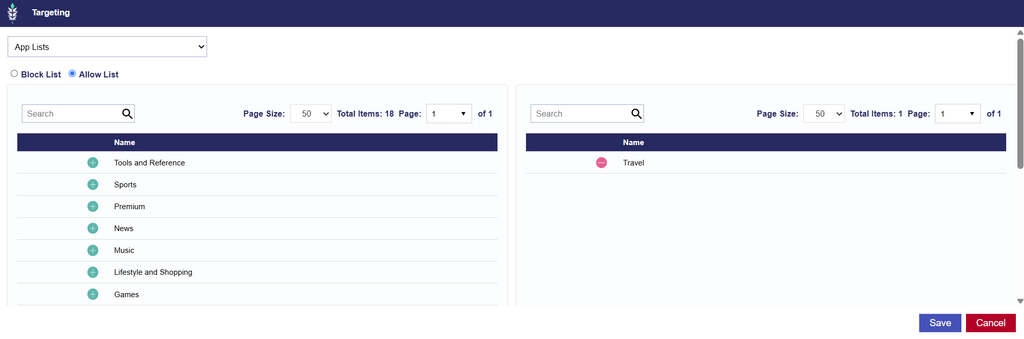
Configuring App List Targeting
- Navigate to the Targeting section of the applicable Campaign or Line.
- Under Inventory, select App Lists from the Targeting dropdown menu.
- Select an Allow List or Block List based on your targeting strategy.
- Select the green plus sign (+) next to each App List you want to apply.
- To remove a selected App List, select the red minus sign (−).
- Review the selected App Lists and select Save to apply the targeting configuration.
Targeting Methods
- Allow List: Restricts delivery to applications associated with the App Bundle identifiers included in the selected App List.
- Block List: Excludes applications associated with the App Bundle identifiers included in the selected App List.
Important Considerations
- Reusable Targeting
- A single App List can be applied to multiple Campaigns and Lines, reducing the need to configure the same group of applications repeatedly.
- App Bundle Formatting
- When creating an App List, enter each App Bundle identifier on a separate line.
- Both alphanumeric and numeric App Bundle identifiers are supported.
- Operating System Differences
- The same application may use different identifiers across operating systems or devices.
- Ensure the App List includes the appropriate identifiers for the intended inventory.
- Campaign and Line Targeting
- App List targeting configured at both the Campaign and Line levels is evaluated together. Review the included App Bundle identifiers and targeting methods to ensure that the requirements are compatible.
- Additional App Restrictions
- If direct App Bundle or App Name targeting is also configured, review these settings alongside the selected App Lists to avoid conflicting restrictions.
- Inventory Availability
- Applying an App List does not guarantee delivery. The included applications must have available inventory that satisfies the remaining Campaign and Line targeting requirements.
Curation — Line Level Only
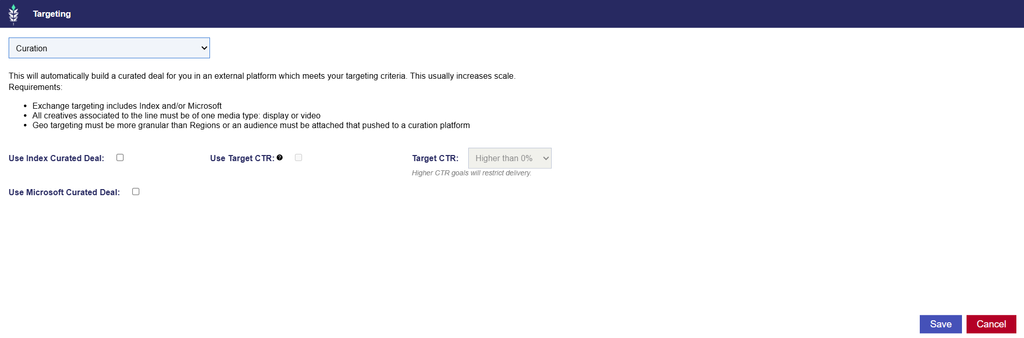
Curation is available under Inventory at the Line level only. It allows users to automatically create a curated Deal through Index or Microsoft using the Line’s targeting configuration.
For full documentation, see Line Targeting > Curation.
When enabled, Pontiac creates a Deal in the selected partner’s marketplace that mirrors the applicable Line targeting parameters and automatically associates it with the Line. This can help increase scale by making inventory available through a curated Deal without requiring manual Deal creation.
Curation supports Display and Video Campaigns.
Available Curation Options
- Index Curation: Enable Use Index Curated Deal to automatically create a curated Deal through Index Exchange.
- Index Curation – Target CTR (Optional): Index Curation also provides an optional Use Target CTR feature that attempts to filter inventory based on a selected Click-Through Rate (CTR) goal.
- When enabled, select a Target CTR threshold from the available dropdown options.
- Important: Higher CTR goals introduce more restrictive inventory filtering and may limit delivery.
- Microsoft Curation: Enable Use Microsoft Curated Deal to automatically create a curated Deal through Microsoft Exchange.
Both options can be enabled on the same Line and require the following:
- Exchange targeting includes Index and/or Microsoft
- All creatives associated to the line must be of one media type: display or video
- Geo targeting must be more granular than Regions or an audience must be attached that pushed to a curation platform
Configuring Curation Targeting
- Create a new Line or open an existing Line in Edit mode.
- Navigate to the Targeting section.
- Under Inventory, select Curation from the Targeting dropdown menu.
- Enable Use Index Curated Deal and/or Use Microsoft Curated Deal.
- Confirm that the Line meets the applicable Exchange, creative, and targeting requirements.
- Select Save to apply the targeting configuration.