Content
Content Targeting allows users to include or exclude inventory based on publisher and content metadata provided in the bid request.
These settings can be used to target specific channels, networks, publishers, genres, programs, and other content identifiers. They are particularly useful for Connected TV (CTV) and Online Video (OLV) campaigns where content-level information is available.
Content Targeting can be configured at both the Campaign and Line levels:
- Campaign Targeting: Applies shared content requirements to every Line within the Campaign.
- Line Targeting: Allows users to apply additional content restrictions to an individual Line.
The following Content Targeting options are available:
| Targeting Field | Description |
|---|---|
| Channel | The channel associated with the content or impression. |
| Content ID | An identifier associated with a specific piece of content. |
| Genre | The category or genre associated with the content. |
| Network | The network associated with the content. |
| Publisher | The publisher associated with the content. |
| Series | The series associated with the content. |
| Title | The title associated with the content. |
| Multi Field | Allows values to be matched across multiple supported content fields. |
How to Access Content Targeting
- Create a new Campaign or Line, or open an existing one in Edit mode.
- Navigate to the Targeting section.
- Select Edit Targeting.
- Under Content, select the applicable targeting field from the Targeting dropdown menu.
- Enter the desired values and configure the targeting options.
- Select Save to apply the targeting configuration.
- Complete and save the Campaign or Line configuration.
Each Content targeting field supports the following controls.
Targeting Methods
- Allow List: Restricts delivery to impressions matching the entered values. For example, entering
comedyin a Genre Allow List restricts delivery to inventory where the Genre value matchescomedy. Multiple values can be entered. An impression can match any of the allowed values within the selected field, but must still satisfy all other applicable targeting requirements. - Block List: Excludes impressions matching the entered values. For example, entering
comedyin a Genre Block List excludes inventory where the Genre value matchescomedy.
Additional Options
- Require Field: Each Content targeting section includes a Require option specific to that field, such as Require Channel, Require Genre, or Require Publisher. Enable this option to require the corresponding metadata field to be present in the bid request. For example, enabling Require Genre makes impressions without a Genre value ineligible to serve. Require Field can be used alongside an Allow List or Block List when the advertiser requires that information to be available.
- Split by Commas: The Split by Commas button allows users to enter multiple targeting values separated by commas and automatically separate them into individual entries. For example, entering: comedy, drama, documentary and selecting Split by Commas separates the values into three individual entries.This is useful when adding multiple values without entering each one separately.
Important: Content Targeting relies on metadata provided by publishers and supply-side platforms (SSPs). The availability and formatting of this information can vary. Review available inventory and reporting data before applying highly restrictive content targeting.
Channel
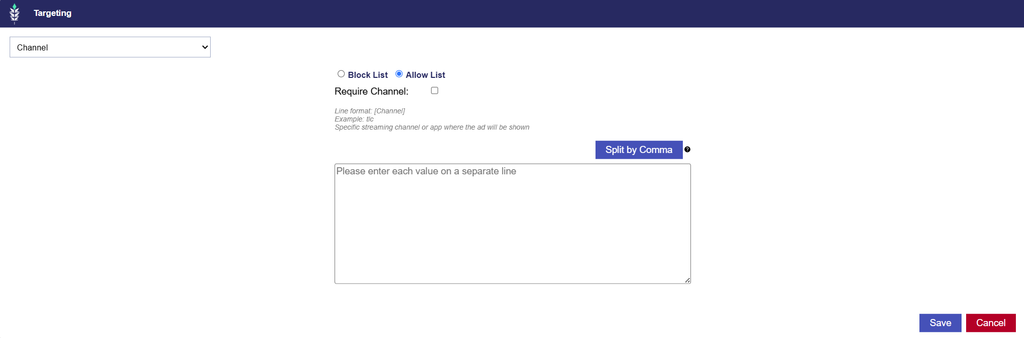
Channel Targeting allows users to include or exclude inventory based on the Channel value provided in the bid request.
A Channel identifies the content channel associated with an impression. It can be used to target particular television or streaming channels when that information is provided by the inventory source.
For example, a publisher may identify a channel using a value such as tlc.
Configuring Channel Targeting
- Under Content, select Channel from the Targeting dropdown menu.
- Enter the applicable Channel values.
- Select an Allow List or Block List.
- Optionally, enable Require Channel to exclude impressions without Channel information.
- Use Split by Commas if entering multiple comma-separated values.
- Select Save to apply the targeting configuration.
Important Considerations
- Channel Value Accuracy
- Channel targeting matches against the Channel value provided in the bid request. Enter values that correspond to the channel metadata available through your intended inventory sources.
- Channel vs. Network
- A Channel and a Network may represent different levels of content organization.
- For example, a publisher may pass a channel name in the Channel field and a broader network name in the Network field.
- Targeting a value under Channel does not automatically search for that value in the Network field.
- Campaign and Line Targeting
- Channel restrictions configured at both levels are evaluated together. Ensure that the selected values and targeting methods are compatible.
Content ID
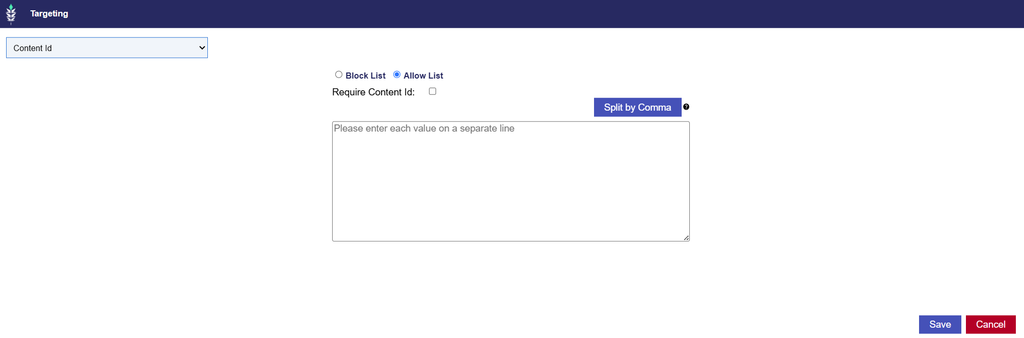
Content ID Targeting allows users to include or exclude inventory based on the Content ID provided in the bid request.
A Content ID is an identifier assigned to a specific piece of content by a publisher or content provider. It can provide a way to target content using an identifier rather than relying on a program or title name.
Content IDs may be alphanumeric or use other identifier formats, depending on the publisher.
Configuring Content ID Targeting
- Under Content, select Content ID from the Targeting dropdown menu.
- Enter the applicable Content IDs.
- Select an Allow List or Block List.
- Optionally, enable Require Content ID to exclude impressions without Content ID information.
- Use Split by Commas if entering multiple comma-separated identifiers.
- Select Save to apply the targeting configuration.
Important Considerations
- Content ID Accuracy
- Content ID targeting relies on the identifier provided in the bid request. Confirm that the entered IDs correspond to the specific content you intend to target or exclude.
- Publisher-Specific Identifiers
- Different publishers may use different identifiers for the same or similar content.
- A Content ID from one publisher should not be assumed to identify that content across all inventory sources.
- Content ID vs. Title
- Content ID targets an identifier, while Title targets the name provided in the Title field.
- For example, a publisher may provide an internal identifier for a program or episode separately from its readable title.
- Use the field that corresponds to the information available in the intended inventory.
- Campaign and Line Targeting
- Ensure that Content ID restrictions are compatible with all other content targeting requirements, including Series and Title targeting.
Genre
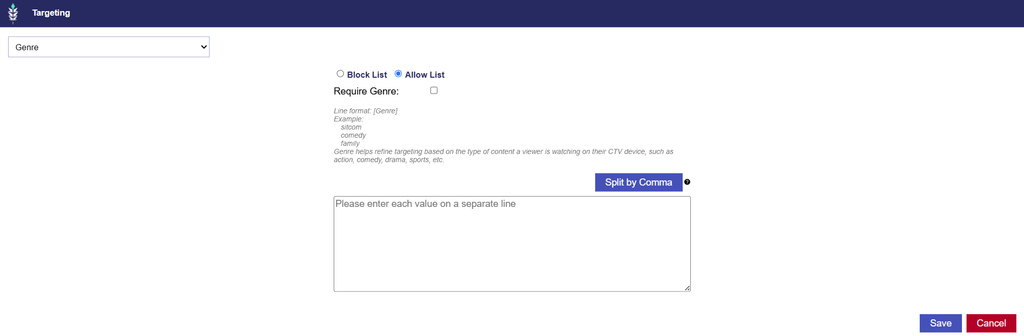
Genre Targeting allows users to include or exclude inventory based on the Genre metadata provided in the bid request.
A Genre describes the category or type of content associated with an impression.
For example, a publisher may provide Genre values such as:
- comedy
- drama
- documentary
- sports
Genre Targeting is useful when advertisers want to reach inventory associated with particular content categories without targeting individual programs, channels, or publishers.
Configuring Genre Targeting
- Under Content, select Genre from the Targeting dropdown menu.
- Enter the applicable Genre values.
- Select an Allow List or Block List.
- Optionally, enable Require Genre to exclude impressions without Genre information.
- Use Split by Commas if entering multiple comma-separated Genres.
- Select Save to apply the targeting configuration.
Important Considerations
- Genre Naming Conventions
- Genre values may vary across publishers and inventory sources.
- For example, similar programming may be classified using different Genre labels. Review the values available in your inventory before applying an Allow List.
- Multiple Genre Values
- If multiple Genres are entered in an Allow List, an impression can match any of the allowed values within the Genre field.
- For example, entering
comedyanddramaallows inventory matching either value, provided all other targeting requirements are satisfied.
- Genre vs. Other Content Fields
- Genre identifies a content category rather than a specific publisher, channel, series, or title.
- When Genre Targeting is combined with other content restrictions, the impression must satisfy all applicable requirements.
- Inventory Availability
- Restrictive Genre Targeting may reduce available inventory if publishers do not consistently provide Genre metadata or use values that differ from those entered.
Network
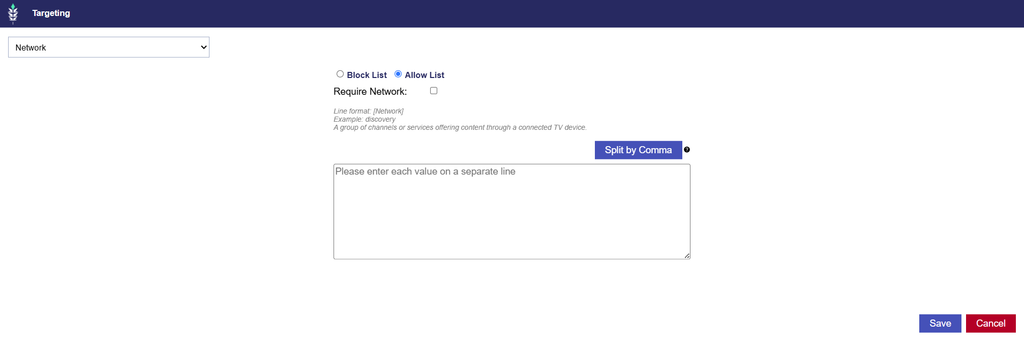
Network Targeting allows users to include or exclude inventory based on the Network value provided in the bid request.
A Network identifies the television or media network associated with the content.
For example, a publisher may provide a Network value such as discovery.
Network Targeting is useful when advertisers want to target content associated with specific networks rather than individual titles or episodes.
Configuring Network Targeting
- Under Content, select Network from the Targeting dropdown menu.
- Enter the applicable Network values.
- Select an Allow List or Block List.
- Optionally, enable Require Network to exclude impressions without Network information.
- Use Split by Commas if entering multiple comma-separated values.
- Select Save to apply the targeting configuration.
Important Considerations
- Network vs. Channel
- Network and Channel are separate metadata fields.
- A media brand may be identified as a Network by one publisher and a Channel by another.
- If the same value may appear in different content fields across inventory sources, consider using Multi Field Targeting.
- Matching Network Values
- Network Targeting matches the value provided in the Network field. It does not automatically search other content fields for the same value.
- Campaign and Line Targeting
- Network restrictions at both levels are evaluated together. Review the selected values to ensure they do not create conflicting requirements.
Publisher
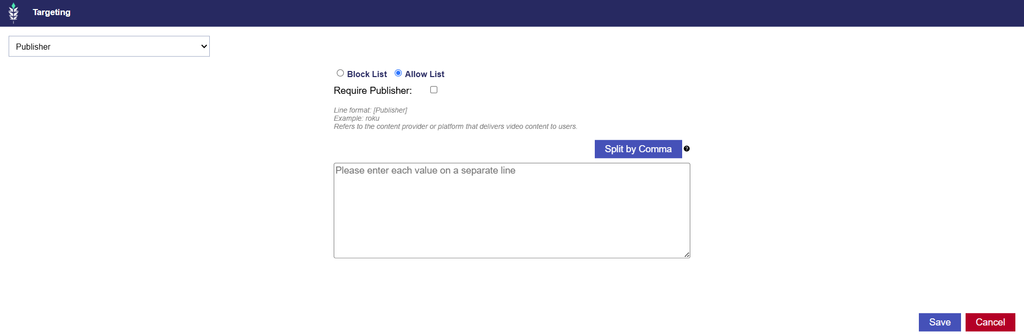
Publisher Targeting allows users to include or exclude inventory based on the Publisher value provided in the bid request.
A Publisher identifies the publishing entity associated with the content or inventory.
For example, a bid request may contain a Publisher value such as roku.
Publisher Targeting is useful when advertisers want to restrict delivery based on the publisher identified in the content metadata.
Configuring Publisher Targeting
- Under Content, select Publisher from the Targeting dropdown menu.
- Enter the applicable Publisher values.
- Select an Allow List or Block List.
- Optionally, enable Require Publisher to exclude impressions without Publisher information.
- Use Split by Commas if entering multiple comma-separated Publishers.
- Select Save to apply the targeting configuration.
Important Considerations
- Publisher vs. Network and Channel
- Publisher, Network, and Channel are distinct targeting fields.
- A media brand may appear in different fields depending on how the publisher or SSP structures its bid request.
- For example, a value may appear as Publisher in one inventory source but as Network or Channel in another.
- Use Multi Field when the goal is to match a value across supported content fields rather than requiring it to appear exclusively in Publisher.
- Publisher Metadata vs. App Targeting
- Publisher Targeting uses the Publisher value in the content metadata.
- It should not be confused with App Bundle or App Name targeting, which uses application information.
- If the objective is to target a specific application, review the App Bundle, App Name, or App List targeting options under Inventory.
- Inventory Availability
- Publisher information may not be consistently available across all inventory sources. Enabling Require Publisher or applying a restrictive Publisher Allow List can reduce eligible inventory.
Series
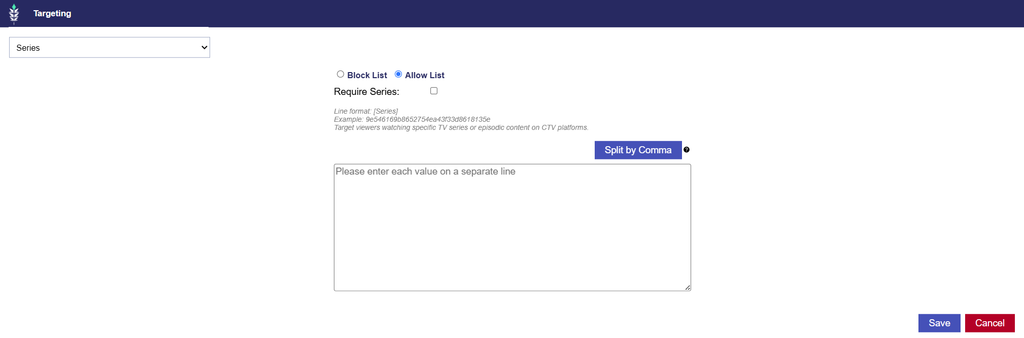
Series Targeting allows users to include or exclude inventory based on the Series metadata provided in the bid request.
A Series identifies the television program or series associated with the content.
Depending on the publisher, this information may be represented as a readable series name or an identifier.
For example, a publisher may provide a Series name such as:
law & order: special victims unitSeries Targeting is useful when advertisers want to target content associated with particular programs rather than an entire network or genre.
Configuring Series Targeting
- Under Content, select Series from the Targeting dropdown menu.
- Enter the applicable Series values.
- Select an Allow List or Block List.
- Optionally, enable Require Series to exclude impressions without Series information.
- Use Split by Commas if entering multiple comma-separated values.
- Select Save to apply the targeting configuration.
Important Considerations
- Series Value Formatting
- Series metadata may be provided as a name or identifier, depending on the publisher.
- Use the value actually provided in the Series field rather than assuming that the program’s public-facing name will match.
- Series vs. Title
- Series typically identifies the broader program, while Title identifies the title associated with a specific piece of content.
- For example, a bid request may identify a television series separately from an episode title.
- The exact information provided in each field can vary by publisher.
- Inventory Availability
- Series-level metadata is not available in every bid request. Enable Require Series only when impressions without that information should be excluded.
- Campaign and Line Targeting
- Review Series Targeting alongside Title, Content ID, Genre, and other applicable requirements to ensure the settings are compatible.
Title
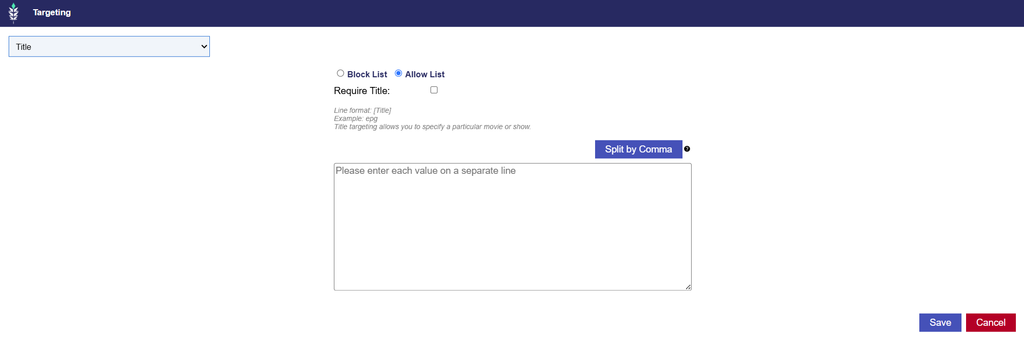
Title Targeting allows users to include or exclude inventory based on the Title metadata provided in the bid request.
A Title identifies the name or title associated with the content being viewed.
Depending on the publisher, this may represent a program, movie, episode, or another piece of content.
Title Targeting is useful when advertisers want to target or exclude specific content titles rather than broader categories such as Genres or Networks.
Configuring Title Targeting
- Under Content, select Title from the Targeting dropdown menu.
- Enter the applicable Title values.
- Select an Allow List or Block List.
- Optionally, enable Require Title to exclude impressions without Title information.
- Use Split by Commas if entering multiple comma-separated Titles.
- Select Save to apply the targeting configuration.
Important Considerations
- Title Matching
- Title Targeting relies on the Title value provided in the bid request.
- Differences in naming conventions, punctuation, spacing, or the use of episode titles instead of series names may prevent the intended content from matching.
- Review the available Title values before configuring restrictive targeting.
- Title vs. Series
- Title and Series are separate fields. A publisher may provide the program name in Series and the episode name in Title.
- If the objective is to target an entire television series, confirm which metadata field contains the relevant value for the intended inventory.
- Content Metadata Availability
- Not all publishers provide Title metadata for every impression.
- Enabling Require Title excludes impressions without this information.
- Campaign and Line Targeting
- Title restrictions are evaluated together with all other applicable content targeting requirements.
- For example, a Line targeting a specific Title must also satisfy any Genre, Network, or Publisher restrictions applied at the Campaign level.
Multi Field
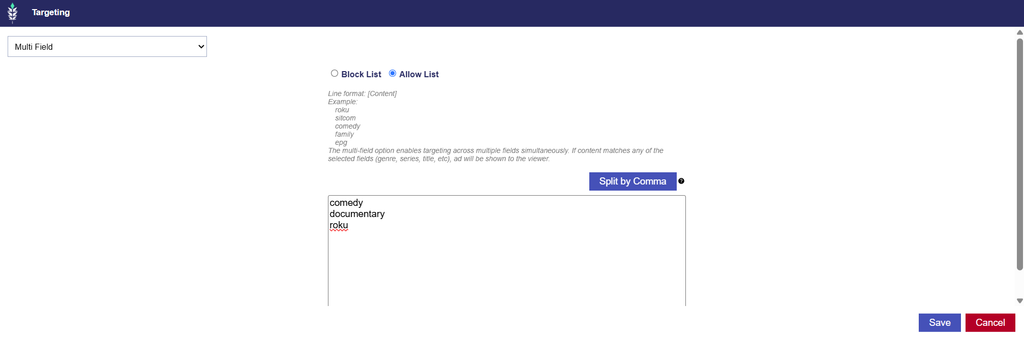
Multi Field Targeting allows users to include or exclude inventory by matching entered values across multiple supported content fields simultaneously.
Unlike individual content targeting options, which evaluate values within a specific field, Multi Field searches across the supported content fields.
This is useful when the same content value may be provided in different fields depending on the publisher or inventory source.
For example, a media brand may appear as Publisher in one bid request, Network in another, or Channel in another.
Instead of entering the same value separately in each field, Multi Field allows users to target it across the supported fields.
Configuring Multi Field Targeting
- Under Content, select Multi Field from the Targeting dropdown menu.
- Enter the content values you want to target or exclude.
- Select an Allow List or Block List.
- Optionally, enable Require Multi Field to require applicable content-field information.
- Use Split by Commas if entering multiple comma-separated values.
- Select Save to apply the targeting configuration.
Important Considerations
- Multi Field vs. Individual Content Fields
- Use individual Content targeting fields when the value must match a specific metadata field.
- Use Multi Field when a value may appear across different supported fields and you do not want to restrict matching to a single field.
For example:
| Targeting Configuration | Matching Behavior |
|---|---|
Publisher Allow List: roku | Matches roku in the Publisher field. |
Network Allow List: roku | Matches roku in the Network field. |
Multi Field Allow List: roku | Matches roku in any supported content field. |
- Additional Content Restrictions
- Multi Field Targeting does not override other targeting requirements.
- For example, if a Campaign has a Publisher Allow List and a Line has a Multi Field Allow List, the impression must satisfy both requirements.
- Inventory Availability
- Multi Field can accommodate variations in where content values are supplied, but it does not guarantee additional inventory or delivery. The relevant metadata and matching values must still be present in eligible bid requests.
Matching Content Values
Content Targeting depends on the values provided in the bid request. To target the intended inventory accurately, entered values must align with the corresponding publisher or content metadata. Matching is case-insensitive, but other formatting differences may prevent a match. For example, differences in spaces, underscores, punctuation, or naming conventions can affect whether an entered value matches the available inventory.
Field-Specific Matching
Individual Content targeting fields evaluate values against the corresponding field in the bid request.
For example:
| Configured Targeting | Bid Request | Result |
|---|---|---|
Channel Allow List: tlc | Channel: TLC | Matches |
Channel Allow List: tlc | Network: tlc, Channel: another value | Does not satisfy the Channel Allow List |
Genre Allow List: comedy | Genre: COMEDY | Matches |
Publisher Allow List: roku | Channel: roku, Publisher: another value | Does not satisfy the Publisher Allow List |
Multi Field is the exception: it evaluates entered values across multiple supported content fields rather than requiring a match in one specific field.
Content Metadata Availability
Publishers and SSPs may provide different levels of content information. Some bid requests include detailed Publisher, Network, Channel, Series, and Title metadata, while others provide only a subset of these fields.
When a Require option is enabled, impressions without the corresponding metadata are ineligible to serve.
Restrictive Allow Lists can also reduce delivery when the requested content values are not present in available inventory.
Campaign and Line Compatibility
Content Targeting configured at the Campaign and Line levels is evaluated together.
For example, a Campaign targeting a specific Publisher and a Line targeting a specific Genre will only serve impressions that satisfy both requirements.
Conflicting or overly restrictive combinations may result in limited or no eligible impressions.
Best Practice: Use Pontiac’s Inventory Availability Tool, sample logs, and reporting data to review the content metadata available from your intended publishers and Exchanges before applying restrictive Content Targeting. Confirm that the values and fields you enter correspond to the inventory you want to reach.