Audience Targeting
Audience Targeting allows users to apply Custom, Third Party, Contextual, and ART Audiences to a Campaign or Line.
Audiences can be organized into groups and combined using Boolean logic to create more specific targeting strategies.
Audience Targeting can be configured at both the Campaign and Line levels:
- Campaign Targeting: Applies shared Audience requirements to all Lines within the Campaign.
- Line Targeting: Allows users to apply additional Audience requirements to an individual Line.
Configuring Audience Targeting
- Create a new Campaign or Line, or open an existing one in Edit mode.
- Navigate to the Audience section.
- Select Add New Group.
- Drag and drop the applicable Audiences to the group.
- Toggle the Target method between groups:
- Any
- All
- If needed, create additional Audience Groups and configure the Boolean logic used to combine them.
- Review your selections and save the Campaign or Line configuration.
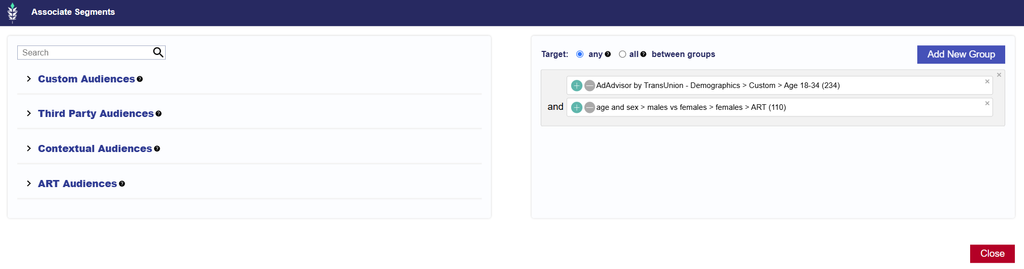
For detailed instructions on selecting and applying Audience segments, see the Associate Segments Documentation .
Audience Groups and Boolean Logic
Audience Groups allow users to organize multiple Audiences and define how they work together.
Boolean logic determines whether an impression must satisfy multiple Audience conditions or can qualify by meeting one of several conditions.
For example:
| Logic | Description |
|---|---|
| AND | Requires the impression to satisfy both Audience conditions. |
| OR | Allows the impression to satisfy either Audience condition. |
Multiple Audience Groups can be combined to create more complex targeting strategies.
For additional explanations and configuration examples, see the Boolean Logic Documentation .
Important Considerations
- Campaign and Line Association
- Audience associations configured at the Campaign and Line levels is evaluated together. Ensure the selected Audiences and Boolean logic do not create conflicting or overly restrictive requirements.
- Audience Availability
- Audience eligibility depends on the selected segment, available inventory, and the information required to identify qualifying impressions. Applying multiple restrictive Audience requirements may reduce available inventory.
- Additional Targeting Requirements
- Audience Targeting does not override other targeting settings. Impressions must also satisfy all applicable Inventory, Location & Device, Content, and other Campaign and Line requirements.
- Best Practice: Review the Audience Groups and their Boolean logic before saving to ensure they reflect your intended targeting strategy. For step-by-step setup instructions, refer to the Associate Segments and Boolean Logic documentation linked above.