Sub Seat Reporting
Sub Seat Reporting allows users on a Master Seat to review performance across associated Sub Seats. This provides a centralized view of Sub Seat activity without requiring users to switch into each individual Sub Seat.
To access Sub Seat Reporting, navigate to: Master Seat > Sub Seats > Reporting
The Sub Seats section includes separate Seats, Reporting, and Pacing tabs. The Reporting tab provides both Standard Reporting and Custom Reporting for Sub Seat activity.
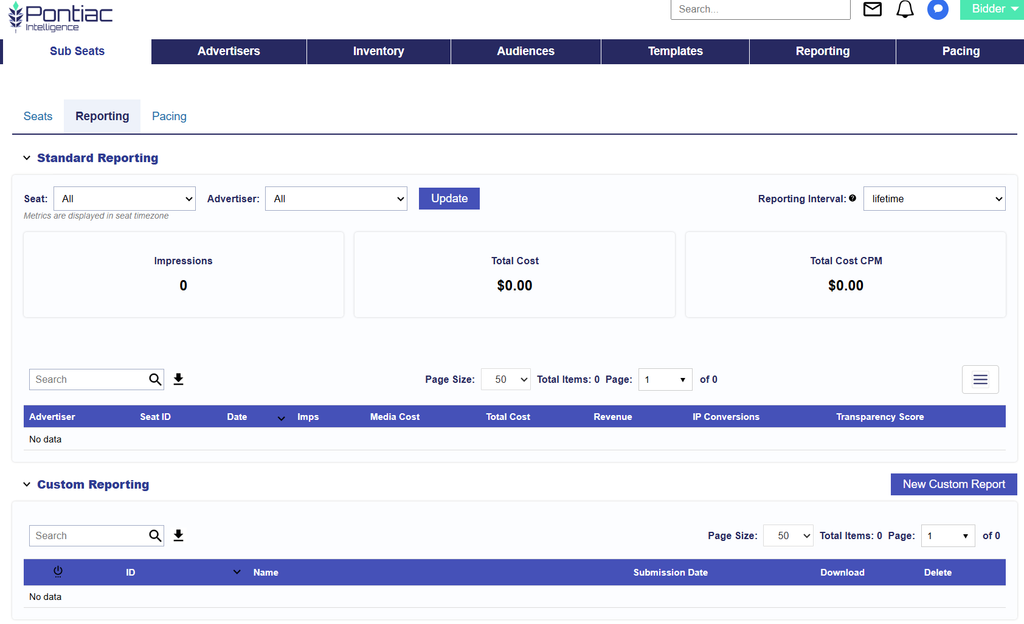
Standard Reporting
The Standard Reporting section provides a summary and downloadable table of performance across selected Sub Seats and Advertisers.
Use the following filters to define the reporting view:
- Seats: Select the Sub Seats to include in the report.
- Advertiser: Select the applicable Advertiser.
- Reporting Interval: Select the date range for the reported activity.
Performance Summary
The performance tiles display:
- Impressions: The total number of Impressions served for the selected filters and Reporting Interval.
- Total Cost: The total cost associated with the selected Sub-Seat activity.
- Total Cost CPM: The Total Cost per thousand Impressions.
Reporting Table
The table provides detailed Sub Seat performance and can be downloaded for additional analysis.
Available columns include:
- Advertiser: The name of the Advertiser associated with the reported activity.
- Seat ID: The unique Pontiac ID assigned to the Sub-Seat.
- Date: The date associated with the reported activity.
- Imps: The total number of Impressions served.
- Media Cost: The cost of purchased media before applicable DSP fees.
- Total Cost: The total cost of the purchased media including applicable DSP fees.
- Revenue: The total amount billed to the Advertiser, calculated as Total Cost plus the Advertiser Margin.
- IP Conversions: The number of attributed IP Conversion events associated with the reported activity.
- Transparency Score: The inventory transparency score associated with the reported activity.
Select the Download option to export the table for further analysis.
Custom Reporting
The Custom Reporting section allows Master Seat users to create configurable reports for Sub-Seat activity.
Select New Custom Report to create a report using the same Custom Reporting options available elsewhere in Pontiac, including applicable:
- Advertisers
- Reporting Interval
- Time Zone
- Dimensions
- Metrics
- Scheduled Report settings
See Custom Reporting for complete setup instructions, report types, available Dimensions and Metrics, and Scheduled Reporting configuration.