Pontiac Wiki Pontiac Wiki

Reporting Overview

Reporting Overview

  • Reporting Timezones
  • Standard Reporting vs Custom Reporting
  1. Home
  2. Bidder Documentation
  3. Reporting
  4. Reporting Overview

Reporting Timezones

Reporting data can be displayed or generated in different timezones depending on the reporting tool and selected settings. When comparing reports or reconciling metrics across Pontiac, confirm that the same timezone is being used.

  • Seat Timezone: The default account timezone configured under Admin > Seat Settings > Preferences. It is used for applicable platform reporting and Advertiser-\ level metrics.
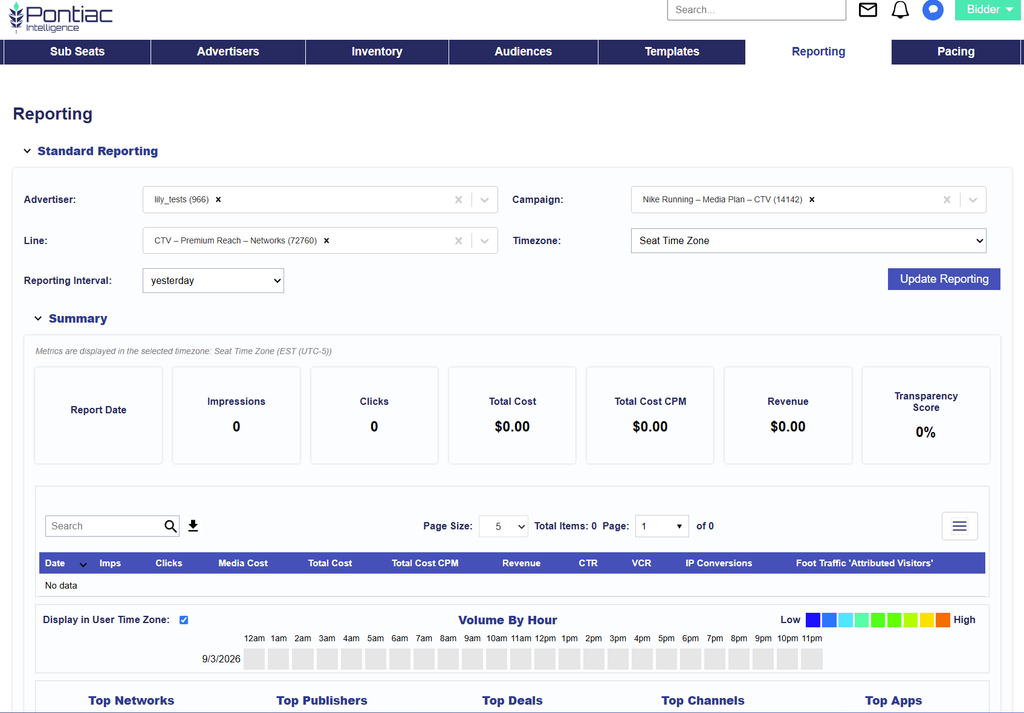
  • Selected Reporting Timezone: Standard Reporting allows users to select the timezone used to display report metrics. The selected timezone applies across the Standard Reporting views.
  • User Timezone: Uses the user timezone offset passed with each impression to display activity based on the local time where the impression was served. If a user timezone offset is unavailable, the impression defaults to UTC.
  • UTC: The standard timezone used for billing and account activity. When reconciling reporting against billing metrics, use UTC.

Different timezone selections can cause the same activity to appear under different dates or hours. For example, an impression served late in the evening in Pacific Time may fall on the following calendar day when viewed in UTC.

For the most accurate comparisons, use the same Reporting Interval and Timezone across the reports or platform views being compared.

Important: Reporting timezones do not control Campaign pacing or dayparting. Pacing and dayparting use the timezone configured for the applicable Campaign or Line.
Standard Reporting vs Custom Reporting

The Reporting tab provides tools to analyze Campaign performance, compare delivery across different dimensions, and create downloadable reports for additional analysis.

Pontiac provides two primary reporting options:

  1. Standard Reporting: An interactive reporting dashboard for reviewing performance directly in the platform. Select an Advertiser, Campaign, and applicable Lines to analyze performance through summary metrics, charts, tables, inventory breakdowns, Creative performance, geographic reporting, and other views.
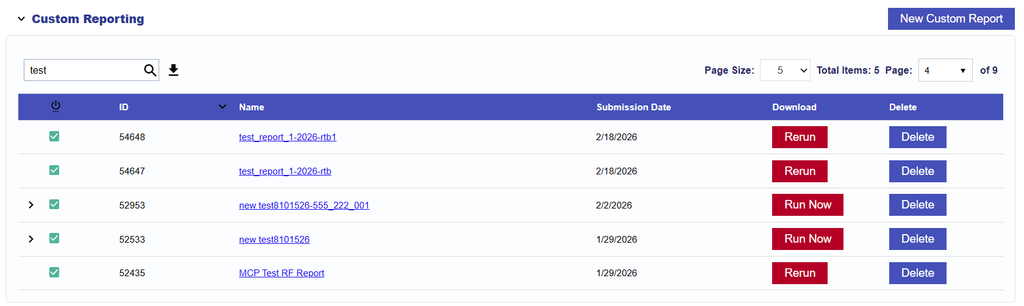
  1. Custom Reporting: A configurable reporting tool that allows users to select specific Advertisers, Campaigns, Lines, dimensions, metrics, date ranges, and other report settings to generate downloadable reports. Custom Reports can also be scheduled for automated delivery.

Use Standard Reporting for quick performance analysis and visual comparisons within Pontiac. Use Custom Reporting when you need a specific data breakdown, additional dimensions or metrics, conversion reporting, log-level data, or recurring report delivery.

Reporting OptionBest ForOutput
Standard ReportingInteractive Campaign analysis, trends, comparisons, and visualizationsCharts, tables, and CSV downloads within Pontiac
Custom ReportingDetailed data exports, custom dimensions and metrics, attribution reports, and recurring reportingDownloadable reports or scheduled delivery

© 2026 Pontiac Wiki Sec · All Rights Reserved · Developed by RDK

  • Contact Us
  • Privacy Policy
  • Terms & Conditions
  • Pontiac.media