Foot Traffic Studies
Foot Traffic Attribution, powered by OnSpot, allows Advertisers to measure visits to tracked commercial Locations following Ad exposure through Pontiac.
Attribution uses Mobile Advertising IDs and mobile GPS location data to identify users who were served an Ad and were later observed at a configured Location.
How Foot Traffic Attribution Works
- Mobile Attribution: OnSpot identifies users who were served an Ad and whose mobile device was later detected at a tracked Location.
- CTV Household Extension: For CTV Campaigns, household extension can associate TVs, desktops, and laptops with mobile devices using household IP relationships. Mobile GPS data can then be used to attribute a Location visit to an exposed household.
- Availability: Foot Traffic Attribution is currently available only in the United States.
- Location Limit: Each Line can track up to 200 Locations.
Set Up Foot Traffic Attribution
Foot Traffic Attribution is configured at the Line level.
- Create or edit the applicable Line.
- Enable Foot Traffic in the Line Setup section.
- Open the Foot Traffic Reporting section.
- Select Add Location and configure the Locations to track.
- Save the Line.
See Line Foot Traffic Reporting for additional information about adding and managing Locations.
Foot Traffic Fee: A Foot Traffic fee may apply when Foot Traffic Attribution is enabled. The fee amount is configured at the Seat level and may vary by account. Contact your Account Manager or reach out through the Help Center if you have questions about the applicable fee.
Foot Traffic Report Availability
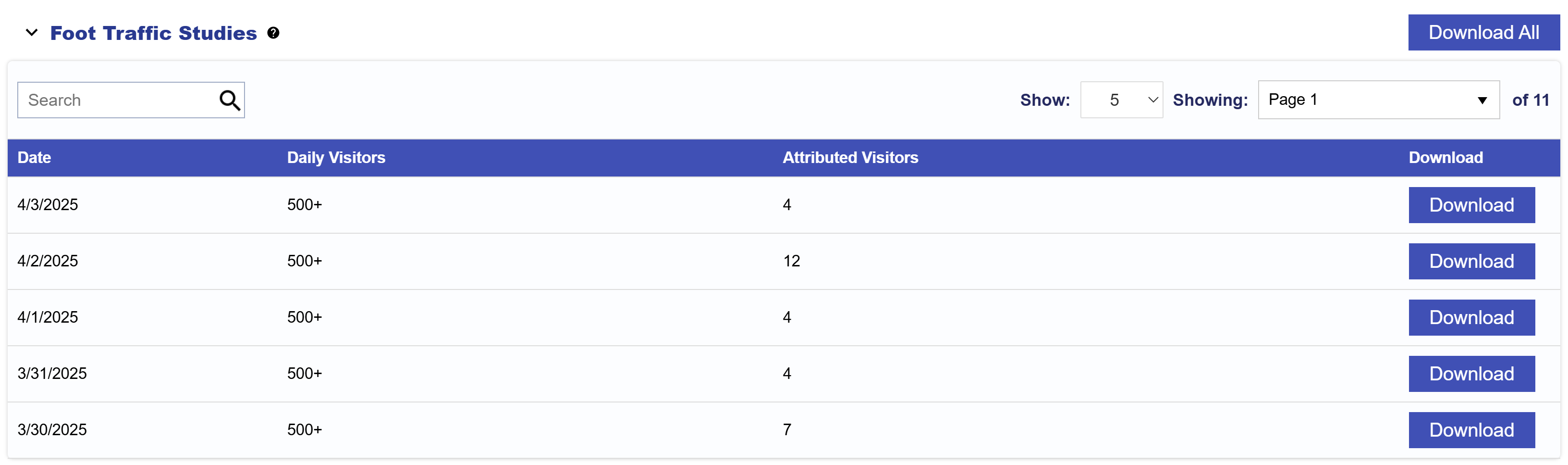
Foot Traffic Studies are generated daily with a 5-day reporting delay.
For example, Foot Traffic activity recorded on January 15 will become available in the report generated on January 20.
To download a Foot Traffic Study:
- Navigate to Reporting > Foot Traffic Studies.
- Locate the applicable report date.
- Select Download to retrieve an individual report or Download All to retrieve all available reports.
Report Fields
Foot Traffic Study reports include the following fields:
- Date: The date associated with the reported Foot Traffic activity.
- Line ID: The unique Pontiac ID assigned to the Line.
- Line Name: The name of the Line.
- Campaign ID: The unique Pontiac ID assigned to the Campaign containing the Line.
- Campaign Name: The name of the Campaign containing the Line.
- Location ID: The unique identifier assigned to the tracked Location.
- Location Name: The name assigned to the tracked Location.
- Daily Visitors: The total number of visitors recorded at the Location on the report date. This metric can help confirm that the Location is receiving visitor activity. If no visitors are recorded, review the Location setup or contact your Account Manager or through the Help Center for assistance.
- Attributed Visitors: The number of users who were served an Ad from the Campaign and subsequently visited the tracked Location on the report date.