Query String Macro Parameters
After a Pixel has been generated, optional query string parameters can be added to pass additional information with each Pixel fire. When enabled, the corresponding parameters and placeholders are added to the Pixel URL.
Work with your web developer to dynamically replace each placeholder with the appropriate value before the Pixel fires. Values passed through these parameters are available in Custom Reporting and can provide additional insight into campaign-driven conversions.
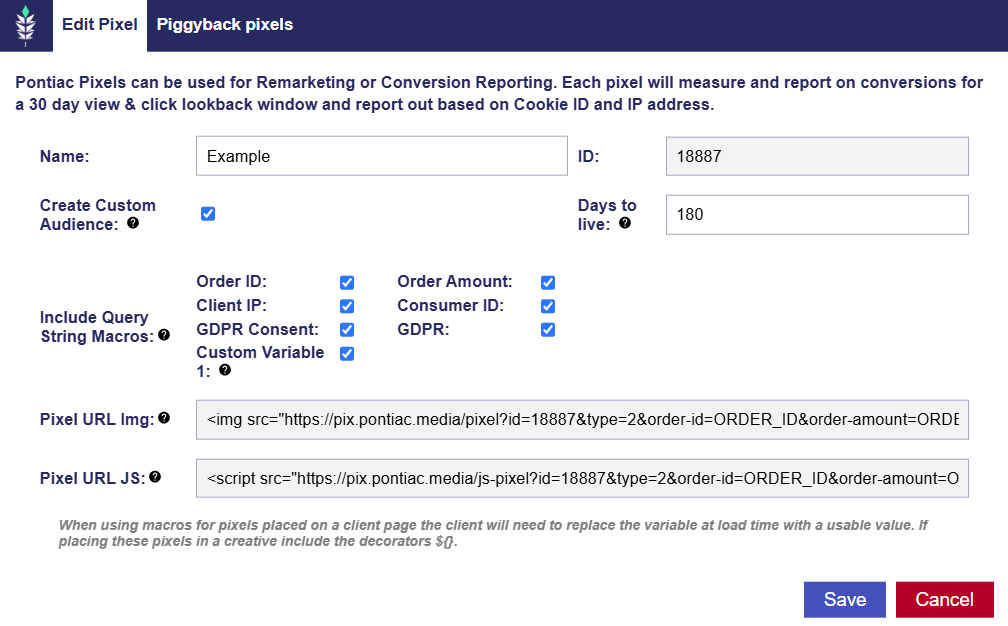
- Order ID: Passes the unique order or transaction ID generated by your site.
- Order Amount: Passes the value associated with the conversion or order. This can be used in reporting for metrics such as revenue and ROAS.
- Consumer ID: Passes a unique customer, lead, or visitor identifier generated by your site.
- Client IP: Passes the visitor IP address observed by your website when the Pixel fires. This can be useful when the Pixel is implemented through a container or another environment where the IP address detected directly by the Pixel may not represent the visitor accurately. When provided, the Client IP value is used for attribution and reporting.
- GDPR Consent: Passes the visitor’s IAB TCF consent string when applicable. This value should be populated dynamically using consent information collected by the website or Consent Management Platform (CMP).
- GDPR: Indicates whether GDPR applies to the visitor associated with the Pixel fire, typically using
1when GDPR applies and0when it does not.- For additional information, see GDPR Query String Macros.
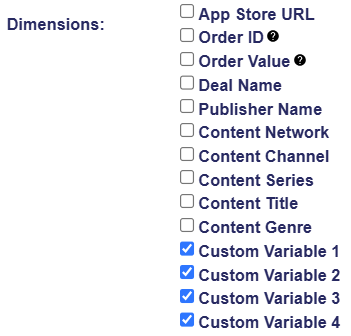
- Custom Variable 1: Adds
var1=VAR1to the Pixel URL and makes the value available as Custom Variable 1 in Custom Reporting. Additional values can be passed usingvar2,var3, andvar4.- Applicable Report Types:
- IP Conversion Pixel: Path to Conversion
- IP Conversion Pixel: Page Visits
- Cookies: Path to Conversion
- Applicable Report Types: