Campaign Pacing Tab
The Pacing tab provides a centralized view of Campaign pacing and delivery across the current Seat. Use this table to identify Campaigns that are underpacing, on pace, or overpacing and quickly review current and historical delivery.
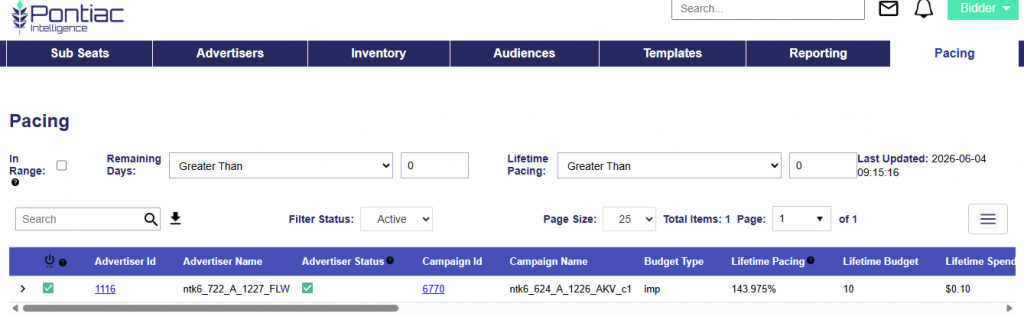
Campaign and Line Pacing
Each Campaign row can be expanded to display the Lines contained within that Campaign. This allows users to review Campaign-level pacing and then drill down into Line-level delivery without leaving the Pacing tab.
Select the expand arrow next to a Campaign to display its associated Lines. The Line-level table includes pacing and delivery metrics such as Lifetime Pacing, Lifetime Budget, Lifetime Spend, Lifetime Impressions, Yesterday and Today delivery, and other available Line-level fields.
Use the expanded view to identify whether a Campaign pacing issue may be associated with a specific Line and select the applicable Line ID to navigate directly to the Line for further investigation or adjustments.
Table Filters
Use the filters above the table to narrow the Campaigns displayed:
- In Range: Show only Campaigns with a flight that includes the current date.
- Remaining Days: Filter Campaigns based on the number of days remaining in the flight. Available operators include:
- Less Than
- Less Than or Equal To
- Equal To
- Greater Than or Equal To
- Greater Than
- Lifetime Pacing: Filter Campaigns based on their Lifetime Pacing percentage. Available operators include:
- Less Than
- Less Than or Equal To
- Equal To
- Greater Than or Equal To
- Greater Than
Enter a value after selecting an operator to identify Campaigns that meet the applicable Remaining Days or Lifetime Pacing criteria.
Use the Search bar to locate Campaigns by keyword or ID. Select the Download icon next to the Search bar to export the table as a CSV file.
Columns
- Campaign Status: Indicates the current status of the Campaign.
- Green indicates Active.
- Red indicates Inactive.
- A yellow warning icon indicates an issue that may prevent the Campaign from serving. Hover over the icon to view the warning.
- Advertiser Status: Indicates the status of the Advertiser associated with the Campaign.
- Green indicates Active.
- Red indicates Inactive.
- An Active Campaign under an Inactive Advertiser is not eligible to serve.
- Campaign ID: The unique Pontiac ID assigned to the Campaign.
- Campaign Name: The name of the Campaign.
- Budget Type: Indicates whether Campaign delivery is budgeted by Spend or Impressions.
- If the Campaign is budgeted by impressions, this metric will display the lifetime budget in impressions.
- If the Campaign is budgeted by spend, this metric will display the lifetime budget in dollars with a $ sign.
- Lifetime Pacing: Compares actual Campaign delivery through yesterday with the delivery expected based on the Campaign flight dates and Lifetime Budget. This metric updates daily and does not include today’s delivery.
- A Lifetime Pacing value near
100%indicates that delivery is aligned with expected pacing. - As a general reference, 90%–110% indicates that the Campaign is near expected pacing.
- A Lifetime Pacing value near
- Lifetime Budget: The total Campaign budget for the full flight.
- For an Impression-budgeted Campaign, the value is displayed in Impressions.
- For a Spend-budgeted Campaign, the value is displayed in dollars.
- Lifetime Spend: The total Campaign spend to date. This metric is updated hourly.
- Lifetime Imps: The total number of Impressions served to date. This metric is updated hourly.
- Yesterday Budget: The Campaign’s Daily Budget for the previous day.
- For an Impression-budgeted Campaign, the value is displayed in Impressions.
- For a Spend-budgeted Campaign, the value is displayed in dollars.
- Yesterday Spend: The total amount spent during the previous day.
- Yesterday Imps: The total number of Impressions served during the previous day.
- Yesterday Pacing: Indicates whether the Campaign is pacing to deliver its remaining budget if delivery continues at the rate observed yesterday.
- ((Lifetime Budget – Delivery to Date) ÷ Remaining Days) ÷ Yesterday’s Delivery
- Delivery is evaluated using Spend or Impressions based on the Campaign’s Budget Type.
- Today Budget: The Campaign’s Daily Budget for the current day.
- For an Impression-budgeted Campaign, the value is displayed in Impressions.
- For a Spend-budgeted Campaign, the value is displayed in dollars.
- Today Spend: The total amount spent today.
- Today Imps: The total number of Impressions served today.
- Today Pacing: Indicates whether the Campaign is pacing to deliver its remaining budget if delivery continues at the rate observed so far today.
- ((Lifetime Budget – Delivery to Date) ÷ Remaining Days) ÷ Today’s Delivery
- Delivery is evaluated using Spend or Impressions based on the Campaign’s Budget Type.
- Start Date: The Campaign Start Date.
- End Date: The Campaign End Date.
- CPM: The Campaign’s Lifetime Cost per thousand Impressions through yesterday.
- CTR: The Campaign’s Lifetime click-through rate through yesterday, calculated as Clicks divided by Impressions.
- Conversions: The Lifetime number of conversions attributed to the Campaign through yesterday.
- Remaining Days: The number of days remaining until the Campaign End Date.