Troubleshoot Checks
The Troubleshoot section on the Line Performance tab automatically runs a series of checks to help identify common delivery blockers related to Campaign and Line setup, Audiences, Creatives, Deals, budgets, Dayparts, Targeting, bidding, and auction performance.
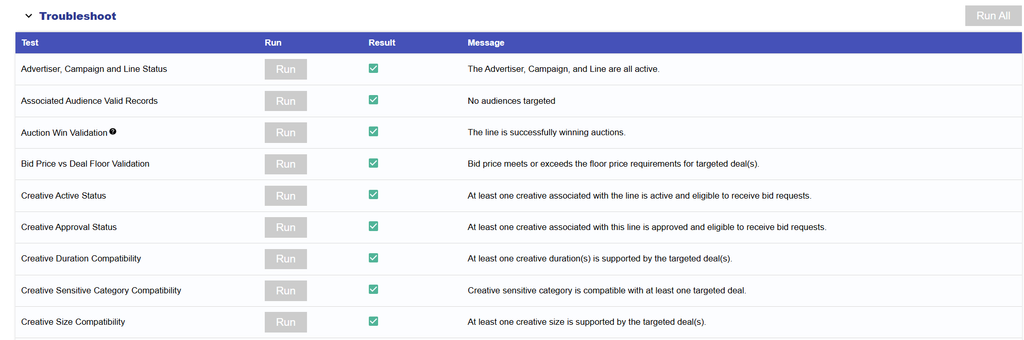
Troubleshoot Checks
The Troubleshoot section on the Line Performance tab automatically runs a series of checks to help identify common delivery blockers related to Campaign and Line setup, Audiences, Creatives, Deals, budgets, Dayparts, Targeting, bidding, and auction performance.
Troubleshoot Checks can return:
- Pass: The applicable delivery requirement is satisfied.
- Warning: The check could not be fully verified or part of the configuration requires review.
- Fail: The check identified a condition that may prevent or limit delivery.
Available checks include:
- Advertiser, Campaign, and Line Status: Confirms that the Advertiser, Campaign, and Line are all Active.
- Associated Audience Valid Records: Confirms that associated Audiences contain valid records that can be used for Targeting.
- Auction Win Validation: Confirms that the Line has recently won auctions and served Impressions.
- Bid Price vs. Deal Floor Validation: Confirms that the Line’s bid meets or exceeds the floor price of targeted Deals.
- Creative Active Status: Confirms that at least one associated Creative is Active.
- Creative Approval Status: Confirms that at least one associated Creative is approved and eligible to serve.
- Creative Duration Compatibility: Confirms that at least one associated video or audio Creative duration is supported by the targeted Deals.
- Creative Size Compatibility: Confirms that at least one associated Creative size is supported by the targeted Deals.
- Creative Sensitive Category Compatibility: Confirms that Creatives with sensitive categories are targeted to inventory that allows those categories.
- Daily Budget: Confirms that the Line has a calculated Daily Budget greater than zero and has remaining budget available to spend.
- Dayparts Status: Confirms whether the Line is currently inside an active Daypart window and eligible to serve.
- Deal Bid Request Availability: Confirms that targeted Deals are actively sending bid requests.
- Deal Device Type Compatibility: Confirms that targeted Device Types align with Device Types observed on the targeted Deals.
- Deal Exchange Compatibility: Confirms that targeted Exchanges align with the Exchanges serving the targeted Deals.
- Deal Inventory Type Compatibility: Confirms that the Line’s selected Inventory Type is compatible with at least one targeted Deal.
- Deal Media Type Compatibility: Confirms that the associated Creative type is compatible with the Media Type of at least one targeted Deal.
- Deal Publisher Approval Status: Confirms that applicable publisher approval requirements have been satisfied.
- Deal Required Field Presence: Confirms that targeted Deals are passing any fields required for the Line’s configuration.
- Deal Targeting Intersection: Confirms that Campaign- and Line-level Deal Targeting overlap.
- Device Targeting Intersection: Confirms that Campaign- and Line-level Device Targeting overlap.
- Exchange Targeting Intersection: Confirms that Campaign- and Line-level Exchange Targeting overlap.
- Geo Targeting Intersection: Confirms that Campaign- and Line-level Geo Targeting overlap.
- Microsoft Creative Audit Approval: When applicable, confirms that at least one associated Creative is approved for the Microsoft exchange.
Use Troubleshoot Checks together with Bid Data, Blockers, and Inventory Availability to determine where delivery may be restricted.
Note: If no Deals are targeted and the Line is using open exchange inventory, Deal-specific checks are treated as not applicable.
For complete Pass, Warning, and Fail messages, detailed check logic, and recommended troubleshooting steps, see Troubleshoot Feature.