Line Creatives
Creatives can be managed at the Line level when different Lines within a Campaign require different Creative sets. Creatives must first be created under the Line’s Advertiser.
Use Line-level Creative management when Creatives should be associated with individual Lines rather than inherited across the Campaign. For example, a Campaign may contain separate Video, Audio, and Banner Lines. Managing Creatives at the Line level allows the applicable Creative assets to be associated only with the appropriate Line.
If Manage Creatives is enabled on the parent Campaign, Creatives are managed at the Campaign level and cannot be associated independently at the Line level. See Campaign Creatives
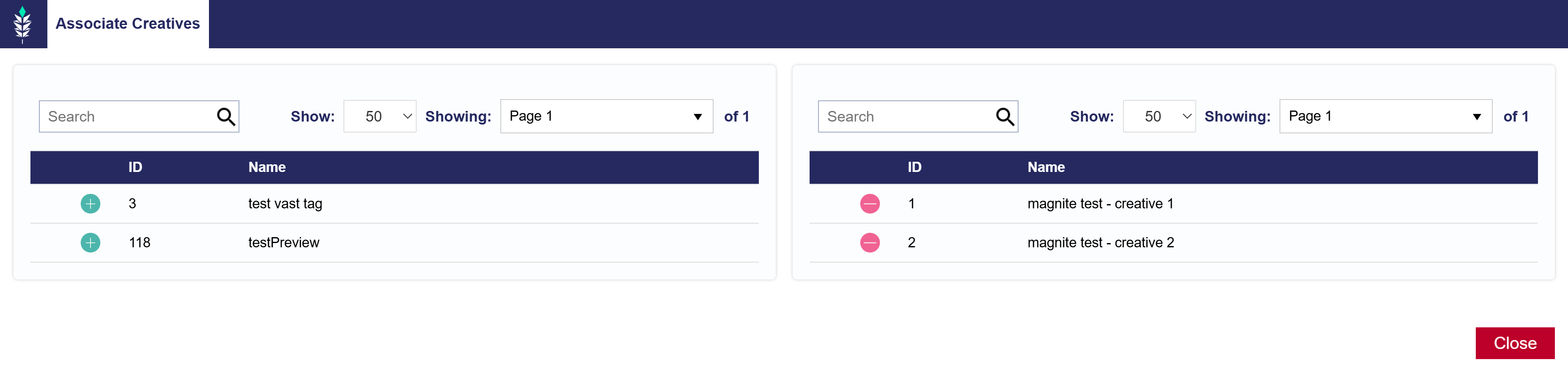
Associate a Creative to a Line
- Open the applicable Line and select Edit.
- Navigate to the Creatives section.
- Select Associate Creatives.
- Select the green plus sign (+) next to the applicable Creative or Creatives.
- To remove an associated Creative, use the red minus sign (−).
- Repeat as needed to associate additional Creatives with the Line.
- Review the associated Creatives and close the Associate Creatives window.
- Select Submit to save the Line.
Repeat this process for other Lines when different Creative sets are required.
For information on creating, uploading, editing, auditing, eligibility, and general Creative management, see the Creatives documentation.