Inventory Overview
The Inventory section provides the tools used to identify, organize, and target the Sites, App Bundles, and Deals where Campaigns and Lines may be eligible to serve.
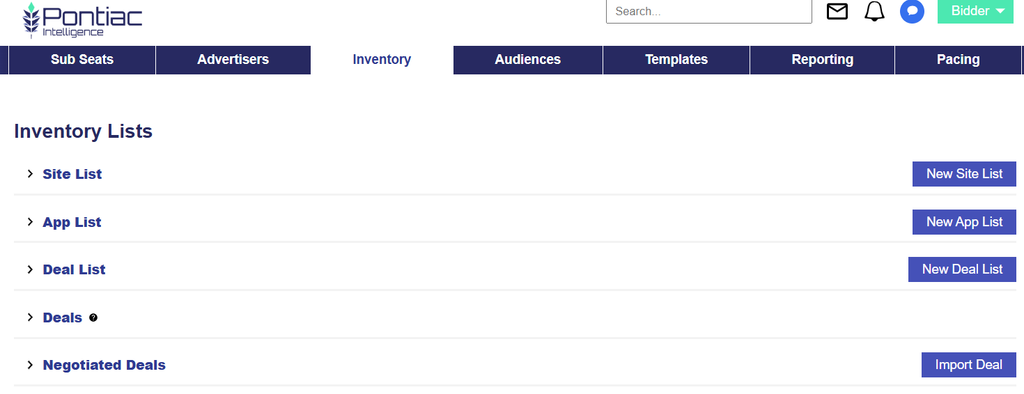
From the Inventory tab, users can:
- Create and manage custom Site Lists, App Lists, and Deal Lists
- Browse available Deals
- View and manage Negotiated Deals
- Review inventory availability, pricing, Media Types, Inventory Types, Device Types, publisher requirements, and other Deal details
- Review sample bid requests to better understand available inventory
- Import eligible Negotiated or Programmatic Guaranteed Deals
- Use Inventory resources for targeting at the Campaign or Line level
er targeting settings, such as Device Type, Media Type, Deal, Site, App, Geography, Audience, or Creative requirements, do not align.
Inventory Hierarchy
Inventory resources are managed from the Inventory tab and can then be associated with Campaigns or Lines for targeting.
Seat
├── Inventory
│   ├── Site Lists
│   ├── App Lists
│   ├── Deal Lists
│   ├── Deals
│   └── Negotiated Deals
└── Advertisers
    └── Campaigns
        └── Lines
Custom Site, App, and Deal Lists created in the Inventory tab become available within the applicable Campaign and Line Targeting sections. Deals can also be targeted directly at either level. When targeting is applied at both the Campaign and Line levels, the settings must remain aligned for inventory to remain eligible.