Deals
The Deals section displays the Deals available through Pontiac. Use the table to evaluate inventory availability and determine whether a Deal aligns with the Campaign or Line’s media, inventory, device, Creative, geographic, and bidding requirements.
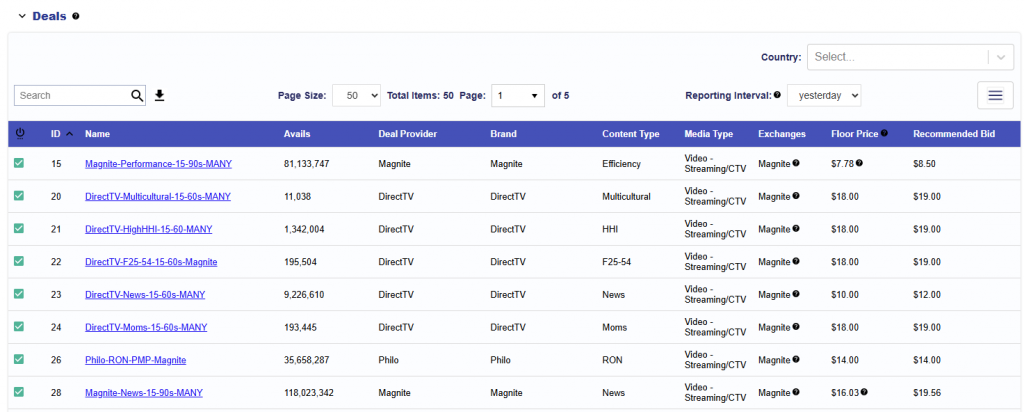
Users can download the table as a CSV for additional review.
Deal Table Fields
The Deals table includes the following columns:
- Deal ID: Pontiac Deal ID.
- Name: The deal name. This field is editable.
- Avails: The estimated number of bid requests observed for the Deal during the selected Reporting Interval. Avails indicates available request volume and should not be interpreted as expected impressions or guaranteed delivery.
- Deal Provider: The provider associated with the deal.
- Brand: The brand associated with the deal.
- Content Type: The content type associated with the deal.
- Media Type: The media type that the deal is set up to serve.
- Video – Streaming/CTV
- Video – Online (OLV)
- Video – Combined
- Audio – Combined
- Audio – Podcast
- Audio – Streaming
- Display
- Native
- Unspecified
- Exchanges: The exchange the deal is served through.
- Magnite (DV+)
- Freewheel
- Index
- Magnite
- Microsoft
- Triton
- Adswizz
- Floor Price: The minimum CPM required to bid on the Deal.
- Use the Floor Price as a starting point for bid guidance. For the Max Bid, it is generally recommended to begin approximately $2-5 above the Floor Price to remain competitive in the RTB auction. Once the Line is achieving the desired scale, gradually test lower bids to identify the most efficient bid level while maintaining delivery.
- Recommended Bid: The recommended bid price for the deal.
- Livestream: Indicates whether live content is coming through the deal. Hover over this field to see the percentage breakdown by type.
- Livestream
- VOD
- Unknown
- Duration: The creative duration intervals coming through the deal. Hover over this field to see the percentage breakdown by duration.
- 15s
- 30s
- 45s
- 60s
- 90s
- Sizes: The creative sizes coming through the deal. Hover over this field to see the percentage breakdown by size.
- Auction Type: The auction types coming through the deal. Hover over this field to see the percentage breakdown by auction type.
- First Price
- Second Price Plus
- Device Types: The device types coming through the deal. Hover over this field to see the percentage breakdown by device type.
- Mobile/Tablet
- Personal Computer
- Connected TV
- Phone
- Tablet
- Connected Device
- Set Top Box
- Unknown
- Countries: Shows the countries associated with the Deal. This field is populated based on observed Deal traffic. Hover over the field to view the percentage breakdown by country.
- Permitted Sensitive Categories: The sensitive categories that are allowed to serve on the deal. Possible values include:
- Beer & Wine
- CBD
- Cannabis
- Firearms & Weapons
- Gambling
- Lawyer
- Liquor
- Pharma
- Political
- Religion
- Tobacco
- Publisher Approval Required: Indicates whether additional publisher approval is required for the Deal. If required, the applicable approval group may include:
- ABC News
- Approved by Freewheel
- Disney XP
- Disney+
- ESPN
- Hulu
- Samsung Political
- Notes: Additional notes associated with the Deal.
- Start Date: The deal start date, if applicable.
- End Date: The deal end date, if applicable.
- Last Served Date: The most recent date the Deal served.
- Action: Indicates whether the Deal is already available or whether access can be requested.
- All deals will be approved within 24 hours after being requested.
- Once approved, these can be targeted by individually targeting them or by creating a Deal List and adding them to the Campaign targeting section.
- Creative Types: Shows the creative types the deal serves to and the percentage breakdown for each creative type. Possible values include:
- Video
- Audio
- Banner
- HTML5
- Native
- Inventory Types: Shows the inventory type of the deal. Hover over this field to see the percentage breakdown by inventory type. Possible values include:
- Web
- In App
- Combined
Checking Deal Compatibility
When selecting a Deal, compare the Campaign or Line configuration against the corresponding fields in the Deals table to confirm that the inventory supports the intended strategy. Targeting a Deal does not override other Campaign or Line targeting requirements. Requests from the Deal must still satisfy all applicable Inventory Type, Device, Geography, Audience, Creative, and other targeting settings.
| Campaign / Line Setting | Deals Table Field |
|---|---|
| Inventory Type | Inventory Types |
| Media strategy | Media Type |
| Creative format | Creative Types |
| Device targeting | Device Types |
| Exchange targeting | Exchanges |
| Country targeting | Countries |
| Video/Audio duration | Duration |
| Creative size | Sizes |
| Livestream targeting | Livestream |
| Sensitive Creative | Permitted Sensitive Categories |
| Creative approval | Publisher Approval Required |
| Bid configuration | Floor Price / Recommended Bid |
| Available scale | Avails |
A Deal may align with one setting but still be ineligible because of another. Review the applicable fields together when configuring or troubleshooting Campaign delivery.
Sample Bid Requests
Select a hyperlinked Deal Name in the Inventory > Deals or Inventory > Negotiated Deals table to review sample bid requests received for that Deal. Sample requests provide a closer look at the inventory attributes being passed to Pontiac by the publisher or SSP.
Users can review or download these logs when validating Deal setup, confirming available inventory, or troubleshooting why a Deal may not align with Campaign or Line targeting.
The fields available in a sample request may vary depending on the Exchange, publisher, Media Type, and Inventory Type.
When troubleshooting delivery, compare the values observed in the sample bid requests with the applicable Campaign and Line targeting settings. A Deal may be receiving bid requests but still be ineligible to serve if the incoming requests do not satisfy all configured targeting requirements.
The deal_id value in the sample logs corresponds to the RTB Deal ID / External Deal ID rather than the Pontiac internal Deal ID.
Sample Download: For reference, download sample bid requests for Spectrum-LiveSports-CTV-OTT-Freewheel (Pontiac Deal ID: 556) to see an example of the inventory information available in these logs.
Inventory Type Compatibility
The Line’s selected Inventory Type must be compatible with the inventory available through the targeted Deal:
- Web Line: Compatible with Deals showing Web or Combined under Inventory Types.
- In App Line: Compatible with Deals showing In App or Combined under Inventory Types.
- Combined Line: Compatible with Deals showing Web, In App, or Combined inventory.
For example, an In App Line targeting a Deal that only shows Web inventory would not be eligible to serve through that Deal.
For example, an In App Line targeting a Deal that only shows Web inventory would not be eligible to serve through that Deal.
A compatible Inventory Type does not guarantee that the Deal is fully aligned with the Line. Review other applicable fields, including Media Type, Creative Types, Device Types, Exchanges, Countries, Duration, Sizes, and any publisher or Creative requirements.
Requesting and Targeting Deals
Deal access requests are generally approved within 24 hours. Once a Deal is available to the Seat, it can be targeted individually or through a Deal List.
To target an individual Deal:
- Navigate to the applicable Campaign or Line.
- Open Targeting > Deals.
- Search for the Deal by Pontiac Deal ID or Name.
- Select the green + button to associate the Deal.
- Save the Targeting window and the Campaign or Line.
The Floor Price provides guidance for the minimum bid required to participate in the auction. Because Deals still operate in an RTB environment, competitive bids may be required to achieve the desired scale. Use the Recommended Bid field, when available, as additional guidance.