Pontiac Wiki Pontiac Wiki

Campaign Pacing & Dayparts

Create a Campaign

  • Overview
  • Campaign Setup
  • Campaign Targeting
  • Campaign Audiences
  • Campaign Creatives
  • Campaign Pixels
  • Campaign Pacing & Dayparts
  • Campaign Flights
  • Campaign Frequency & Recency
  1. Home
  2. Bidder Documentation
  3. Campaigns
  4. Create a Campaign
  5. Campaign Pacing & Dayparts

Campaign Pacing & Dayparts

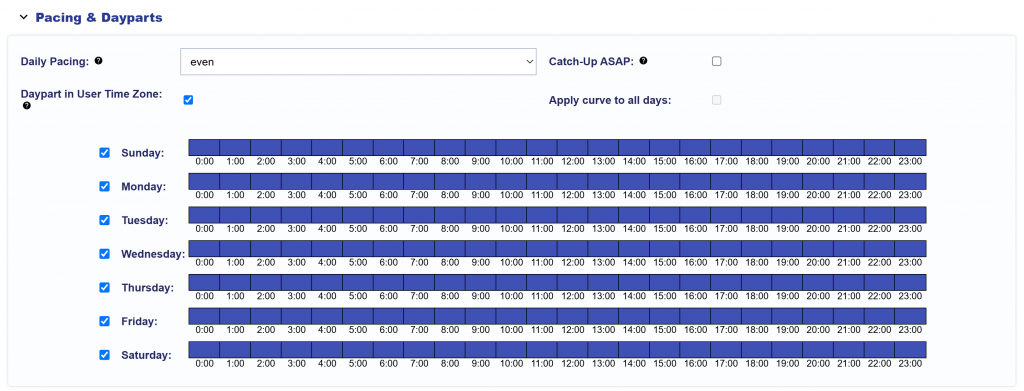
If ‘Mange Dayparts’ is enabled on the Campaign Setup, you can configure the following settings:

  • Daily Pacing Type:
    • Controls how the daily budget is distributed throughout each pacing day. Daily Pacing weights are evaluated using the campaign’s selected Pacing Time Zone: {campaign_pacing_timezone}.
    • Even: Spends the daily and lifetime budgets as evenly as possible.
    • ASAP: Spends the daily budget as quickly as possible while pacing the lifetime budget evenly.
    • Primetime: Uses a predefined hourly weighting curve to favor higher-weighted hours in the selected Pacing Time Zone.
    • Custom: Uses the configured hourly weighting curve in the selected Pacing Time Zone.
  • Apply Curve to All Days: Available only when Primetime or Custom Daily Pacing is selected. The weights are evaluated using the campaign’s selected Pacing Time Zone: {campaign_pacing_timezone}. When enabled, the same hourly pacing weights are applied to all selected days. When disabled, custom pacing weights can be configured independently for each selected day and hour.
  • Catch-up ASAP: Opt in or out to allow unspent budget to catch up quickly. This will override the daily budget and daily pacing type selected to spend as quickly as possible until the Campaign or Line reaches 100% pacing. Once the Campaign or Line has caught up on any underspent budget, it will return to the selected daily pacing model.
  • Daypart in User Time Zone: When enabled, Dayparts determine impression eligibility using each user’s local day and hour.
    When disabled, Dayparts use the campaign’s selected Pacing Time Zone: {campaign_pacing_timezone}. This setting affects Daypart eligibility only. It does not shift Daily Pacing or its hourly weights into the user’s local time zone.

US National Campaign Best Practices:

  • For national US campaigns using a single Pacing Time Zone, Central Time is recommended as a practical default, as it provides a more balanced alignment across Eastern, Central, Mountain, and Pacific audiences.
  • For national US campaigns using Primetime pacing, consider using a Custom pacing curve that combines the Primetime curves for the targeted US time zones. This provides broader alignment with local Primetime hours across the country.
    • If Central Time is used as the campaign Pacing Time Zone, take the standard Primetime curve for each targeted time zone, shift each curve so its peak represents 8pm local time, and combine the curves.
    • For the continental US, an 8pm local Primetime peak corresponds to the following hours in Central Time:
      • Eastern Time (ET): 7pm CT
      • Central Time (CT): 8pm CT
      • Mountain Time (MT): 9pm CT
      • Pacific Time (PT): 10pm CT
    • If targeting the broader US, Alaska Time and Hawaii-Aleutian Time can also be incorporated into the Custom curve.
    • Rather than producing a single sharp Primetime peak, the combined curve creates a broader evening window as Primetime moves across the country: low overnight → gradual increase throughout the day → stronger around 6pm CT → highest from approximately 7–10pm CT → taper later in the evening.

© 2026 Pontiac Wiki Sec · All Rights Reserved · Developed by RDK

  • Contact Us
  • Privacy Policy
  • Terms & Conditions
  • Pontiac.media