Contextual AI
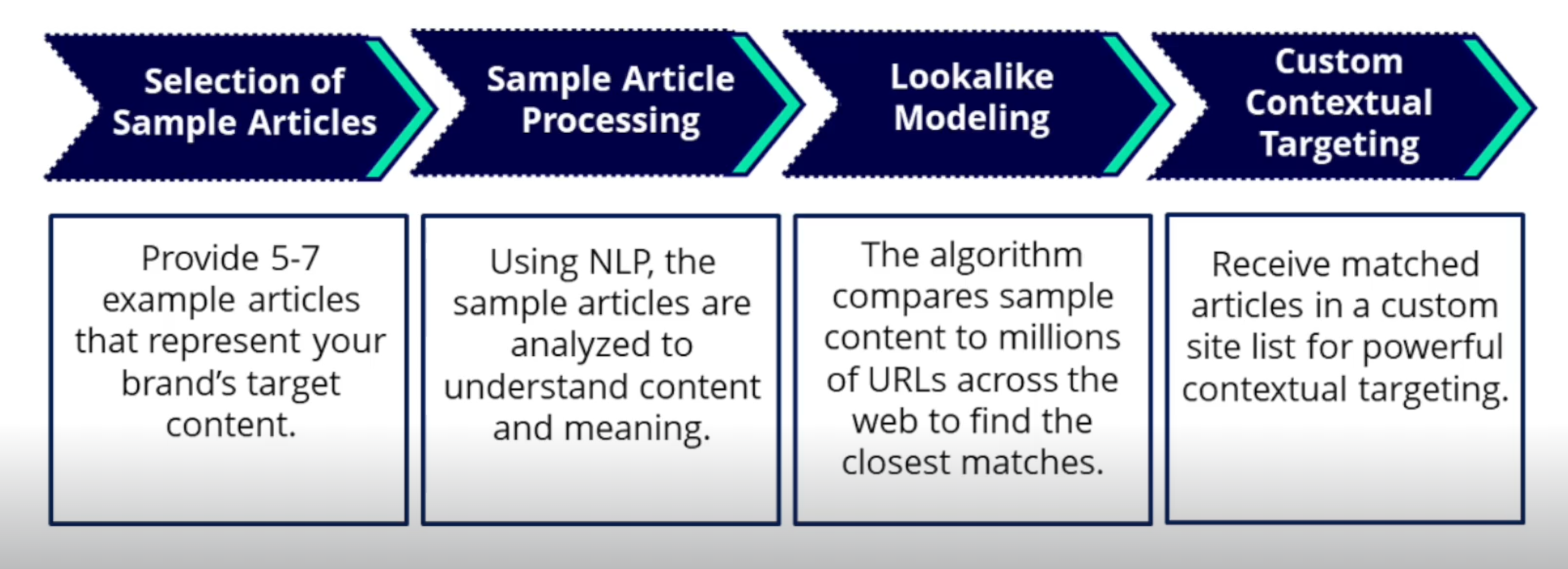
Contextual AI allows Advertisers to target web content based on the meaning and context of a page rather than relying only on individual keywords.
Using Natural Language Processing (NLP), Contextual AI analyzes the content of webpages to identify topics and concepts and find other contextually relevant content. This helps account for words that may have different meanings depending on how they are used. For example, the word “Apple” could refer to the technology company or the fruit.
Contextual AI can be used in two ways:
- Custom Contextual Audiences: Build an Audience using representative webpage URLs or a written description of the desired content.
- IAB Curated Contextual Segments: Select from more than 300 prebuilt contextual segments curated by Pontiac around IAB content categories.
Contextual AI segments have an additional $0.25 CPM fee that is included in the Total Cost CPM and does not need to be added to the Bid Price. Contextual AI can only be used with Web and Combined inventory types.
Create a Custom Contextual Audience
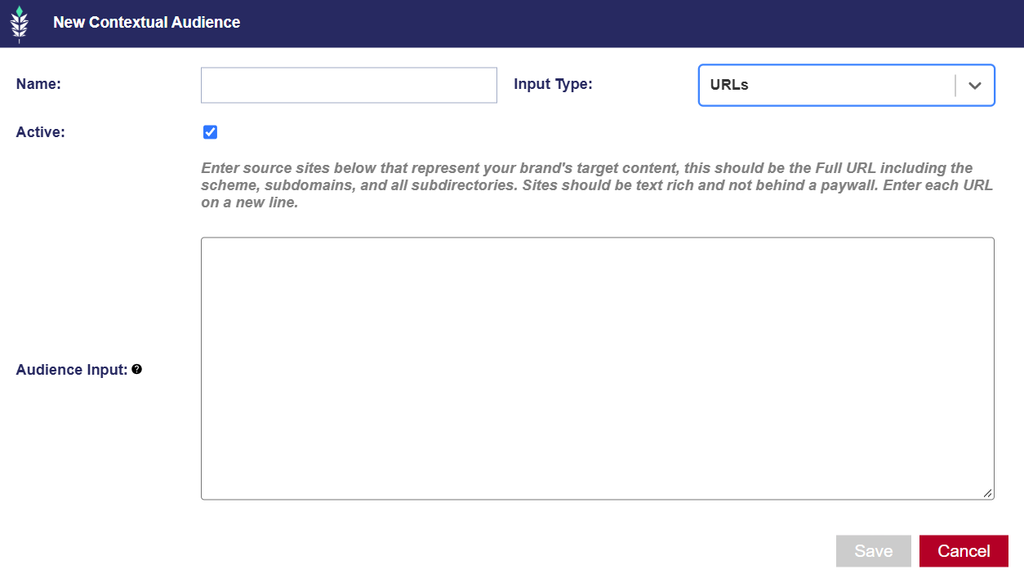
- Navigate to Audiences > Contextual AI.
- Select New Contextual Audience.
- Enter an Audience Name.
- Select an Input Type:
- URLs: Use URLs when you have representative webpages that reflect the type of content you want to target. Enter one full URL per line, including the scheme, subdomain, and complete URL path.
- Text: Use Text when you want to describe the desired content rather than provide example URLs.
- Enter the applicable source content.
- Save the Audience.
URLs
Use URLs when you have representative webpages that reflect the type of content you want to target.
Enter one full URL per line, including the scheme, subdomain, and complete URL path.
For example:
https://example.com/news/article-one
https://example.com/news/article-two
For best results:
- Use at least 3–5 representative pages. Closer to 10 may be useful for broader topics.
- Use more examples when defining a broad topic and fewer examples when defining a narrow or specific topic.
- Select text-rich pages with at least five sentences.
- News articles, blog posts, guides, and other content-heavy pages generally provide stronger source material.
- Avoid pages that are primarily images, interactive content, infinite scroll, or located behind a paywall.
For example, a broad Audience focused on current events may benefit from source articles covering several different current-event topics. A narrowly defined Audience, such as 1960s muscle cars, may require fewer examples because the desired context is more specific.
Text
Use Text when you want to describe the desired content rather than provide example URLs.
Enter a descriptive paragraph explaining the topic, subject matter, or type of content you want the Audience to match.
- Minimum: 50 words
- Maximum: 500 words
The description should provide enough detail for Contextual AI to understand the intended topic and identify contextually relevant webpages.
View and Manage Contextual Audiences
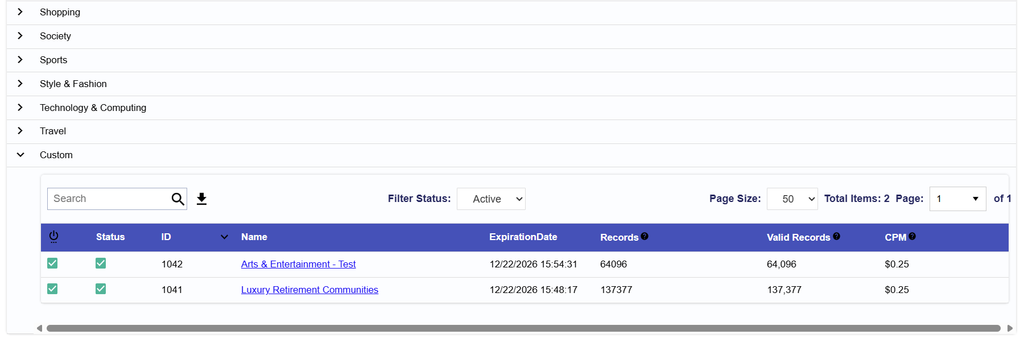
Navigate to Audiences > Contextual AI to review the Contextual Audiences available to the Seat.
The table includes:
- Status: Indicates whether the Audience is Active or Inactive.
- ID: Pontiac’s unique identifier for the Audience.
- Name: The name assigned to the Audience. Select the name to open and review the Audience.
- Expiration Date: Displays when the Audience is scheduled to expire, when applicable.
- Records: Displays the number of records associated with the Audience.
- Valid Records: Displays the number of records successfully validated for use.
- CPM: Displays the applicable Contextual AI data fee.
To view and edit the Custom Contextual AI segments Navigate to Audiences > Contextual AI > Custom.
Edit a Custom Contextual Audience
To edit an existing Custom Contextual Audience:
- Navigate to Audiences > Contextual AI > Custom.
- Select the Audience Name.
- Update the Name, Active Status, or Input Data as needed.
- Select Save.
Changes to the source URLs or text may change the content identified as contextually relevant to the Audience. Review existing Campaign and Line targeting before making significant changes to an Audience that is already in use.
Associate a Contextual Audience to a Campaign or Line
Once available, Contextual AI Audiences can be associated with eligible Campaigns or Lines through Audience targeting.
- Navigate to the applicable Campaign or Line.
- Enter Edit mode.
- Open Audiences and select Associate Segments.
- Select Contextual Audiences.
- Search for the desired Custom or IAB Curated Contextual Audience.
- Select Add New Group and add the Audience to the desired targeting group.
- Select:
- the green plus (+) to target the Audience
- the red minus (–) to anti-target the Audience, when applicable
- Configure any additional Audience or Boolean logic as needed.
- Close the dialog and select Save.
For additional information on combining Audiences and configuring Any / All logic, see Associate Segments and Boolean Logic.
IAB Curated Contextual Segments
Pontiac provides more than 300 prebuilt Contextual AI segments based on IAB content categories. These Audiences are already available for use across Advertisers and do not need to be created manually. To review a curated segment, select the Audience name. The Audience details include:
- Site List: Displays the source articles used to define the intended content for the segment.
- Example Audience Data: Displays a sample of webpages identified as contextually relevant to the segment.
Example Audience Data is a sample and does not represent the complete set of URLs contained in the Audience.
IAB Curated Contextual Segments:
- Can be associated through Campaign or Line > Audiences > Associate Segments > Contextual Audiences.
- Cannot be edited.
- Are available across Advertisers.
- Have an additional $0.25 CPM fee.