Pontiac Wiki Pontiac Wiki

Edit an Advertiser

Advertisers

  • Advertisers Overview
  • Create an Advertiser
  • Edit an Advertiser
  • Navigating the Advertiser Tab
    • Filter Advertisers
    • Advertiser Level Metrics
    • Advertiser Setup Tab
    • Advertiser Performance Tab
  • Download Campaign Setup
  1. Home
  2. Bidder Documentation
  3. Advertisers
  4. Edit an Advertiser

Edit an Advertiser

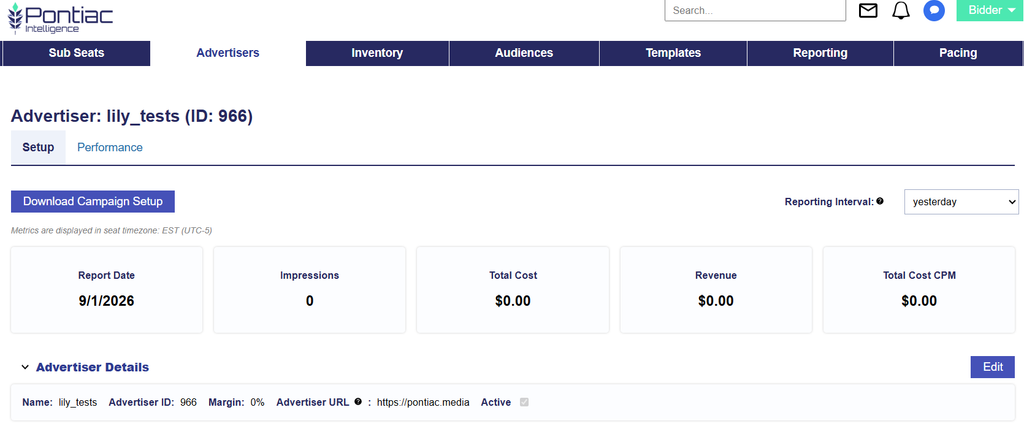
  1. On the Bidder > Advertisers tab > Select the Advertiser’s name that you would like to edit.
  2. Next to Advertiser Details, click the ‘Edit’ button.
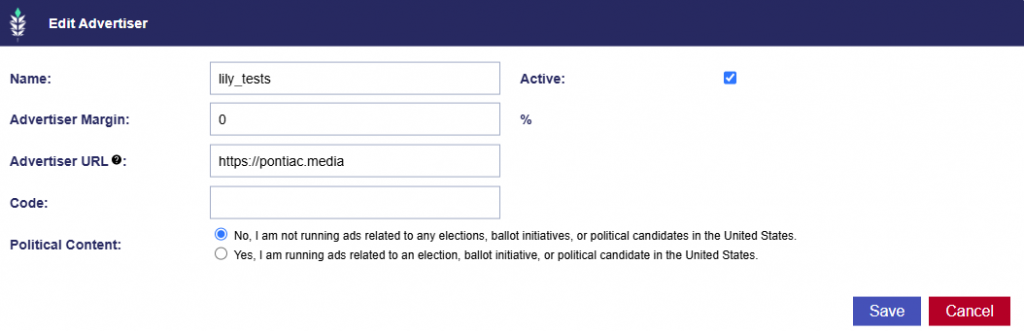
  1. Make edits to the following:
    • Name
    • Active Status
    • Advertiser Margin
    • Advertiser URL
    • Political Content
  2. Click the ‘Save’ button to apply the edits.

© 2026 Pontiac Wiki Sec · All Rights Reserved · Developed by RDK

  • Contact Us
  • Privacy Policy
  • Terms & Conditions
  • Pontiac.media