Uploading a Creative
Creatives are created at the Advertiser level using: POST /rtb/creatives
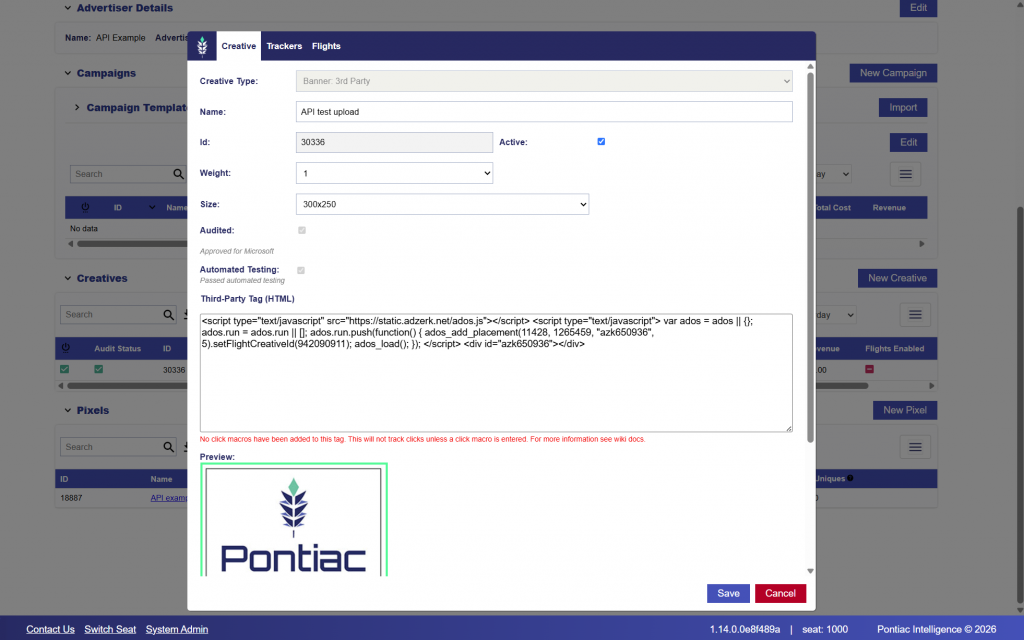
The required fields vary depending on the Creative type. In this example, we will create a 300 × 250 Display Creative using a third-party HTML/JavaScript tag.
For a Display Creative, the full HTML or JavaScript tag is passed in the creativeData field.
Required Fields
All Creative types require:
- advertiserId: Parent Advertiser ID.
- name: Creative display name.
- status: Creative status. Use
1for active or0for inactive. - creativeType: Creative type. Supported values include Display, Video, Audio, FirstPartyVideo, and FirstPartyBanner.
- duration: Creative duration in seconds. Use
0for display and banner Creatives. - creativeSizes: Array containing at least one
{width, height}object. - autoSizeDetection: Determines whether automatic size detection is enabled.
- weight: Creative rotation weight from
1to10.
Additional fields are required depending on the Creative type:
- Video / Audio:
vastTagcontaining the VAST XML URL. - First-Party Video:
clickUrlcontaining the click-through destination. - First-Party Banner:
creativeDatacontaining the Base64 encoded image. - Display:
creativeDatacontaining the HTML or JavaScript Creative tag.
Additional fields may also be included depending on the Creative setup, including clickUrl, MIME types, trackers, Creative flights, language, aspect ratio settings, and other Creative-level configuration.
Example Display Tag
The following HTML/JavaScript tag will be used for this example:
<script type="text/javascript" src="https://static.adzerk.net/ados.js"></script>
<script type="text/javascript">
  var ados = ados || {};
  ados.run = ados.run || [];
  ados.run.push(function() {
    ados_add_placement(11428, 1265459, "azk650936", 5)
      .setFlightCreativeId(942090911);
    ados_load();
  });
</script>
<div id="azk650936"></div>
When the tag is included in a JSON request body, quotation marks within creativeData must be escaped.
Request
curl -X 'POST' \
  'https://api.pontiac.media/rtb/creatives' \
  -H 'accept: application/json' \
  -H 'auth: YOUR_AUTH_TOKEN' \
  -H 'Content-Type: application/json' \
  -d '{
    "seatId": 1000,
    "advertiserId": 5943,
    "name": "API test upload",
    "status": 1,
    "creativeType": "display",
    "duration": 0,
    "creativeSizes": [
      {
        "width": 300,
        "height": 250
      }
    ],
    "clickUrl": "https://pontiac.media/",
    "autoSizeDetection": true,
    "weight": 1,
    "creativeData": "<script type=\"text/javascript\" src=\"https://static.adzerk.net/ados.js\"></script> <script type=\"text/javascript\"> var ados = ados || {}; ados.run = ados.run || []; ados.run.push(function() { ados_add_placement(11428, 1265459, \"azk650936\", 5).setFlightCreativeId(942090911); ados_load(); }); </script> <div id=\"azk650936\"></div>"
  }'
Response
A successful request returns the newly created Creative with its assigned id and stored Creative configuration.
{
  "timestamp": "2026-09-01 16:38:48",
  "response": {
    "id": 30336,
    "seatId": 1000,
    "advertiserId": 5943,
    "name": "API test upload",
    "status": 1,
    "creativeType": "display",
    "mimes": [],
    "clickUrl": "https://pontiac.media/",
    "auditStatus": "pending",
    "categories": [],
    "autoSizeDetection": 0,
    "creativeSizes": [
      {
        "width": 300,
        "height": 250
      }
    ],
    "weight": 1,
    "controls": [],
    "trackers": [],
    "aspectRatioFiltering": 0,
    "hasFlights": 0,
    "dcmHosted": 0,
    "language": "en",
    "creativeData": "<script type=\"text/javascript\" src=\"https://static.adzerk.net/ados.js\"></script> <script type=\"text/javascript\"> var ados = ados || {}; ados.run = ados.run || []; ados.run.push(function() { ados_add_placement(11428, 1265459, \"azk650936\", 5).setFlightCreativeId(942090911); ados_load(); }); </script> <div id=\"azk650936\"></div>",
    "nativeData": {},
    "publisherSpecs": []
  },
  "accountStatus": 1,
  "seatId": 1000
}
From the response, save the Creative id. This ID will be used later when associating the Creative with a Campaign or Line.
In this example: Creative ID: 30336
The response also shows the Creative’s current audit status: “auditStatus”: “pending”
New Creatives are submitted for audit after creation. The audit status will update once the Creative has been reviewed.
Note that if you update any fields of the creative, this will trigger a reaudit.
Optional Creative Settings
Depending on the Creative type and setup, additional fields may include:
- mimes: Supported MIME types (e.g., [‘video/mp4’, ‘video/webm’])
- trackers: Additional VAST trackers [{type, url}]
- aspectRatioFiltering: Enable aspect ratio filtering
- hasFlights: Enable creative flights/scheduling
- flightsDates: Flight date ranges (when hasFlights=true)
- language: Creative language code
Pontiac Bidder UI Validation